Embedded strings are propably the most valuable indicators to get a fast insight of an applications capabilities. Thus, a typical statical initial triage of a PE-file starts by checking the imports, the exports and the embedded strings. However nearly all well designed modern malware will protect these strings by applying any means of obfuscation. Hence, a simple pesstr or strings will not reveal a lot of interessting information. More advanced tools like floss, which emulates the binary in order to e.g., compile and reveal stack strings may help to handle basic to advanced obfuscated malware samples. However sometimes this is not enough. We need to manually figure out the obfuscation routine and emulate it using an emulation framework like quiling.
In this blog post I will take an image known as evil3.exe on VirusTotal as an example to demonstrate how an analysts may obtain valuable Indicators of Compromise (IoCs) from embedded strings by emulating the deobfuscation routine. The binary under consideration was initially dropped by the .NET-malware sample image.exe from the SANS FOR 610 course extra material.
The sample under consideration poses the following properties:
- SHA256:
B4043B4E86E7591012251410EC5408360C03F479165580C22CF116BD4D0C9EAE(VirusTotal) - Internal name: unknown
- File Size: size: 80.384 bytes / entropy: 6.587
- File Type: Microsoft Linker 6.0 / Microsoft Visual C++ (32 bit)
So lets get started by our initial static file triage!
Initial File Triage
As already mentioned in the prologue we have to deal with a Microsoft Visual C++ (32 bit) compiled binary. Loading the image into PeStudio or Binary Ninjas Triage Summary view we immediately notice that there are no imports at all! Thus, the binary is likely using a custom API loader to resolve its dependencies or is packed (for the sake of this post I already checked this and can confirm that it is not packed). Beside this, the most of the strings are short garbage looking like ones. There are only a few text artifacts telling us that the malware is somehow interacting with SMTP/ POP3 and RDP files. Also there are references to the DPAPI, file directories and applications like Outlook. Overall this may let us assume that we have to deal with a credential stealer type of malware here.
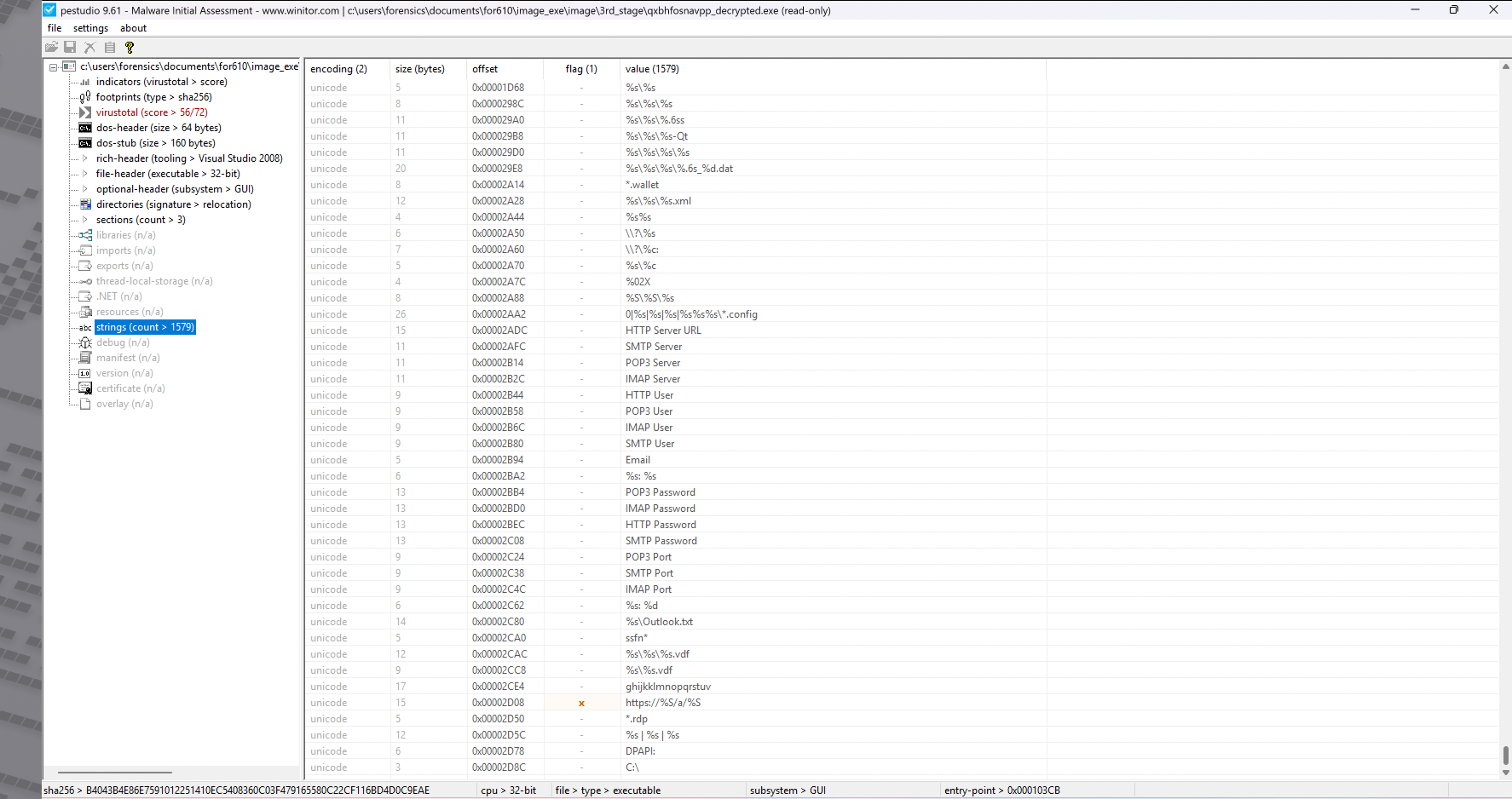
While this information may was already helpful in the general classification of the malware, it does not reveal a lot about the samples concrete capabilities. Especially the missing imports are a major issue. So just using strings is simply not enough for this sample!
Revealing the Strings by using floss
If we do not want to execute the malware on our machine and dump the strings from memory during runtime, the best option becomes emulation. floss is a widely used and well known Obfuscation String solver, which emulates the binaries execution and compiles the embedded stringgs in that way. According to the official documentation FLOSS extracts all the following string types:
- static strings: “regular” ASCII and UTF-16LE strings
- stack strings: strings constructed on the stack at run-time
- tight strings: a special form of stack strings, decoded on the stack
- decoded strings: strings decoded in a function
which makes floss the perfect initial triage tool always worse to mount.
Thanks to Nix package management I can run floss from a temporary shell using
nix-shell -p floss
Once inside the shell, we mount floss against our sample. The output is very promising.
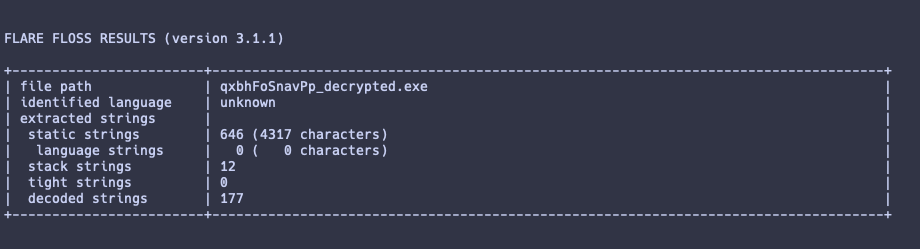
Floss was able to reconstruct 12 stack strings and 177 decoded strings! Taking a look at the decoded ones, we obtain a lot more of insights into the binary.
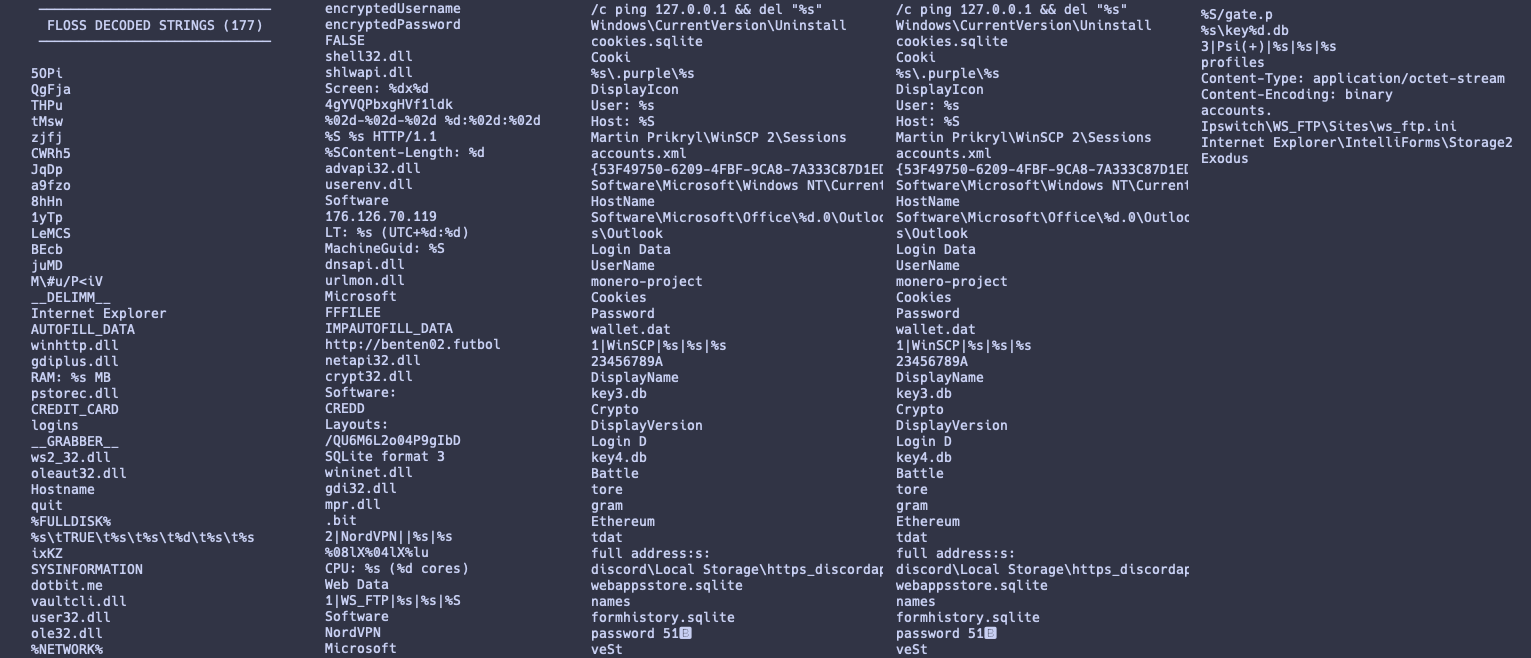
In the case of this malware sample, flossdid a quit well job. The emulation succeeded without major errors. From the results we can deduce the capabilites far better than from simple string command. We obtained new IoCs and/or general insights on the binary like
- The used library depdendencies. E.g.,
winhttp.dll,oleauth.dll,user32.dll,shell32.dll, etc. - Remote Urls, may be used for additional investigation, e.g.,
hxxp[//]benten02[.]fulbol,176.126.70.119 - Mentioning of several locations likely beeing associated with credential storage, and/or session data. E.g.,
cookies.sqlite,webappstore.sqlite,fromhistory.sqlite,wallet.dat.Key4.db, etc.
This information already tell us a lot about the malwares functionality and capability by just running a basic emulation command like floss. However, how should we proceed in case where floss is not able to reconstruct the strings. There are sometimes scenarios, where this method fails since the malware authors included tricks to avoid emulation of the binary. In such a case we simply can not emulate the entire binary, but what always is possible, is to emulate the de-obfuscation function only.
In the next section I will discuss how we can identify the obfuscation routine and emulate this one using quiling framework.
Emulating parts of a binary using Quiling
Before we can start our emulation we have to answer two critial questions:
- Where is the code located we want to emulate? I.e., what do we want to emulate?
- What are the emulated functions input arguments and where can we find them?
Often, answering these two questions requires some reverse engineering and understanding of the image at least. To keep this post as short and coince as possible I will use a heuristic often helped me to identify the location of the encryption routine and answer question (1). Once this is done, answereing question (2) becomes an easy task.
So, we already know, that the sample is using API resolving and runtime string deobfuscation; but it does not use any packer. The later can also easily be confirmed by opening the sample in Binary Ninja and scrolling over the disassembeld / decompiled code. The most parts of the binary are legitimate machine processable instructions. This is a very important notice since it does imply that all references are fine - more or less. I.e., we can rely on the call tree. Beliving in this assumption, we could think about how we would implement an obfuscation routine. A possible pseudo-code may look like
obfuscated_string = ["gsdg4567hter", "htrdh3425", "gsgr098765"];
for str : obfuscated_string
	plain = deobfuscate(str);

	// do something with 'plain'
	//
In this pseudo-code the de-obfuscation routine is called several times, for each obfuscated string from the array once. Remember that modularization is a common technique in software development and putting functionality in contained functions is a basic pattern every programer learns from the first day. So no wonder malware authors are just software engineers as well and they follow these patterns often, too. So looking for any function which poses a high callcount, often provides a good starting point for our investigation.
Applying this heuristic to our sample, we observe two functions located at addresses, 0x40c95b and 0x40c98f, having a very high call count of 117 and 67 respectively! Checking the decompiled code we immediately spot common instructions used in encryption routines. After some renaming of the contained variables we obtain the following refined code.
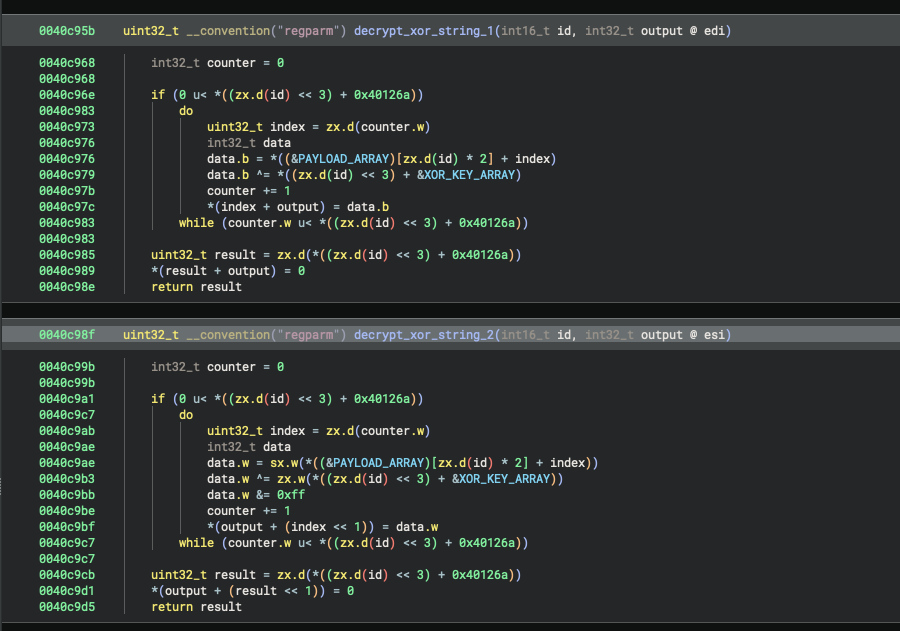
We have identified the relevant code by just using an easy heuristic and some statistics. Question one is answered. Now checking the call cross-refeences, we can collect all the input variables.
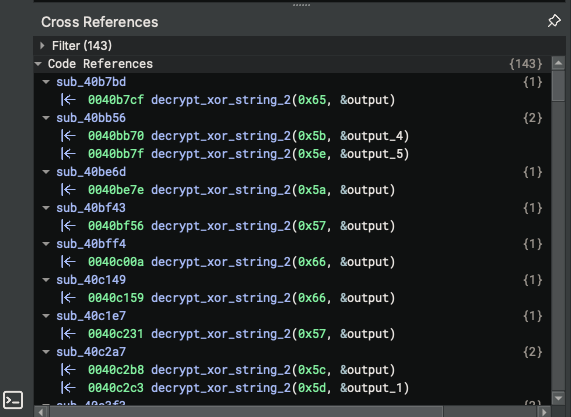
In our case it seems like the malware is storing a global array of obfuscated strings. The strings were referencesd by the array index given as an ID to the obfuscation routine. Once, the decryption completed, the result is returned in form of a pointer to the plain-text string stored in edi register.
To wrap up, we now have identified the code, i.e., the start and end addresses of the de-obfuscation routine we want to emulate, and the input arguments. It is not always as easy as here, but the general method met remain: Identify the obfuscation routine, and collect the input and output arguments.
So finally, let us use quiling framework to de-obfuscate the strings. We have to mount the following steps:
- Initialize the
quilingsandbox using a generic initialization code; well documented in the wiki - Run the decryption task by specifying the start and end addresses, as well as the functions input parameters, quiling should execute
- Eventually handling any memory management and string encoding
All this can be done by using the following basic python code.
import struct
from qiling import Qiling
from qiling.const import QL_ARCH, QL_OS, QL_VERBOSE, QL_INTERCEPT
from qiling.os.windows.api import *
from qiling.os.windows.const import *
from qiling.os.windows.fncc import *


SAMPLE = "./rootfs/x86_windows/Windows/Temp/sample.exe"
ROOTFS = "./rootfs/x86_windows"


def sandbox():
	'''
	Setup the Sandbox environment and apply the required
	sub-tasks
	'''
	## instance qiling emulator
	ql = Qiling(
		[SAMPLE], rootfs=ROOTFS,
		libcache=True,
		archtype=QL_ARCH.X86, ostype=QL_OS.WINDOWS,
		verbose=QL_VERBOSE.DEFAULT
	)

	# run the decryption task
	for id in range(0x95):
		result = run_decryption_task(ql=ql, id=id)
		print(f"Id: {hex(id)}\tValue: {result}")


def run_decryption_task(ql: Qiling, id : int):
	'''
	Emulating the decryption routine from address 0x40c95b to 0x40c98e
	'''
	# setup function boundaries
	FUNCTION_BEGIN = 0x40c95b
	FUNCTION_END = 0x40c98e

	# map output memory
	# I.e., allocate space where the decrypted strings can be saved to
	payload_size = 0xff
	memory = ql.mem.map_anywhere(payload_size)

	# setup function parameters as required by the functions signature
	ql.arch.regs.eax = id
	ql.arch.regs.edi = memory

	# run the emulation
	ql.run(
		begin=FUNCTION_BEGIN,
		end=FUNCTION_END
	)

	# read decrypted memory
	return read_c_string(ql=ql, addr=memory, max_len=payload_size)


def read_c_string(ql : Qiling, addr : int, max_len : int =256) -> str:
	'''
	Helper function to read a single C-style string from the memory
	'''
	result = bytearray()
	for i in range(max_len):
		c = ql.mem.read(addr + i, 1)
		if c == b'\x00':
			break
		result += c
	return result.decode('utf-8', errors='ignore')


if __name__ == "__main__":
	sandbox()
	print("done!")
Executing the application will provide us with the same strings we obtained via floss. However, this approach would have worked even if flosshad failed! Thus, it is a nice little technique we should keep in our toolbox.
From here onwards, we could start renaming symbols, functions, and enriching the dissassembly with the newly gained insights. However, the rest of the analysis is out of the scope of this basic blog post trying to focus on obfuscated strings only. So let us call it a day end end our analysis here.
Summary
In this post we considered a well known 32 bit PE-file malware sample named evil3.exe. We demonstrated that the plain usage of strings command is often not enough to grasp the samples capabilities. We would lose valuable insights and indicators of compromise. A much better obtion is to let strings automatically decode via emulation. We discussed the usage of floss and showed how this tool can widen our perspective of the malware by one simple execution. Finally, we went through the “manual” approach of emulating the obfuscation routine only, which is sometimes necessary when floss fails. The Quiling framework is an essential tool should be available in the toolbox of any security analyst and malware researcher. In future posts I may show how we can use quiling to investigate API loaders and custom dependency resolvers commonly found in modern malware.