In the recent decade many companies were hit by small to large scale ransomware incidents. From malware perspective ransomware does challenge us with an interessting obstacle. If we try to mount a dynamically analysis against the sample, i.e., executing it inside the sandbox, we may end up to encrypt our analysis environment. The later can slow down the analysis a lot, since on every mistake we have to reset to an earlier snapshot. Also most modern malware will implement anti-analysis / anti-debugging and sandbox detection mechanisms. Inside the sandboxed analysis environment the sample may behave differently. There are better approaches of analysis not requiring to execute the malware a single time. We can even analyse it on a different CPU architecture / OS platform. The solution is pure staticaal reverse engineering approach with targeted emulation of specific core functions of the malware using an emulation framework like quiling.
For the sake of this post I will take the educational sample named Update.exe taken from the LovelyMalware Sherlock hosted at HackTheBox. The challenge comes usally with three files namely the Update.exe, a cap.pcapng and Attachment.txt.naso. However, for this post I want to focus on the executable only! I will not answer any of the questions of the LovelyMalware CTF explicitely, however with the knowledge gained from this post you will likely be able to solve it on your own.
The sample does pose the following file properties:
- SHA256:
83cb5e8b7455fcb3b6c2d45269b08b3ae003dfed4ce8ca942cd007c1ebf17cf2 - Filetype: 64 Bit PE; Little Endian
- Filesize:
0xd600
So let us start with our usual initial file triage of the sample.
Initial File Triage of Update.exe
After having commented on the basic file characteristics in the previous section, let us open the sample in Binary Ninja Triage Summary view. We immediately spot the high entropy sections, with a peak in the .rdatasection, and only a few readable strings.
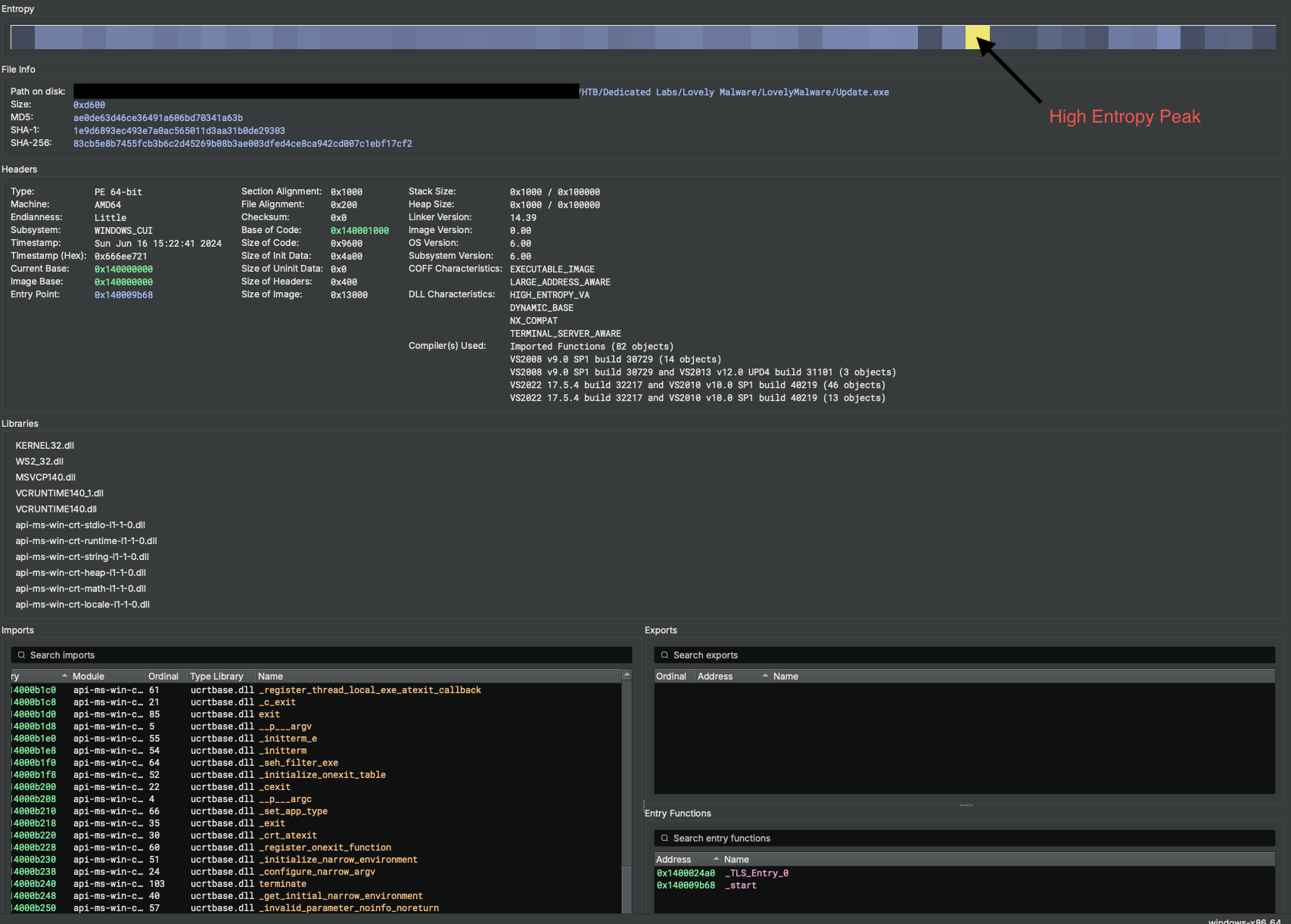
This combination will already be a stong indicator for applied obfuscation, encryption or packing of the executable. The image imports basic VCRuntime.dlls , the KERNEL32.dll, and WS2.dll libraries only. There are a some plain function imports from these libraries. Still the actual malware’s payload will likely be obfuscated. Either by means of encryption or compression. The reason for this is the type of function imports present. Carefully looking over the imported functions, we notice, that there are mainly ones used for Anti-Analysis and Sandbox-Detection. Speaking about functions, we also notice the high amount of sub_* functions extracted by Binary Ninja and genrally low entropy of the overall sample - excluding the initally mentioned peak. This means large parts of the sample will be valid machine instructions lowering the likelyhood of an applied packer.
From all this, we can conclude, that the malware implements basic string obfuscation and a custom API / dependency resolver only.
Finally it is worth to mention, that there are two exports, _start and _TLS_ENTRY_0. The later one is an indicator for the usage of registered TLS Callbacks, which is a common feature in malware. Often the malware prepares for execution using TLS Callback functions. I.e., initialize key material, deobfuscate runtime relevant sections and so on. So, we should remember this later, when analysing the sample in depth!
Scrolling over the binary in linear view, we observe a large area of int64_t data fields ranging from address 0x14000f138 to 0x14000f338. These area is of special interesst for two major reasons:
- A list / array of 64 byte data fields addressed from different points within the sample, which is the case here, are a quit good indicator for a function jump table.
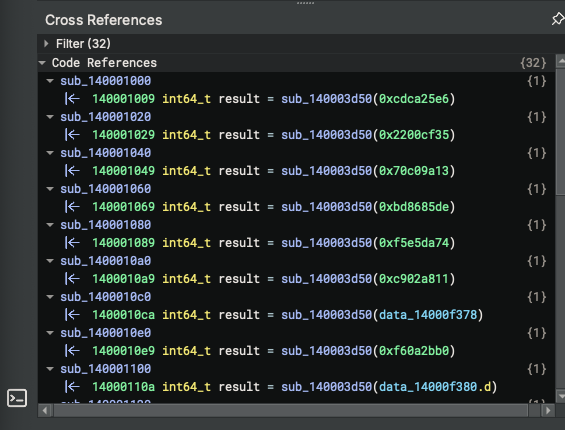
- Looking closer at the Code references, we observe that the references all share a similar pattern.
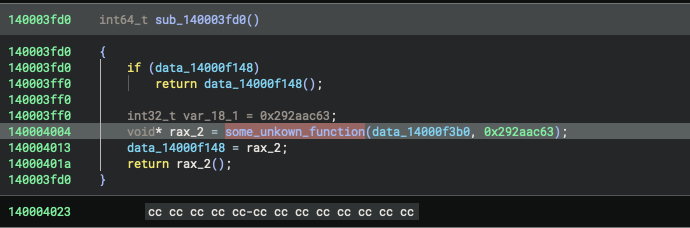
So the identified memory region is a jump table for sure, and the yet unkown function in the screenshot is very likelay used to resolve a function ins some way. We should keep this in mind for the ongoing analysis!
Beside this, we have large blobs of junk data, that is addressed from code section, more precisely spoken the _TLS_ENTRY_0.
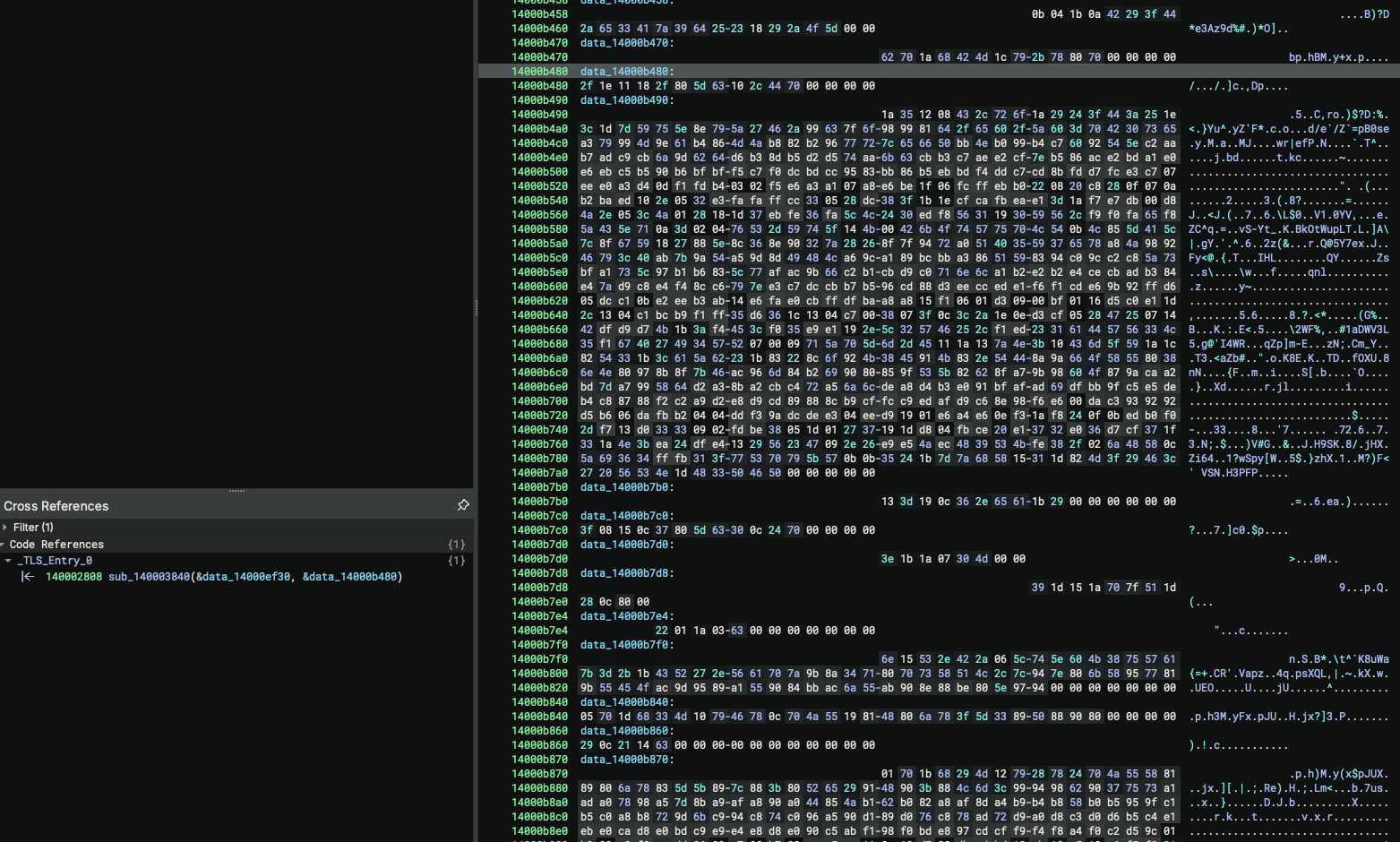
So, to sum up, we have to deal with:
- Anti-Analysis and Anti-Debugging mechanisms as seen by the imported functions (not really important, since we apply static analysis only)
- Dynamic resolving of APIs and functions; guessed from the likely function tables identified.
- Some kind of string obfuscation and/or obfuscated payloads as we can conclude from larger memory areas with high entropy data, as well as the presence null valued fields and the absence of any relevant strings in the triage view.
In the next, section, we want to handle all of these aspects in the order mentioned. It is important to always start by analyzing the module loader, followed by the strings to get a better readability and high-level overview on the malware’s capabilities. Once this is done, we can start to try to understand the malwares logic.
Reverse Engineering the module loader
Already during our initial triage we noticed, that there were only a few imports and only less relevant function imports. To this end, we can assume for sure that there is a second loader, responsible to load the actual libraries and locate the required functions to serve the malware’s functionality.
Finding the module loader can sometimes become the needle in a haystack problem. However, there are some heuristics that may help in identifying the right functions.
- By means of statistics: It is a valid assumption, that a function responsible for resolving function imports, like one used in API-Hashing, or an encryption function is called more often than a normal core function of the application. Thus, listing all functions ordered by there call count can help identifying the ones very often used. Looking on the first five entries does often reveal the module loader already or provide some kind of reference to it at least.
- Looking for known locations. Another approach ist to check for well known locations. E.g., the
_startentry, aDLLMain()function, or the TLS Callback functions or any other exported function. - Checking known techniques. Many malware samples use similar techniques to resolve API level functions. One very common methodology is to utilize the
LDR_DATA_TABLE_ENTRYtable from thePEB. So we may look out for any references of that.
In our case all three methods will earlier or later bring us to a function located at address 0x140003D50, where the API resolving is implemented.
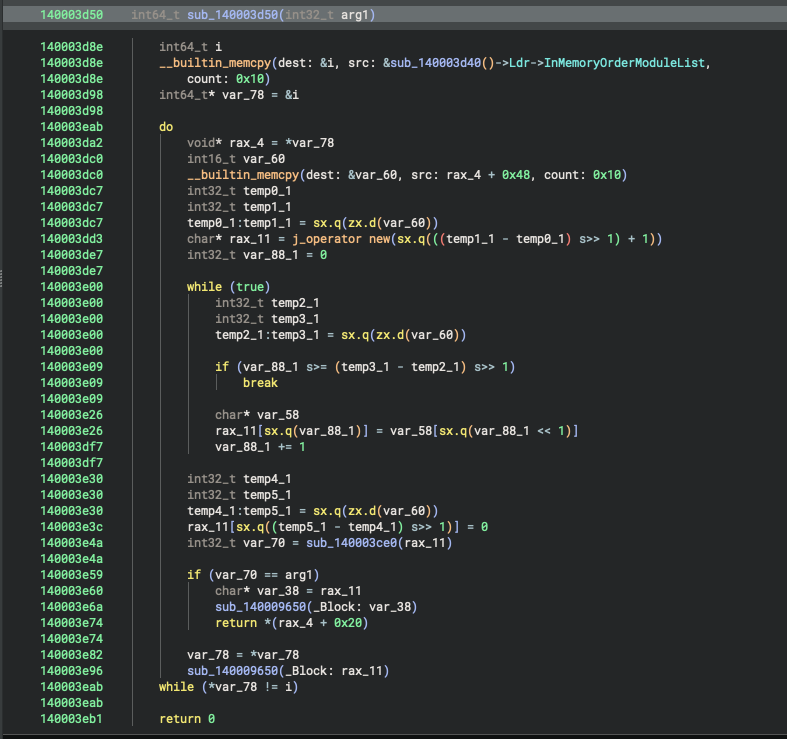
A short look at the function defined at 0x140003D50 makes clear that there is happening some kind of lookup on the LDR_DATA_TABLE_ENTRY contained inside the Process Environment Block (PEB). The strong indicators like usage of the InMemoryOrderModuleList in combination with a while loop and comparison operations are present. So this malware uses a classical and well known PEB-Walk to resolve its dependencies.
Take notice that there are is also a high call count, accounting 32 cross-references.
After setting the correct types for the variables Binary Ninja does a quit well job in decompiling the code. We can easy observe the utilization of the InMemoryOrderModuleList. Taking each module loaded while the update.exe image is initialized from disk by the PE-Loader. Iterating over the _LIST_ENTRY nodes we observe only a few functions executed during each iteration. The one located at address 0x140009650 can easily be associated with some free operator used to manage memory. The more interesting is the one located at 0x140003d50.
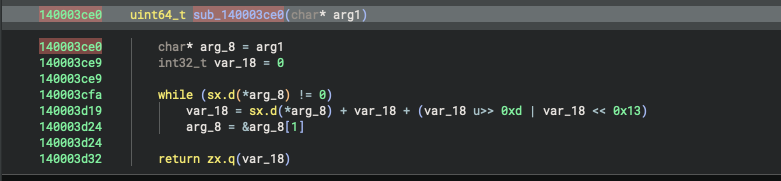
The assembly is only a few instructions without any callor jmp. The pure usage of arithmetics make this function a likely candidate for an API-Hashing algorithm. So let us rename the function signature to
// @ 0x140003ce0
uint64_t hash_api_name(char* api_name)
At the same time we may already rename the outer function according to its likely purpose
// @140003d50
int64_t get_module_from_peb(int32_t api_hash_key)
The API hashing algorithm has the following high-level code (decompiled by Binary Ninja, with some refinements on the variable names):
// @ 0x140003ce0
uint64_t hash_api_name(char* api_name)
{
	char* api_name_1 = api_name;
	int32_t api_name_hash = 0;

	while ((int32_t)*(uint8_t*)api_name_1)
	{
		api_name_hash = (int32_t)*(uint8_t*)api_name_1 + api_name_hash
		              + (api_name_hash >> 0xd | api_name_hash << 0x13);

		api_name_1 = &api_name_1[1];
    }

	return (uint64_t)api_name_hash;
}
Having the hash function, we will be enabled to figure out all the modules used by the sample. To this end, we need to “crack” the hashes contained in the sample, which is a two step approach. First we need a kind-of wordlist, i.e., all possible DLL names from a reference Windows system; Next, we need the actual hashes used inside the malware we want to crack.
We start by enumerating all DLL files on Windows 11 system (and their variants by case, e.g., name.dll, Name.dll, NAME.DLL, etc) to get a basic wordlist to mount a directory attack against the hash algorithm. This can be easily done in any programming language of our choice and is skipped here.
Once the wordlist is created, we can create a list of modules used by the malware. Getting this list is quit easy. We just need to enumerate all calls of the
// @140003d50
int64_t get_module_from_peb(int32_t api_hash_key)
function and extract their parameter from the call site. If having access to a non-free version of Binary Ninja this task can be scripted and automated. Otherwise, some hand-crafting is required to obtain the following hash values.
API_HASHES = [
	0xcdca25e6,
	0x2200cf35,
	0x70c09a13,
	0xbd8685de,
	0xf5e5da74,
	0xc902a811,
	0xf60a2bb0,
	0xbcd6be6b,
	0xb331ab6e,
	0xb031a30e,
	0xf8e5e2d4,
	0x70c09a13,
	0x5a706ec3,
	0xc19961f4,
	0x6dc091b3,
	0x5d707723,
	0xcc02b071,
	0x26a4adc5,
	0x23a4a565,
	0xf90a3410,
	0xc8380d6a,
	0xbfd6c6cb,
	0xc538050a,
	0x202ade09,
	0x1bba016b
]
The complete code to brute-force the used modules is listed below. It basically will read in the wordlist, i.e., the list of all DLL names on a typical Windows; generates all possible variants by means of capitalization; and finally calculates the hash on them. Once this is done, we compare the calculated hashes with the ones taken from the sample above. By a simple matching we obtain the mapping from API hash used in the sample to plain-text DLL name.
import json
import os

API_HASHES = [ ... ]

def api_hash(api_name: str) -> int:
    '''
        Hash the API Name with the algorithm obtained during reverse engineering
        the LovelyMalware sample
    '''
    hash_value = 0
    for ch in api_name:
        # emulate 32-bit unsigned arithmetic
        rotated = ((hash_value >> 13) | ((hash_value << 19) & 0xFFFFFFFF))
		        & 0xFFFFFFFF

        hash_value = (ord(ch) + hash_value + rotated) & 0xFFFFFFFF
    return hash_value


def generate_variants(filename):
    """Generate lowercase, original case, uppercase, and variants
	   without extension.
	"""
    filename = filename.replace("\n", "").replace("\r", "")
    base, ext = os.path.splitext(filename)

    variants = set()

    # With extension
    variants.add(filename)                  # original
    variants.add(base.capitalize() + ext)   # lowercase
    variants.add(base.lower() + ext)        # lowercase
    variants.add(base.upper() + ext)        # uppercase

    # With upper extension
    variants.add(base + ext.upper())                 # original
    variants.add(base.capitalize() + ext.upper())   # lowercase
    variants.add(base.lower() + ext.upper())        # lowercase
    variants.add(base.upper() + ext.upper())        # uppercase

    # Without extension
    variants.add(base)                # original base
    variants.add(base.capitalize())   # lowercase base
    variants.add(base.lower())        # lowercase base
    variants.add(base.upper())        # uppercase base

    return variants

if __name__ == "__main__":
    api_map = dict()
    with open('mosule-wordlist.json', 'r', encoding='utf-8') as f:
        modules = json.loads(f.read())
        for module_name in modules:
            ## expand variants
            variants = generate_variants(filename=module_name.get('name'))

            ## calculate hashes
            for variant in variants:
                hash = api_hash(variant)
                if hash in API_HASHES:
                    api_map[hash] = variant

    for hash, module in api_map.items():
        print(f"{hex(hash)}\tModule: {module}")

    print("Done!")
Notice: Here we reimplemented the API hash function on our own, since it was a very trivial one. In case of more complex algorithms emulation is often the faster solution. I.e., we coul use Quiling to emulate the function located at address 0x140003ce0 even without every knowing how it works in detail. We only need to know the inputs, outputs and its purpose.
Executing the Python script, we get a curatted list of DLLs used by the sample:
API_HASHES = [
	0xcdca25e6, ## KERNELBASE.dll
	0x2200cf35, ## KERNEL32.dll
	0x70c09a13, ## USER32.dll
	0xbd8685de, ## ntdll.dll
	0xf5e5da74, ## advapi32.DLL
	0xc902a811, ## shell32.DLL
	0xf60a2bb0, ## crypt32.DLL
	0xbcd6be6b, ## shlwapi.DLL
	0xb331ab6e, ## ADVAPI32.dll
	0xb031a30e, ## ADVAPI32.DLL
	0xf8e5e2d4, ## advapi32.dll
	0x70c09a13, ## USER32.dll
	0x5a706ec3, ## SHELL32.DLL
	0xc19961f4, ## user32.DLL
	0x6dc091b3, ## USER32.DLL
	0x5d707723, ## SHELL32.dll
	0xcc02b071, ## shell32.dll
	0x26a4adc5, ## CRYPT32.dll
	0x23a4a565, ## CRYPT32.DLL
	0xf90a3410, ## crypt32.dll
	0xc8380d6a, ## SHLWAPI.dll
	0xbfd6c6cb, ## shlwapi.dll
	0xc538050a, ## SHLWAPI.DLL
	0x202ade09, ## WS2_32.dll
	0x1bba016b  ## ws2_32.DLL
]
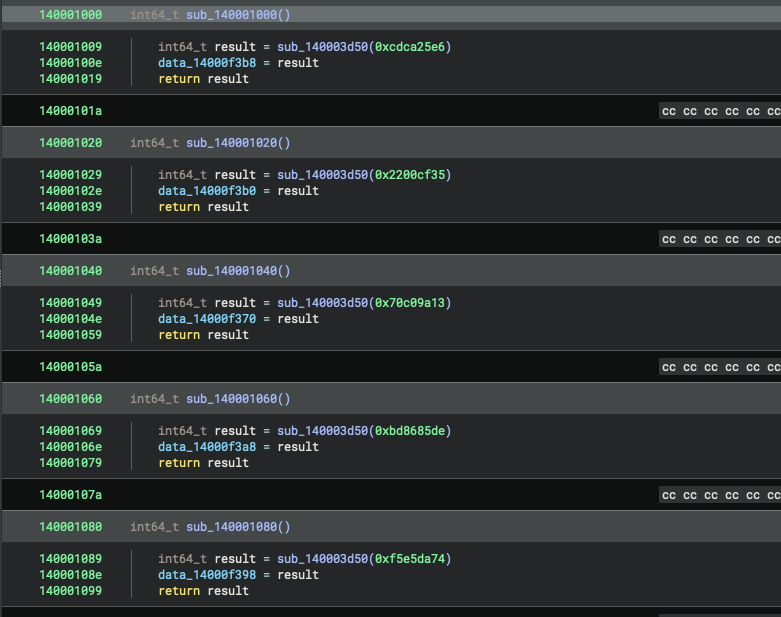
The loaded modules can already tell us a lot about the capabilities of the sample, however the real game-changer is to enumerate / figure out the imported functions. However before approaching this, we should update our Binary Ninja analysis database with the new insights gained. To this end, we have to iterate over all usages of get_module_from_peb and set the variable names according to the hash passed to the function. Hereby, we notice that all of these functions have a similar structure, which is shown below for the case of kernelbase.dllonly.
140001000    int64_t lookup_kernelbase_dll()
140001009        int64_t result = get_module_from_peb(api_hash_key: 0xcdca25e6)
14000100e        kernelbase_dll = result
140001019        return result
We notice several of these loading stubs. A special interest seems to be on Advapi32.dll, User32.dll, shell32.dll, crypt32.dll, shlwapi.dll and WS2_32.dll. These DLLs were tried to load by using three different means of naming scheme. E.g., tying to find it by the names ws2_32.dll, WS2_32.DLL, ws2_32.DLL. So we can assume that successfully loading these libraries is a critical component of the malware.
Coming back to the API-Hash function, we may already have noticed that it had two call sites. The one is the already discussed get_module_from_peb function at address 0x140003d50. The other is a yet not investigated function located at 0x140003ec0.
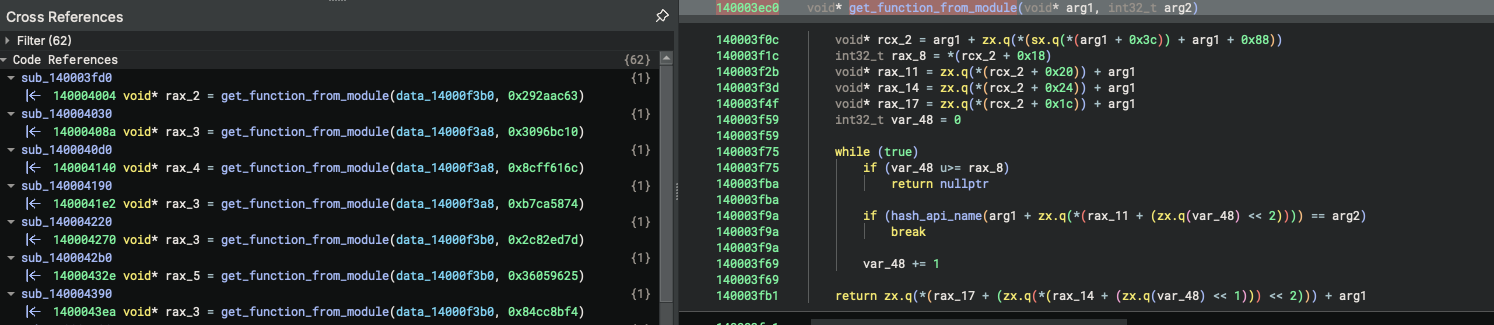
From the call-references we can spot that it is called with a hash-value as the second argument and a pointer to the already identified modules as the first argument. Thus, this function is likely responsible for resolving the imported functions from the respective module. To this end, we can define the following signature
// @140003ec0
void* get_function_from_module(
	struct LDR_DATA_TABLE_ENTRY* module,
	int32_t api_hash
)
Since using the same hash function, we can easily adopt our script we have used to figure out the loaded modules. We only need to extract the hashes from the sample and curate a list of exports from the DLLs identified earlier. For the extraction we need to actually make a copy of the originating DLL from Windows OS to parse its exports.
import pefile
import json
import os

## list of modules loaded by the malaware
## sample as obtained by the previous analysis
DLL_FILES = [
	"KernelBase.dll",
	"advapi32.dll",
	"kernel32.dll",
	"ntdll.dll",
	"shell32.dll",
	"shlwapi.dll",
	"user32.dll",
	"ws2_32.dll",
	"crypt32.dll"
]

## function hashes exported from the malware
## sample
FUNCTION_HASHES : int = [
	0x292aac63,
	[...]
]

def hash_function(function_name: str) -> int:
	'''
	Hash the API Name with the algorithm obtained during reverse engineering of
	the LovelyMalware sample
	'''
	hash_value = 0
	for ch in function_name:
		# emulate 32-bit unsigned arithmetic
		rotated = ((hash_value >> 13)
				| ((hash_value << 19) & 0xFFFFFFFF)) & 0xFFFFFFFF
		hash_value = (ord(ch) + hash_value + rotated) & 0xFFFFFFFF

	return hash_value


def get_module_exports(module : str) -> list[any]:
	'''
	Load a given module by path and parse its exports using the pefile
	library.
	'''
	pe = pefile.PE(module)
	exports = []

	if hasattr(pe, "DIRECTORY_ENTRY_EXPORT"):
		for exp in pe.DIRECTORY_ENTRY_EXPORT.symbols:
			name = exp.name.decode() if exp.name else None
			exports.append({
				"Address": hex(pe.OPTIONAL_HEADER.ImageBase + exp.address),
				"Name": name
			})
	else:
		print(f"WARNING: The module {module} has no exports.")
		return []

	return exports


if __name__ == "__main__":
	## iterate over libraries of inteeresst
	for module in DLL_FILES:
		path = BASE_DIR + module
		exports = get_module_exports(module=path)
		for export in exports:
			fn_name = export.get('Name')
			if fn_name is not None:
				hash = hash_function(function_name=fn_name)
				if hash in FUNCTION_HASHES:
					## match found
					print(f"Hash: {hex(hash)}\tModule: {module}\tFunction: {fn_name}")

	print("done!")
Thus, we obtain the following list of exported function names used by the malware:
python3 resolve_function_names.py

Hash: 0x55aba392        Module: KernelBase.dll  Function: AdjustTokenPrivileges
Hash: 0x70cf9daa        Module: KernelBase.dll  Function: CloseHandle
Hash: 0xe572daa5        Module: KernelBase.dll  Function: CreateFileMappingW
Hash: 0x797d53b2        Module: KernelBase.dll  Function: CreateFileW
Hash: 0x9774399d        Module: KernelBase.dll  Function: CreateMutexA
Hash: 0x36059625        Module: KernelBase.dll  Function: CreateThread
Hash: 0xcc6231          Module: KernelBase.dll  Function: ExitProcess
Hash: 0x26fd2279        Module: KernelBase.dll  Function: FindFirstFileW
Hash: 0x633ddc99        Module: KernelBase.dll  Function: FindNextFileW
Hash: 0xa5226ba7        Module: KernelBase.dll  Function: GetComputerNameExA
Hash: 0xe1f8926f        Module: KernelBase.dll  Function: GetCurrentProcess
Hash: 0x2e31f225        Module: KernelBase.dll  Function: GetLastError
Hash: 0xb52b0588        Module: KernelBase.dll  Function: GetModuleFileNameA
Hash: 0x292aac63        Module: KernelBase.dll  Function: GetProcessHeap
Hash: 0xb03e0686        Module: KernelBase.dll  Function: GetProcessId
Hash: 0xc2ba27df        Module: KernelBase.dll  Function: GetSystemInfo
Hash: 0x7ae65b77        Module: KernelBase.dll  Function: GetTokenInformation
Hash: 0x2c82ed7d        Module: KernelBase.dll  Function: GetWindowsDirectoryA
Hash: 0x84cc8bf4        Module: KernelBase.dll  Function: HeapCreate
Hash: 0x8b3237ba        Module: KernelBase.dll  Function: K32GetModuleFileNameExA
Hash: 0x411ad011        Module: KernelBase.dll  Function: LoadLibraryA
Hash: 0xb770c36c        Module: KernelBase.dll  Function: MapViewOfFile
Hash: 0x3b7cfe73        Module: KernelBase.dll  Function: OpenProcess
Hash: 0xf668cb82        Module: KernelBase.dll  Function: OpenProcessToken
Hash: 0x7e5a3881        Module: KernelBase.dll  Function: PathFindExtensionA
Hash: 0x17e8a744        Module: KernelBase.dll  Function: SleepConditionVariableCS
Hash: 0x9e98efc2        Module: KernelBase.dll  Function: UnmapViewOfFile
Hash: 0x5722a7c         Module: KernelBase.dll  Function: WaitForMultipleObjects
Hash: 0x5fafb0d1        Module: KernelBase.dll  Function: WriteFile
Hash: 0x55aba392        Module: advapi32.dll    Function: AdjustTokenPrivileges
Hash: 0x81df1519        Module: advapi32.dll    Function: CryptAcquireContextA
Hash: 0xfeee300e        Module: advapi32.dll    Function: CryptCreateHash
Hash: 0x90547454        Module: advapi32.dll    Function: CryptDestroyHash
Hash: 0x2163e0a6        Module: advapi32.dll    Function: CryptGenRandom
Hash: 0x559dfaa9        Module: advapi32.dll    Function: CryptGetHashParam
Hash: 0xac2fe938        Module: advapi32.dll    Function: CryptHashData
Hash: 0x13bf4f57        Module: advapi32.dll    Function: CryptReleaseContext
Hash: 0x7ae65b77        Module: advapi32.dll    Function: GetTokenInformation
Hash: 0x5f53b1fd        Module: advapi32.dll    Function: GetUserNameA
Hash: 0xae1c5437        Module: advapi32.dll    Function: LookupPrivilegeValueA
Hash: 0xf668cb82        Module: advapi32.dll    Function: OpenProcessToken
Hash: 0x70cf9daa        Module: kernel32.dll    Function: CloseHandle
Hash: 0xe572daa5        Module: kernel32.dll    Function: CreateFileMappingW
Hash: 0x797d53b2        Module: kernel32.dll    Function: CreateFileW
Hash: 0x9774399d        Module: kernel32.dll    Function: CreateMutexA
Hash: 0x36059625        Module: kernel32.dll    Function: CreateThread
Hash: 0xf1d77796        Module: kernel32.dll    Function: CreateToolhelp32Snapshot
Hash: 0xcc6231          Module: kernel32.dll    Function: ExitProcess
Hash: 0x26fd2279        Module: kernel32.dll    Function: FindFirstFileW
Hash: 0x633ddc99        Module: kernel32.dll    Function: FindNextFileW
Hash: 0xa5226ba7        Module: kernel32.dll    Function: GetComputerNameExA
Hash: 0xe1f8926f        Module: kernel32.dll    Function: GetCurrentProcess
Hash: 0x2e31f225        Module: kernel32.dll    Function: GetLastError
Hash: 0xb52b0588        Module: kernel32.dll    Function: GetModuleFileNameA
Hash: 0x292aac63        Module: kernel32.dll    Function: GetProcessHeap
Hash: 0xb03e0686        Module: kernel32.dll    Function: GetProcessId
Hash: 0xc2ba27df        Module: kernel32.dll    Function: GetSystemInfo
Hash: 0x2c82ed7d        Module: kernel32.dll    Function: GetWindowsDirectoryA
Hash: 0x84cc8bf4        Module: kernel32.dll    Function: HeapCreate
Hash: 0x8b3237ba        Module: kernel32.dll    Function: K32GetModuleFileNameExA
Hash: 0x411ad011        Module: kernel32.dll    Function: LoadLibraryA
Hash: 0xb770c36c        Module: kernel32.dll    Function: MapViewOfFile
Hash: 0x433a8677        Module: kernel32.dll    Function: MoveFileW
Hash: 0x3b7cfe73        Module: kernel32.dll    Function: OpenProcess
Hash: 0xf668cb82        Module: kernel32.dll    Function: OpenProcessToken
Hash: 0x7c13012a        Module: kernel32.dll    Function: Process32FirstW
Hash: 0x9090ceff        Module: kernel32.dll    Function: Process32NextW
Hash: 0xb7ca5874        Module: kernel32.dll    Function: RtlZeroMemory
Hash: 0x17e8a744        Module: kernel32.dll    Function: SleepConditionVariableCS
Hash: 0x9e98efc2        Module: kernel32.dll    Function: UnmapViewOfFile
Hash: 0x5722a7c         Module: kernel32.dll    Function: WaitForMultipleObjects
Hash: 0x5fafb0d1        Module: kernel32.dll    Function: WriteFile
Hash: 0x3096bc10        Module: ntdll.dll       Function: RtlAllocateHeap
Hash: 0x8260b31         Module: ntdll.dll       Function: RtlDeleteCriticalSection
Hash: 0xa34cfc57        Module: ntdll.dll       Function: RtlEnterCriticalSection
Hash: 0x8cff616c        Module: ntdll.dll       Function: RtlFreeHeap
Hash: 0x43e67279        Module: ntdll.dll       Function: RtlInitializeConditionVariable
Hash: 0xd5c317d1        Module: ntdll.dll       Function: RtlInitializeCriticalSection
Hash: 0xdfa17da5        Module: ntdll.dll       Function: RtlLeaveCriticalSection
Hash: 0x4fdade8e        Module: ntdll.dll       Function: RtlWakeConditionVariable
Hash: 0xb7ca5874        Module: ntdll.dll       Function: RtlZeroMemory
Hash: 0xe9506dd8        Module: shell32.dll     Function: ShellExecuteExA
Hash: 0x7e5a3881        Module: shlwapi.dll     Function: PathFindExtensionA
Hash: 0x41a00503        Module: user32.dll      Function: ExitWindowsEx
Hash: 0x7bf30c73        Module: user32.dll      Function: GetForegroundWindow
Hash: 0x68936bc0        Module: ws2_32.dll      Function: WSACleanup
Hash: 0x90ad04a2        Module: ws2_32.dll      Function: WSAStartup
Hash: 0xb907ae0b        Module: ws2_32.dll      Function: closesocket
Hash: 0x3765fda5        Module: ws2_32.dll      Function: connect
Hash: 0x4a4790ef        Module: ws2_32.dll      Function: htons
Hash: 0xfa88712a        Module: ws2_32.dll      Function: send
Hash: 0xed1d0dce        Module: ws2_32.dll      Function: socket
Hash: 0xdd960fd5        Module: crypt32.dll     Function: CryptBinaryToStringA
Without API access on Binary Ninja, a funny task begins, we have to update our analysis database and rename all the functions and variables.
While renaming these elements, we can also see that the malware’s loader is implementing a basic caching mechanism. E.g.,
140003fd0 PVOID GetProcessHeap()
140003fdc   if (ptr_GetProcessHeap != 0)
140003fea       return ptr_GetProcessHeap()
140003fea
140003ff0   int32_t var_18_1 = 0x292aac63
140004004   void* rax_2 = get_function_from_module(
									module: kernel32_dll,
									api_hash: 0x292aac63
								)
140004013   ptr_GetProcessHeap = rax_2
14000401a   return rax_2()
I.e., in the first step it will be checked if the function is already resolved. If yes, a reference to the globally stored function pointer table is returned; otherwise the function will be resolved, the global variable updated and the function pointer returned to the callee. Actually, we saw this pattern earlier during our initial triage, when we identified the jump table. The ptr_GetProcessHeapis basically just one element of that jump table renamed for better readability.
Note, that it is possible to automate this enter process using Binary Ninjas python API, however at the moment of documenting this write-up I did not had access to the commercial version of the software. Hence, using the free version, I had to manually conduct these steps.
So to sum up this part of the write-up, we can say that we have already achieved a major step into reversing this binary. Having renamed and typed all the function pointers correctly increases the readability of the code a lost. Also Binary Ninja does now have an easier job in decompiling the functions. Remember, fixing the module loader is always first priority. Anyways, let us continue with our second priority task, considering the obfuscated memory areas.
Identifying obfuscated Memory regions
Once the correct types and names are set for the API-functions the code will become a lot more readable. Still, we have to deal with another problem, the binary contains many small to large areas of obfuscated data and null-valued fields in the .rdata segment. All these fields have something in common, they were read and/or written within the TLS_Entry_0 function, a callback handler often used by malware to prepare the execution environment.
So let us focus on TLS_Entry_0. The function does provide two main purposes. The first covering an address area from 0x1400024d9 to 0x1400027b3 is defining a XORkey. They keys bytes are more or less statically set, however to avoid leakage of the key the malware authors did the following little obfuscation trick.
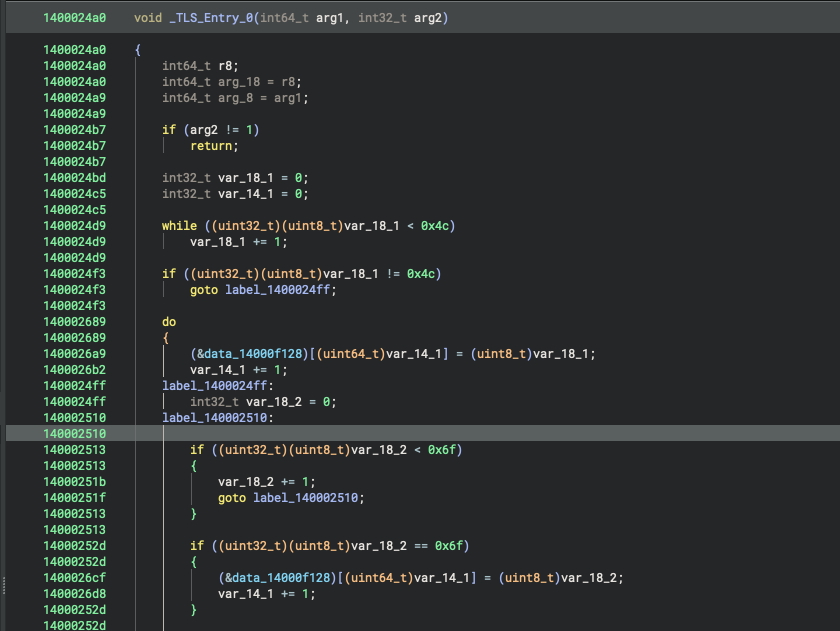
The trick is summarized by the following pseudo-code.
int counter = 0;
for(; counter != KEY_POS_VALUE; ++counter) {
	key[idx] = counter;
}
Instead of directly setting the keys byte to the value KEY_POS_VALUE, a counter is used counting up to that value; and then setting the counter value to the byte of the key. Anyways, in the end it is equivalent to key[idx] = KEY_POS_VALUE.
Following up these calculations, we obtain the XOR-Key namely “Love_Her”.
Continouing after the address 0x1400027b3, there is a heavy usage of two functions.
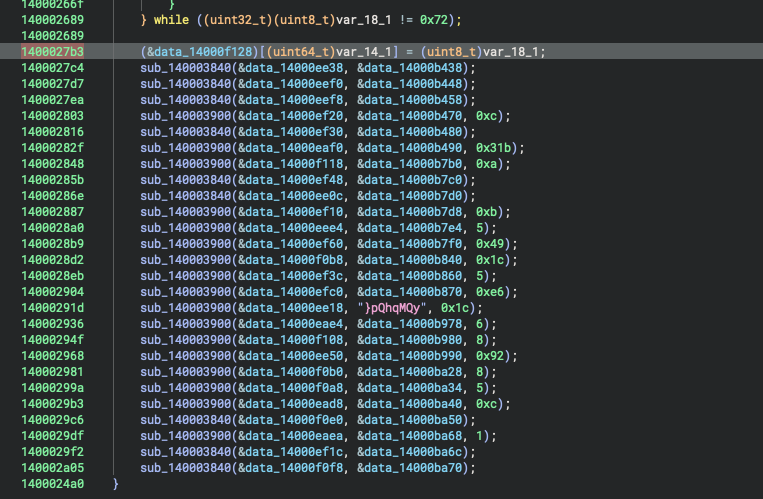
Analyzing these functions, we can deduce that these are basic copy operations:
140003840 void copy_buffers(char* dst, char* src)
// [...]
140003900 void copy_buffers_secure(char* dst, char* src, int32_t cnt)
All function calls are using the previously identified null blobs as destination and the obfuscated, high entropy blobs as sources. So what is the clue here, beside copying the data around? To answer this question, we have to check cross-references. The destination buffers were all accessed just from a few functions., the copy_buffers* functions and a yet unknown function at address 0x140003550.
Analyzing this function is very simple. We obtain the following decryption routine which does basic XOR-encryption using the key constructed in the TLS-Callback.
140003550  int32_t static_shift_and_xor(char* buffer, int32_t length)

14000355d  int32_t idx = 0
140003574  int32_t result = sx.d((*XOR_KEY)[0])
140003574
14000357a  if (result != 0)
14000357e     while (true)
14000357e       result = length
140003582       // loop until length is reached
140003585       if (idx u>= result)
140003585          break
140003585
1400035a3       buffer[zx.q(idx)] -= idx.b
1400035e6       buffer[zx.q(idx)] ^= (*XOR_KEY)[zx.q(modu.dp.d(0:idx, 8))]
1400035ee       idx += 1
1400035ee
1400035f7       return result
From here one, we could simply try to reverse engineer the encryption routine, and manually apply it to all relevant data, as we have done with the API resolver. However there is a smarter way! - Using emulation.
We will use qiling advanced binary emulation framework to emulate the execution of the TLS callback (to prepare the XOR key and payloads) and then execute the static_shift_and_xor function from address 0x140003550 for each data entry. All of this is implemented in the following python code.
The code basically
- Initializes Quiling
- Emulate the entire
TLS Callbackfunction to create theXORkey and put the payloads into there correct position in memory. - Iteratively executes the decryption routine at address
ENCRYPTION_STUB_BEGIN = 0x140003550for each of the obfuscated memory regions in the sample. - Read the decrypted memory regions and convert them from C-Style stings to python strings in order to print them to the console.
from qiling import Qiling
from qiling.const import QL_ARCH, QL_OS, QL_VERBOSE, QL_INTERCEPT
from qiling.os.windows.api import *
from qiling.os.windows.const import *
from qiling.os.windows.fncc import *

SAMPLE = "./rootfs/x8664_windows/bin/update.exe"
ROOTFS = "./rootfs/x8664_windows"

MEMORY : int = [
	# (name, addr, len)
	('malware_filename', 0x14000f0f8, 0xd),
	('payload_reconstructed_part_1', 0x14000ee38, 0x9),
	('payload_reconstructed_part_10', 0x14000ef10, 0xb),
	('payload_reconstructed_part_8', 0x14000ef48, 0xc),
	('payload_reconstructed_part_5', 0x14000ef30, 0xc),
	('lpMutexName', 0x14000eef8, 0x16),
	('shellExecVerb', 0x14000ee0c, 0x6),
	('payload_reconstructed_part_18', 0x14000f108, 0x8),
	('payload_reconstructed_part_22', 0x14000ead8, 0xc),
	('payload_reconstructed_part_17', 0x14000eae4, 0x6),
	('payload_reconstructed_part_16', 0x14000ee18, 0x1c),
	('payload_reconstructed_part_12', 0x14000ef60, 0x49),
	('payload_reconstructed_part_13', 0x14000f0b8, 0x1c),
	('payload_reconstructed_part_20', 0x14000f0b0, 0x8),
	('payload_reconstructed_part_19', 0x14000ee50, 0x92),
	('payload_reconstructed_part_21', 0x14000f0a8, 0x5),
	('payload_reconstructed_part_4', 0x14000ef20, 0xc),
	('payload_reconstructed_part_7', 0x14000f118, 0x1c),
	('payload_2' , 0x14000b448, 0x9),
	('payload_6', 0x14000b490, 0x31b),
	('payload_7', 0x14000b7b0, 0xa),
	('payload_11', 0x14000b7e4, 0x5),
	('payload_14', 0x14000b860, 0x5),
	('payload_15', 0x14000b870, 0xe6),
	('payload_24', 0x14000ba68, 0x1),
	('payload_25', 0x14000ba6c, 0x3),
	('privilege_list', 0x14000f0e0, 0x14),
	('data_14000e2d0', 0x14000e2d0, 0x9)
]


def sandbox():
	'''
	Setup the Sandbox environment and apply the required
	sub-tasks
	'''
	## instance qiling emulator
	ql = Qiling(
		[SAMPLE], rootfs=ROOTFS,
		libcache=True,
		archtype=QL_ARCH.X8664, ostype=QL_OS.WINDOWS,
		verbose=QL_VERBOSE.DEFAULT
	)

	## emulate the TLS callback to prepare the environment
	run_tls_callback(ql=ql)

	## get the internal XOR Key
	key = read_c_string(ql=ql, addr=0x14000f128, max_len=8)
	print(f"XOR-Key: {key}")

	## once the addresses are popilated we can read
	## and decrypt the payloads
	for (name, addr, len) in MEMORY:
		decrypted_mem = decrypt_memory(ql=ql, memory_address=addr, length=len)
	 print(f"{hex(addr)}\t{name}\t\t{decrypted_mem}")


def run_tls_callback(ql : Qiling):
	'''
	Emulates the TLS Callback to initialize the emulators
	state to the proper runtime one.
	'''
	TLS_CALLBACK_BEGIN = 0x1400024a0
	TLS_CALLBACK_END = 0x140002a0e

	## prepare registers
	ql.arch.regs.rdx = 1

	## run emulation
	ql.run(
		begin=TLS_CALLBACK_BEGIN,
		end=TLS_CALLBACK_END
	)


def decrypt_memory(ql : Qiling, memory_address : int, length : int) -> str:
	'''
	Helper Function to decode a specific memory region using the XOR Key at
	memory location 0x14000f128 and the encryption stub at
	0x140003550 int32_t static_shift_and_xor(char* buffer, int32_t length)
	'''
	ENCRYPTION_STUB_BEGIN = 0x140003550
	ENCRYPTION_STUB_END = 0x1400035f7

	## map parameters into the emulator
	ql.arch.regs.rcx = memory_address
	ql.arch.regs.rdx = length

	## run the emulation of the encryption stub
	ql.run(
		begin=ENCRYPTION_STUB_BEGIN,
		end=ENCRYPTION_STUB_END
	)

	## fetch the functions results
	result = ql.arch.regs.rax
	return read_c_string(ql=ql, addr=memory_address, max_len=length)


def read_c_string(ql : Qiling, addr : int, max_len : int =256) -> str:
	'''
	Helper function to read a single C-style string from the memory
	'''
	result = bytearray()
	for i in range(max_len):
		c = ql.mem.read(addr + i, 1)
		#if c == b'\x00':
		# break
	result += c
	return result.decode('utf-8', errors='ignore')


if __name__ == "__main__":
	sandbox()
The decrypted strings will already provide us with new insights into the malwares inner workings. Below are listed just some of them.
0x14000f0f8			explorer.exe
0x14000ee38			advapi32
0x14000ef10			user32.dll
0x14000ef48			shell32.dll
0x14000ef30			crypt32.DLL
0x14000eef8			Global\On3_S1d3d_hard
0x14000ee0c			runas
0x14000f108			shlwapi
0x14000ead8			notepad.exe
0x14000eae4			ws2_32
0x14000ee18			192.168.1.104
0x14000ef60			"{'Name' : %s , 'Computer' : %s , 'Proc' : %s , 'Key' : %s , 'Id' : %s}"
0x14000f0b8			Important.txt
0x14000f0b0			cmd.exe
0x14000ee50			/c vssadmin.exe Delete Shadows /All /Quiet & bcdedit /set {default} recoveryenabled No & bcdedit /set {default} bootstatuspolicy ignoreallfailures
0x14000f0a8			open
0x14000ef20			.naso
0x14000f0e0			SeShutdownPrivilege
0x14000e2d0			Users\*
Thus, we have obtained an IP Address may be helpful in later analysis of the PCAP file to filter on the relevant traffic if targeting the original HackTheBox CTF. Also we can see that the malware is using vssadmin.exe to delete any old volume shadow copies. Anyways, the next step is to rename the variables in Binary Ninja and if possible pathing the values (requires the non-free version) to work on with the decrypted text in the HIL view. This task is left to the reader and not presented in detail here.
Reconstructing Control Flow
Now, our code should be nearly human readable and we can start in reconstructing the applications flow. This process is a “jump-forward” and “jump-backwards” process with a lot of chaos by nature. In essence, it is like a net getting more and more tight. Since this part of malware analysis is the most strigh forward, but also most difficult to blog on, I decided to keep it rather short and just present you some of the ideas, techniques and methods may to apply.
My usual approach here is to
- Start from the API functions! A binary is commonly not understood by understanding assembly instructions, however each meaningful piece of software have to call, e.g., WIN API at some point of time and thats the point where we can hook in!. So start from this API functions, rename the variables on the callee site according to the MSDN documentation and walk your way up the function graph.
- In a top down approach, we can also work from the
main()function downwards. - Cross-References are helping a lot in understanding the flow.
There is only one possible mistake to make hrere: Do not focus to much on the assembly level or spend to much time on a single function. I promise it is wasted and you better had to look at another place until you have enough context to come back.
During this analysis I made heavy usage of qiling to emulate certain functions of the malware in order to better understand it. Below is, e.g., a snipped of python code used to obtain the list of extension targeted by the ransomware, as well as the final ransom-note dropped once the infection happened.
from qiling import Qiling
from qiling.const import QL_ARCH, QL_OS, QL_VERBOSE, QL_INTERCEPT
from qiling.os.windows.api import *
from qiling.os.windows.const import *
from qiling.os.windows.fncc import *

SAMPLE = "./rootfs/x8664_windows/bin/update.exe"
ROOTFS = "./rootfs/x8664_windows"

TLS_CALLBACK_BEGIN = 0x1400024a0
TLS_CALLBACK_END = 0x140002a0e

## List of addresses, where file exteions are
## stored in encrypted form
FILE_EXTENSIONS : int = [
	0x000000014000ba9c, 0x000000014000baa4,
	0x000000014000baac, 0x000000014000bab4,
	0x000000014000babc, 0x000000014000bac4,
	0x000000014000bacc, 0x000000014000bad4,
	0x000000014000badc, 0x000000014000bae4,
	0x000000014000baec, 0x000000014000baf4,
	0x000000014000bafc, 0x000000014000bb04,
	0x000000014000bb0c, 0x000000014000bb14,
	0x000000014000bb1c, 0x000000014000bb24,
	0x000000014000bb2c, 0x000000014000bb34,
	0x000000014000bb3c, 0x000000014000bb44,
	0x000000014000bb4c, 0x000000014000bb54,
	0x000000014000bb5c, 0x000000014000bb64,
	0x000000014000bb6c, 0x000000014000bb74,
	0x000000014000bb7c, 0x000000014000bb80,
	0x000000014000bb88, 0x000000014000bb90,
	0x000000014000bb98, 0x000000014000bba0,
	0x000000014000bba8, 0x000000014000bbb0
]

def sandbox():
	'''
	Setup the Sandbox environment and apply the required
	sub-tasks
	'''
	## instance qiling emulator
	ql = Qiling(
		[SAMPLE], rootfs=ROOTFS,
		libcache=True,
		archtype=QL_ARCH.X8664, ostype=QL_OS.WINDOWS,
		verbose=QL_VERBOSE.DEFAULT
	)

	## emulate the TLS callback to prepare the environment
	run_tls_callback(ql=ql)

	## get the internal XOR Key
	key = read_c_string(ql=ql, addr=0x14000f128, max_len=8)
	print(f"XOR-Key: {key}")

	## once the addresses are popilated we can read
	## and decrypt the payloads
	for (name, addr, len) in MEMORY:
		tmp = decrypt_memory(ql=ql, memory_address=addr, length=len)
		print(f"{hex(addr)}\t{name}\t\t{tmp}")

	## next, we can decode the file exteions
	## encrypted by the malware
	for addr in FILE_EXTENSIONS:
		tmp = decrypt_memory(ql=ql, memory_address=addr, length=5)
		print(f"{hex(addr)}\tExtension:\t\t{tmp}")

	## print the template text sued to generate the ransom note
	print(decrypr_ransom_note(ql=ql))


def run_tls_callback(ql : Qiling):
	'''
	Emulates the TLS Callback to initialize the emulators
	state to the proper runtime one.
	'''
	## prepare registers
	ql.arch.regs.rdx = 1

	## run emulation
	ql.run(
		begin=TLS_CALLBACK_BEGIN,
		end=TLS_CALLBACK_END
	)


def decrypt_memory(ql : Qiling, memory_address : int, length : int) -> str:
	'''
	Helper Function to decode a specific memory region using the XOR Key at
	memory location 0x14000f128 and the encryption stub at
	0x140003550 int32_t static_shift_and_xor(char* buffer, int32_t length)
	'''
	ENCRYPTION_STUB_BEGIN = 0x140003550
	ENCRYPTION_STUB_END = 0x1400035f7

	## map parameters into the emulator
	ql.arch.regs.rcx = memory_address
	ql.arch.regs.rdx = length

	## run the emulation of the encryption stub
	ql.run(
		begin=ENCRYPTION_STUB_BEGIN,
		end=ENCRYPTION_STUB_END
	)

	## fetch the functions results
	result = ql.arch.regs.rax
	return read_c_string(ql=ql, addr=memory_address, max_len=length)


def decrypr_ransom_note(ql : Qiling) -> str:
	'''
	Helper function to decrypt the template used for the ransom note
	'''
	RANSOM_NOTE_DECRYTPTION_STUB_BEGIN = 0x140003600
	RANSOM_NOTE_DECRYTPTION_STUB_END = 0x1400036a7

	RANSOM_NOTE_ADDR = 0x14000eaf0
	RANSOM_NOTE_LEN = 795

	## map parameters into the emulator
	ql.arch.regs.rcx = RANSOM_NOTE_ADDR
	ql.arch.regs.rdx = RANSOM_NOTE_LEN

	## run the emulation of the encryption stub
	ql.run(
		begin=RANSOM_NOTE_DECRYTPTION_STUB_BEGIN,
		end=RANSOM_NOTE_DECRYTPTION_STUB_END
	)

	## fetch the functions results
	result = ql.arch.regs.rax
	print(f"RAX:\t{result}")
	return read_c_string(ql=ql, addr=RANSOM_NOTE_ADDR, max_len=RANSOM_NOTE_LEN)


def read_c_string(ql : Qiling, addr : int, max_len : int =256) -> str:
	'''
	Helper function to read a single C-style string from the memory
	'''
	result = bytearray()
	for i in range(max_len):
		c = ql.mem.read(addr + i, 1)
		#if c == b'\x00':
		# break
		result += c
	return result.decode('utf-8', errors='ignore')


if __name__ == "__main__":
	sandbox()
As the code documents the approach is nearly all the time the same. Identifying what we do not understand finguering out the method, which de-obfuscates it, and feeding everything into Quiling.
Executing this script, we obtain the following list of extensions:
0x14000ba9c	Extension:		pdf
0x14000baa4	Extension:		doc
0x14000baac	Extension:		docm
0x14000bab4	Extension:		docx
0x14000babc	Extension:		htm
0x14000bac4	Extension:		html
0x14000bacc	Extension:		txt
0x14000bad4	Extension:		rtf
0x14000badc	Extension:		xml
0x14000bae4	Extension:		csv
0x14000baec	Extension:		ods
0x14000baf4	Extension:		xls
0x14000bafc	Extension:		xlsm
0x14000bb04	Extension:		xlsx
0x14000bb0c	Extension:		xltm
0x14000bb14	Extension:		xltx
0x14000bb1c	Extension:		bmp
0x14000bb24	Extension:		jpg
0x14000bb2c	Extension:		mp4
0x14000bb34	Extension:		mp3
0x14000bb3c	Extension:		odp
0x14000bb44	Extension:		pot
0x14000bb4c	Extension:		potm
0x14000bb54	Extension:		potx
0x14000bb5c	Extension:		ppt
0x14000bb64	Extension:		pptm
0x14000bb6c	Extension:		pptx
0x14000bb74	Extension:		zip
0x14000bb7c	Extension:		7zk
0x14000bb88	Extension:		jpeg
0x14000bb90	Extension:		rar
0x14000bb98	Extension:		tmp
0x14000bba0	Extension:		wpd
0x14000bba8	Extension:		wp5
0x14000bbb0	Extension:		png
As well as the ransom note:
						!!!!Important Information!!!!

I - What's Happened ?

All your important files got encrypted by my Lovely Ransomware , U can check that but remeber U dont have enough time to play around.

II - What To do ?

I garantie that all your files can be recovered by purchasing my software , To do so follow the instructions below:

1: Pay 2000$ worth of bitcoin to this address : <REDACTED>
2: Send me an email containing the ID below to the following address and i'll contact u soon : nebilij251@rencr.com .

ID = {}

III - What not to do ?
1- Please dont change the filename of any encrypted file in your computer.
2- Dont waste Your time searching for free decryptors , I've Encrypted all your files with a very strong algorithm.

Good Luck !!!!!!!!!!!!!
All these information help to get context into the execution flow.
To wrap-up this chapter, let me depict the very abstract flow of execution by means of the following enumeration:
- Executing
main - Check and create a
Mutexto avoid double execution - Mount basic anti-analysis techniques
- Restart the sample with escalated privileges using
runas - Delete eventually existing shadow copies
- Decrypt Payloads and strings
- Encrypt files
- Drop the ransom note to the users folder
- Connect to the C2 providing the attacker some identifiers and the actual encryption key used
This is a fair high level overview only. If you really want to understand the sample I can totally recommend to analyse it on your own and completing the LovelyMalwre sherlock on HackTheBox. It is really worse it!
Anyways, this blog post should provide some ideas on how to analyse ransomware samples only. My major goal was to present you how to deobfuscate custom API resolver and embedded strings. So let us stop here and call it a day.
Summary
We have analysed a basic ransomware sample taken from the LovelyMalware CTF of HackTheBox. We showed how to mount emulation frameworks like quiling in order to emulate specific parts of the sample to get more insights into the malware capabilities. Thereby we never needed to actually execute the ransomware, providing us an additional layer of protection and security. The general approach of identifying API resolvers, deobfuscating strings and cleaning up the applications control flow was demonstrated. Thus, this blog post may provides a different perspective on malware analysis compared to the commonly found write-ups using dynamic code analysis.