Following the social media, regardless wether you are on X, LinkedIn or Instagram, everyone talks about Agentic AI and Claude Code. The post scoping from the perfect prompt to just another fancy Skill. The people going crazy and trying to approach every problem with AI, especially LLMs, regardless of the model is suitable for that case or not. Anyway, this is a subjective topic and should not be the concern of our todays post. Instead, we will use Claude code for something it is really good in: Automation and automated human-language report generation. More precisely spoken, we will create a malware-triage skill and a corresponding agent monitoring a directory and applying this skill to write reports based on the samples copied to that directory. This step of automation allows the analyst to just put samples in the inbox and await the finished reports, while at the same time being able to focus on level 2 and level 3 analysis.
The problem statement
Security analysts, especially the ones working in level 1 operations, often needs to judge on unknown images, wether if it is malicious or benign. To this end, common tasks, like hash calculation, import/export checking and strings evaluation are repeaditly executed. Additionally, often the service requests to write a report or notification in the case-management at least. During daily operations an analyst may process up to 10 samples depending on the working environment. This task is time consuming and repitive. A perfect problem to solve with automation and AI agents.
Understanding the Task
The very first step in every agentic AI setup should be understanding the task. We need to answere the following fundamental questions and/or aspects:
- Break down the task in multiple smaller sub-tasks (classical divide and conquer strategy)
- For each task, ask yourself, whether this task can be automated using deterministic scripts (no fancy AI usage here), or requires content parsing / generation (perfect use-case for LLMs)
- Evaluate the importance of the tasks results. Are minor mistakes acceptable or will they ruin the entire result of the triage?
- Which parts needs to be deterministic (fact outputs)? Which are jubject to small fluctuations, like the exact writting of the report.
For the sake of our initial malware triage pipeline we may end up with the following table formalizing our requirements:
| Feature | Description | Technique |
|---|---|---|
| Evaluation of the File | Our final report should contain md5, sha1 and sha256 hashes of the sample. Beside this, we should provide the file size, file type and other common meta-data. All these values can easily be calculated using either command-line tools or a small python implementation. The task have to be non-generative and deterministic, hence LLMs are the wrong tool. Instead we should provide a clear deterministic function to be called by the AI agent. |
Automation via deterministic script |
| Imports/Exports | Imported functions and there libraries can tell a lot about the sample under consideration. The very same holds true for exported symbols like TLS callbacks or custom export symbols. The required information can easily be parsed from the given sample using, e.g., pefile library from python. We need to automate this task by plain python code. |
Automation via deterministic script |
| Identifying high entropy sections | Entropy is another good indicator to judge on a sample and decide how to continue the analysis. Anyway, again this is no task a LLM should handle. We will provide a script for that. | Automation via deterministic script |
| String parsing | Embeeded strings are often the most valuable indicator of a given sample. However, often the strings are obufscated and try additional postprocessing. We may start with tool invocation to execute floss, then providing the results to the LLM in order to match the output for any strings related to malware. |
Both AI and deterministic script |
| Report Generation | Once all information are gathered, a human-friendly report should be generated. This is the perfect task for a LLM. | LLM Task |
Additionally, we should define the following requirements.
- A sample should never be executed at any time. Even not in a sandbox. We approach a pure statical file triage!
- The Skill shlould implement the least privilege approach. We should provide the Agent only with the functionality absolutel required to work
- Any script execution should happen inside an isolated docker container
From this initial thoughts, we can already conclude that during the skill execution, the AI will play a minor role only. Nevertheless, we can utilize Claude code for the skill generation itself. This is even the recommended method and it will speed up thinks a lot.
Generating the Skill
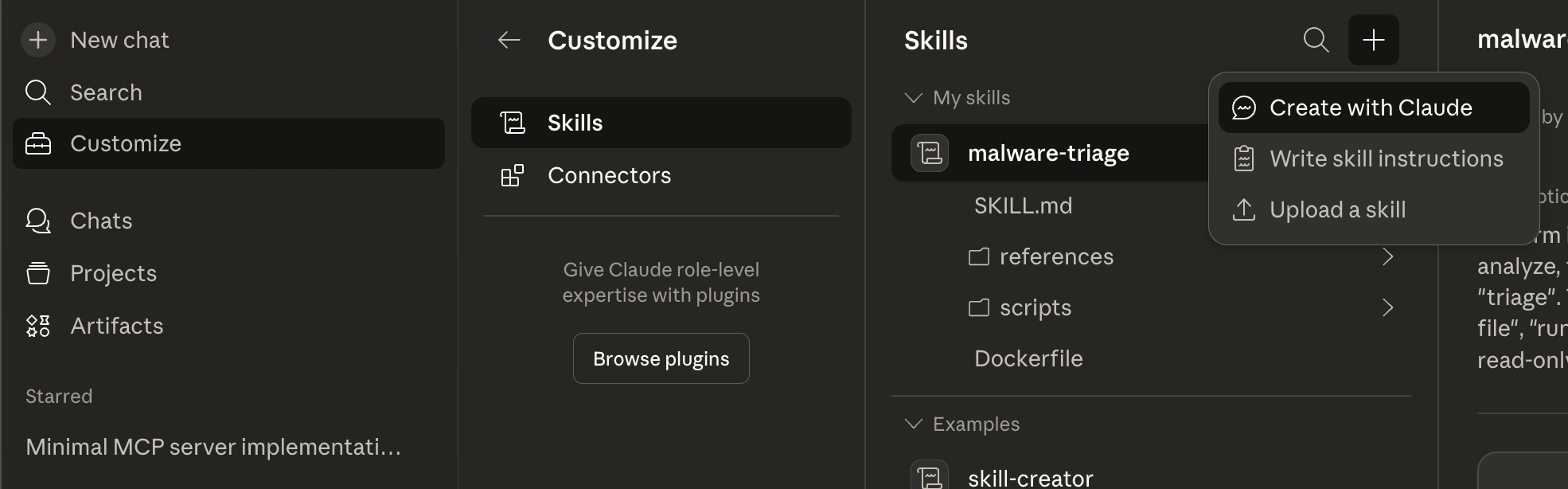
To generate the skill, all we need is a good prompt. The LLM will generate the required docker files, python scripts and put everything together for us. After just a few iterations and minutes later, we will have a valid SKILL to use in Claude code. However, good prompt design requires us to understand What we want in the first place. Thanks to the formulation of our initial requirements, we exaclty know what should be handled in which way. We utilize the well known CONTEXT- TASK CONSTRAINTS pattern to generate our prompt.
Below is a possible sample prompt to generate the skill:
Daily SOC operations requires analysis of windows based malware (PE format). The first step in analysis is initial static file triage. The analyst reports on the file hash, the files entropy highlighting specific sections in the PE file with high entropy, the impports / exports of the sample, as well as the contained strings. Commonly strings are obfuscated and require additional reconstruction using emulation by e.g., using floss. The analyst. Once all information gathered, a markdown formated report is generated.
I need a skill to write an initial file triage report in markdown of given malware samples. The initial triage skill should operate on a given file, calculating the following properties
- Calculation of
MD5,SH1, andSHA256Hash. Additionally, the hashes should be looked up on VirusTotal to check if one of the hashes is already publicly known - Calculate the samples entropy; Reporting on specific sections with high entropy
- Parse the imported libraries and functions, searching for any commonly associated with malware.
- Provide a list of all exported symbols like
_start, TLS Callbacks and other exports - Finally, the contained strings should be calculated using
floss. From the reported strings all short and high entropy ones should be filtered out, leaving only human readable information.
For each of these tasks (calculating hashes, parsing imports/exports, processing strings, etc.) there should be implemented one sperate python script. These python scripts should be orchestrated by an entrypoint.py script that executed the various sub-tasks. The entire execution should be isolated in a minimal python docker container. Results from the single scripts should be stored in a sub-directory called /report. I.e., /report/strings.txt, report/imports.txt, etc. Once all information gathered, a markdown formatted report should be generated. Use the following structure:
# Static File Triage of {sample.exe}
## File Meta Data
- Hash Values
- Link to VirusTotal
- Entropy and Sections
## Imports / Exports
- List of Imports (mark suspicious ones)
- List of Exports
## Embedded Strings
- Results from the floss run
## Triage Summary
It is of absolute importance, that the initially provided sample is never executed at any time. Only simulation using dockerized floss is allowed (floss may be installed inside the minimal python docker container using pip3). The docker images should be run on AMD64 and AArch64 architecture. Every executed python script needs to be executed inside the docker container as well. The Skill should implement the least-privilege concept. Use Skill meta-data to restrict the skill to the required exections of the docker container and reading of relevant files only.
Before anything is executed, the user should be informed about every step! Proceed only on user agreement!
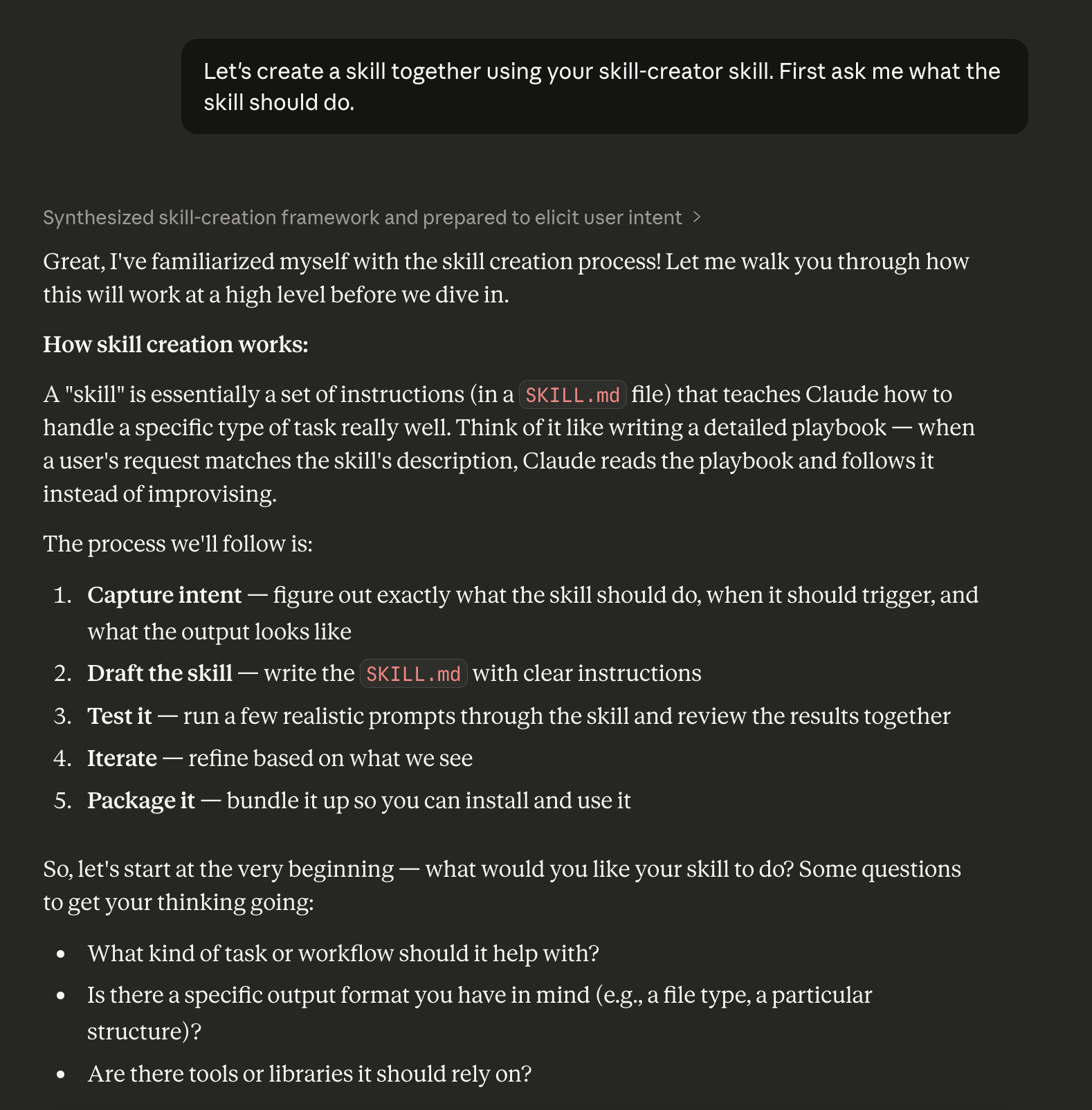
The prompt looks a bit lengthy in the first place, however only thus, we are able to exactly describe what we expect the LLM to generate. Also this will require us less iterations. We can not copy the prompt into the Claude Chat and let the LLM do the work. While the LLM is processing our request, we likely need to interact wth it from time to time clarifying some design decisions.
Investigating the genrated Artifacts
Once Claude AI has completed our request, we may end up with the following skill structure
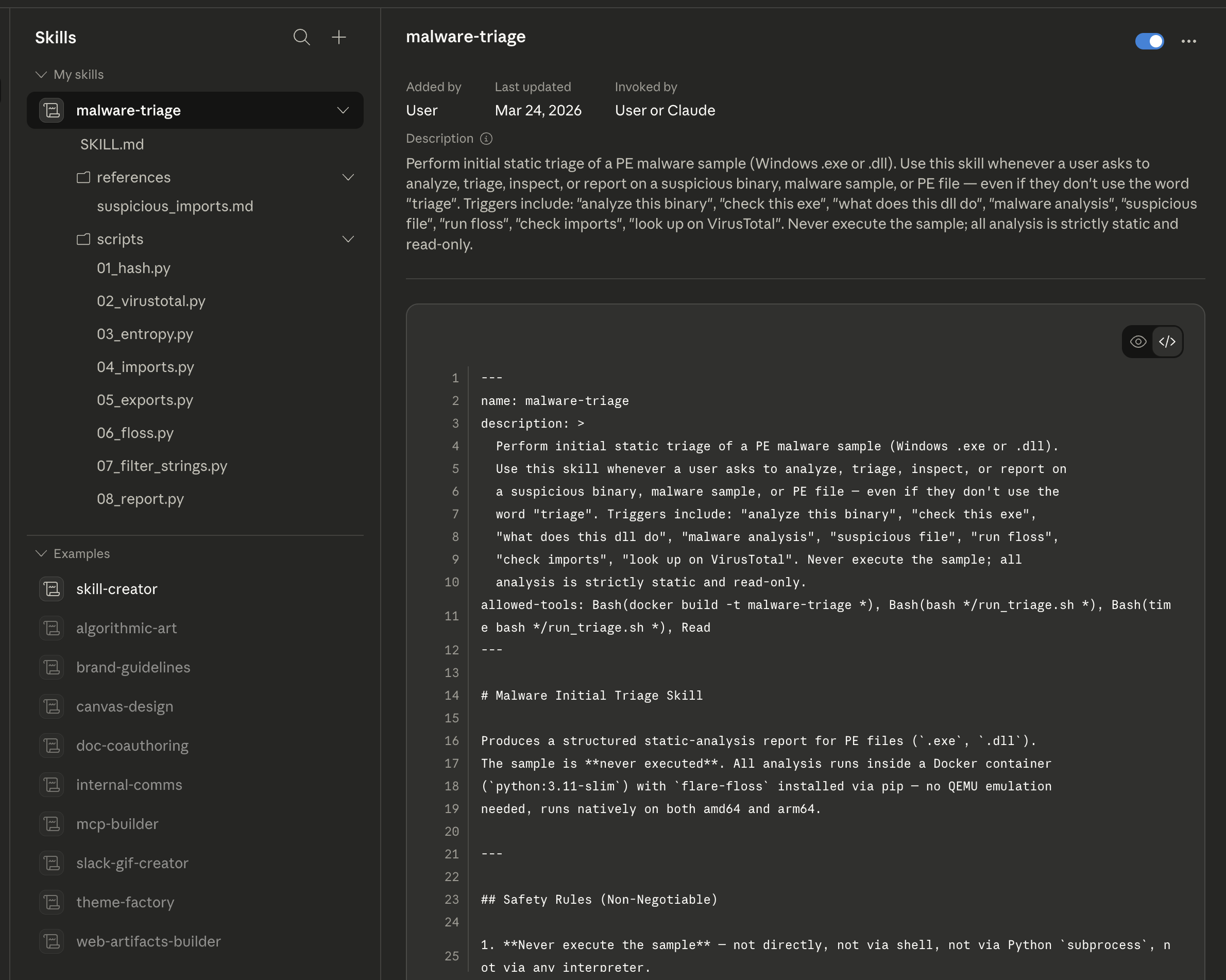
The screenshot clearly depicts, that Claude generated the SKILL.md file, a docker file and various python scriptes named by the sub-tasks we defined earlier.
We can see the dockerfile build based up from python:3.11-slim:
FROM python:3.11-slim

# binary2strings (flare-floss dependency) requires a C++ compiler to build.
RUN apt-get update && apt-get install -y --no-install-recommends \
        g++ \
    && rm -rf /var/lib/apt/lists/*

# Install analysis dependencies.
# flare-floss runs natively on both amd64 and arm64.
RUN pip install --no-cache-dir pefile requests flare-floss

WORKDIR /app
COPY scripts/    /app/
COPY references/ /app/references/

# /samples — bind-mounted read-only by the caller (sample lives here)
# /report  — bind-mounted writable by the caller (all output written here)
ENTRYPOINT ["python", "/app/entrypoint.py"]
The container definition installs the required dependencies, copies over the single scripts reposible for the sub-tasks like hash calculation, and ends with instructions for a read-only bind mount. The generated Python scripts under /scripts does look valid as well.
The run_triage.sh script is basically a wrapper around the docker container:
echo "======================================================"
echo "  Malware Initial Triage"
echo "======================================================"
echo "[*] Sample    : $SAMPLE_PATH"
echo "[*] Output    : $OUTPUT_DIR"
echo ""

echo "[*] Building malware-triage image (cached after first build)..."
docker build -t malware-triage "$SKILL_DIR"

echo ""
echo "[*] Running triage container..."
docker run --rm \
    -v "$SAMPLE_DIR:/samples:ro,z" \
    -v "$OUTPUT_DIR:/report:z" \
    malware-triage "/samples/$SAMPLE_NAME"
Finally, the SKILL.md only provides a rough textual description of how and when to execute the skill. Even the least privilege concept was implemented by adding the right meta-data in the yaml header:
---
name: malware-triage
description: >
  Perform initial static triage of a PE malware sample (Windows .exe or .dll).
  Use this skill whenever a user asks to analyze, triage, inspect, or report on
  a suspicious binary, malware sample, or PE file — even if they don't use the
  word "triage". Triggers include: "analyze this binary", "check this exe",
  "what does this dll do", "malware analysis", "suspicious file", "run floss",
  "check imports", "look up on VirusTotal". Never execute the sample; all
  analysis is strictly static and read-only.
allowed-tools: Bash(docker build -t malware-triage *), Bash(bash */run_triage.sh *), Bash(time bash */run_triage.sh *), Read
---
Take special notice on the allowed-tools line.
So from a first look, it looks like the LLM was able to generate exactly what we have requested! If we are confident enough, that the skill does look usable, we can apply it inside a sandboxed envionment. For the first run, we should always use a sample, where we already know the expected output! This will allow us to validate the correctnedd by example at least.
Notice, that it is always worth to check any code generated by a model. Never blindly trust the generated content. If unsure execute in sandboxed environments only.
Testing the Triage skill
We fire up a basic Fedora 43 Workstation VM, install Claude code according to the official documentation, install our skill in ~/.claude/skill/malware-triage and enter the claude code cli.
Prompting claude to “Apply initial static file triage to evil3.exe” will trigger our skill and generate the report. For the sake of this validation I used the sample analyzed in my previous blog post about floss.
The obtained result is very promissing! Convince yourself, attached the report to this post. However, the best part is, that the report ist just text. Hence, we can easily use the LLM to, e.g., summarize the report, as depicted in the following two screenshots.
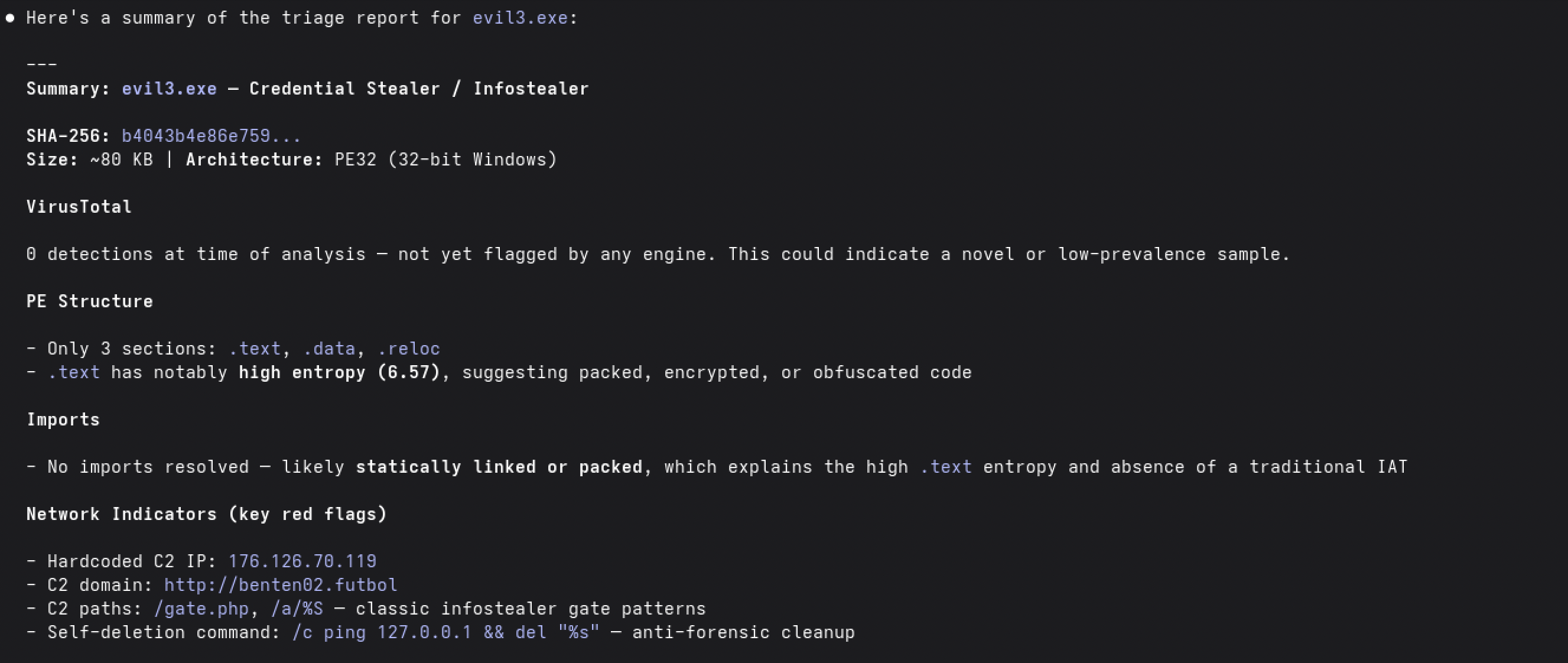
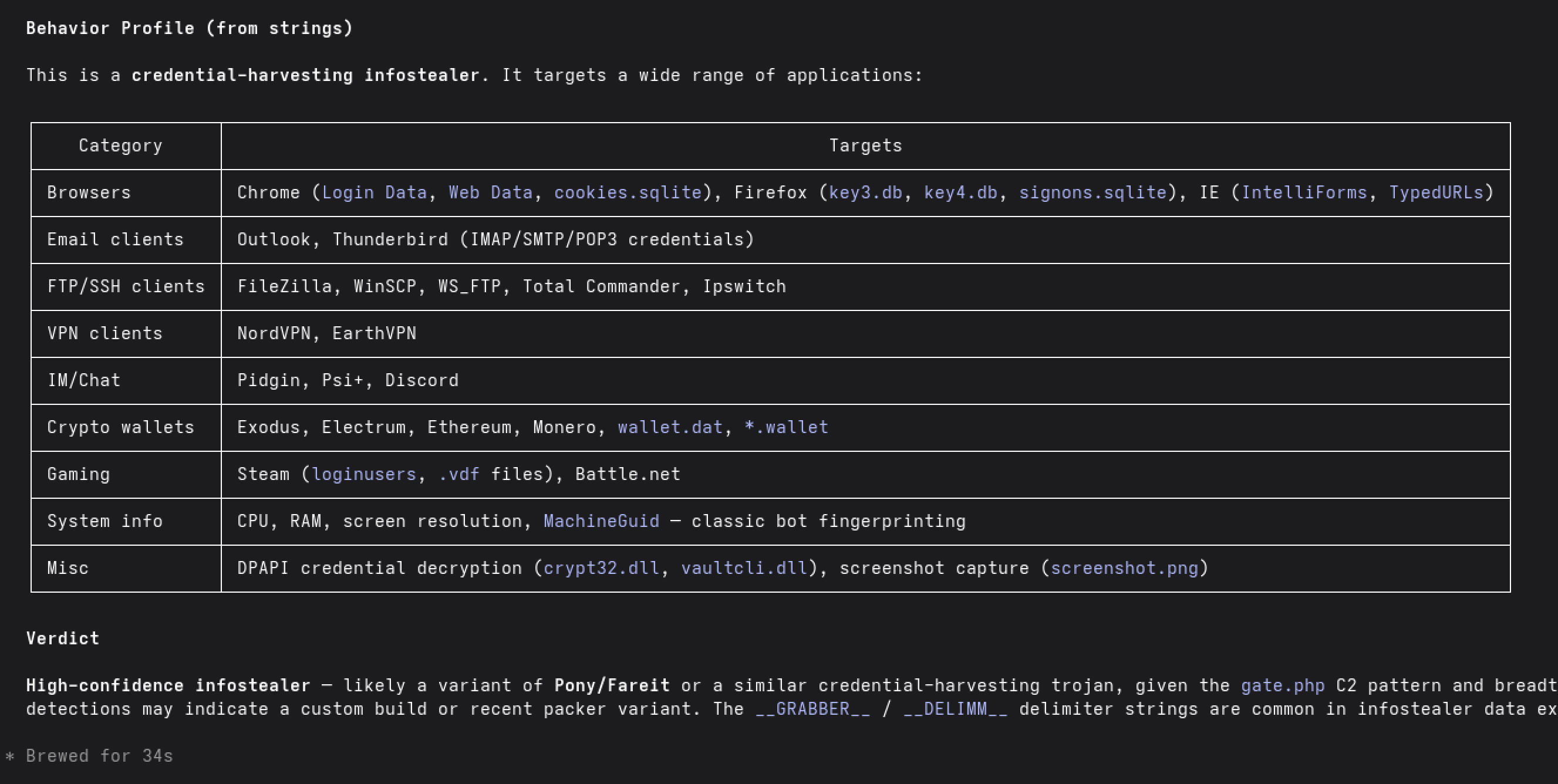
Thanks to the deterministic scripts, we have correct hashes, imports, exports and strings. Thanks to the LLM, we have automated tool call and summarization. Hence, we were able to combine the strength from both sides.
The analyst can take a short look at the triage report and directly does know what to do next.
Making it Agentic
There is one final step missing. The agentic part. Until here, the analyst needs to call the skill for every sample to be analyzed. The formulation in a natural language prompt is even longer that the call of a single script like run_triage.sh. What really would level up the skill would be automatic execution. I.e., an analyst drops a new sample in a folder named /inbox, the “agent” does mount the analysis on that file, and copies the created report to a /reports folder. Additionally, may the analyst will be notified on completed reports.
Let us start by thinking about the requirements and asking the fundamental question, if this is an AI task or not. So, what do we expect from our Triage Agent?
- The agent should monitor an
inboxfolder for newly copied malware - The created skill have to be applied.
- Generated reports should be copied to a
/reportsdirectory. - Malware samples processed once, should be moved to a folder
/processed - At the end of the day, the samples from the
/processedfolder should be deleted. - The agent have to be executed in the background and only notify the analyst on newly created completed reportings
- Optionally, the notifications on new reports may be send out via mail, slack or any other messenger platform
Reading the requirementts, the only non deterministic task suitable to be conducted by AI is the report generation. Hence, we should not let the AI do everything. Instead, we may add the following refined technical requirements.
- The agent should run on UNIX like systems as
systemdservice. To avoid polling of newly samples in the/inboxthe application should utilize Kernel Event Notification (inotify). - On every sample copied to the
/inboxour script should executeclaude /app/inbox "[SYSTEMPROMPT]", where the system prompt will tell claude to analyze the newly found sample and summarize the report. So, Claude will be invoked single-shot only.
Now, since we have exactly clarified, which parts should be handled by Claude and which not, we can start our development. For the pure development Claude can help us generating the required code. Below is my prompt I used:
I created a malware-triage skill able to analyze a given windows PE file sample, and create an markdown formatted report. During day to day work, I have a lot of samples to mount the initial triage on. New samples will be copied to a folder named /inbox. The analysis should be triggered automatically and generate a report saved to /reports directory. For handling the detection of new samples Kernel Notification events should be used (libnotify).
Generate a python or shell script, that can be installed as systemd service unit. The script should
- Monitor the /inbox folder using Kernel Event notifications to find new files.
- Once a new file is found (and writing to disk is completed), the script should invoke claude code with a given prompt to analyze the sample and summarize the obtained report. (claude is started one-shot).
- After Claude does have completed the malware-triage skill and have summarized the report. Both files, the plain full report and the summarized report, have to be copied to the /reports directory
- Finally the processed sample should be moved into a directory
/processed.
Since the malware-triage skill is running for several minutes, the script needs to be multi-threaded. E.g., the service should be able to process multiple samples at the same time or if not possible utilize a queue to handle any concurrency issues.
Using above promt, we obtain our complete malware triage agent. For the sake of completeness, I added all files to my GitHub repository as well. Again, it is crucial to check any code generated by the AI, to avoid any security risks. For the sake of this blog post I roughly checked the code and deployed the “agent” inside a virtual machine for testing.
As we may have already expected, the triage does work really well.
Deployment of the Triage Agent
For the Deployment I decided to install the agent in a virtualizes envirnment. To this end, I set up a virtual machine running the agent. The application is executed as systemd service running under a user named agent. The application files are all stored at /opt/malware-triage. To be able to run claude code, the systemd unit needs to consume the environment of the agent user. Thhis is the only possibility, if now API key is available and we need to call claude interactively, like done in our setup. The complete project files can be found in my GitHub repository. To rebuild this setup, either apply the exact same steps like me …
- Create a virtual machine with a user named
agent - Make sure that docker and python are installed, including
venv. Also ensure that the user is able part of thedockergroup to allow the user to start docker continers - Next, install claude code via the recommended method. Log into your claude code using
claude /login. - Finally, you can start the installaton, using the
install.shscript provided in the repository
… or adopt the scripts from the repository to your specific enviornment.
Once everything is deployed, we can test it out by coping some samples to the /inbox folder:
cp evil3.exe /opt/malware-triage/inbox
Afer a short amount of time the report will be available in the /reports directory. Below are some screenshots of the demonstration.
This first picture shows the logs during runtime.
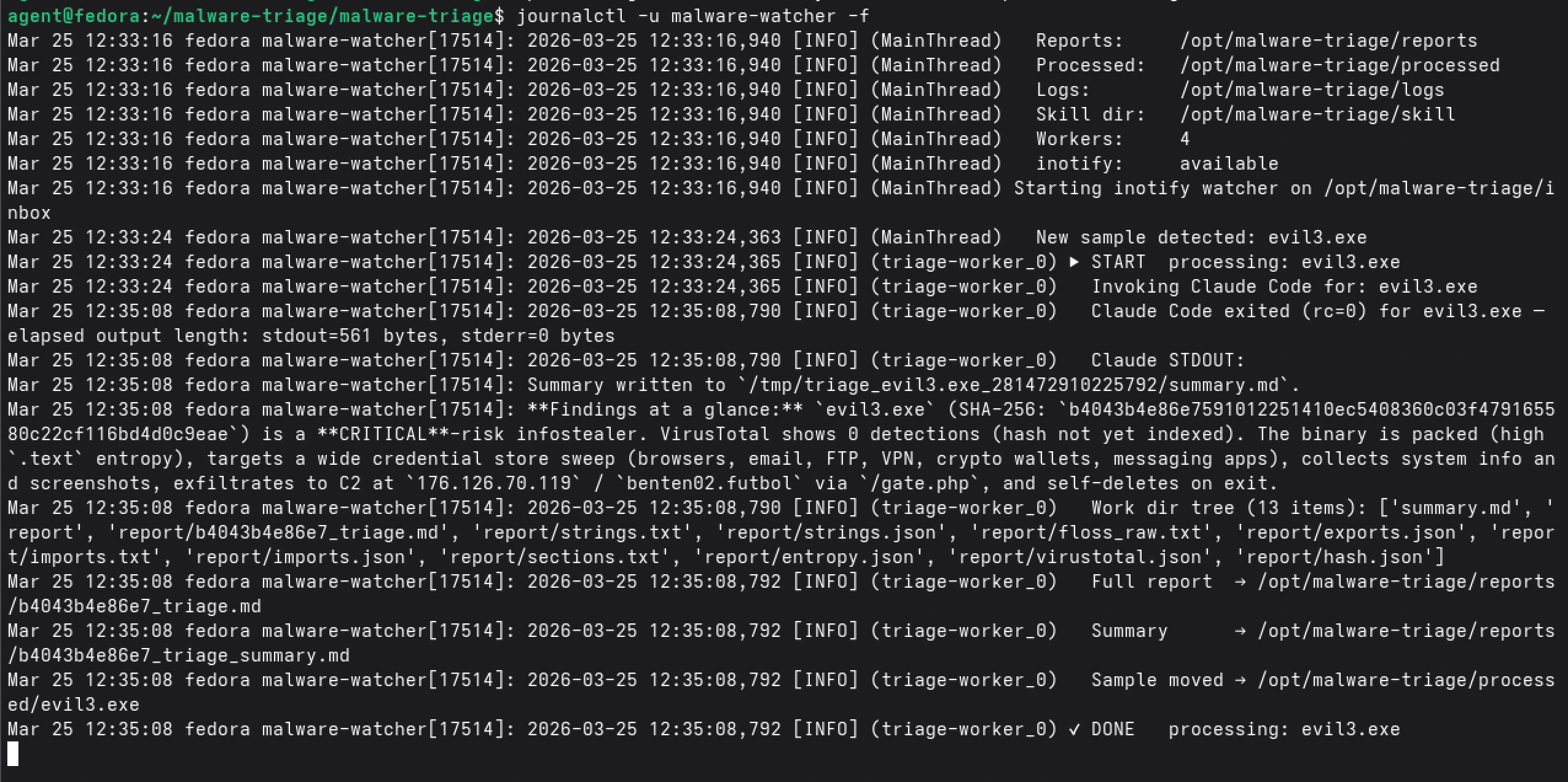
We can clearly see how our agent starts working on the given sample evil3.exe. While it is running, we can inspect the background tasks and files created by the agent.

Finally, the completed reports will be stored in the /reports directory.

Looking on the results, we obtained a complete initial triage report on the sample without any further human interaction. The LLM does not only summarize the report, it also provides an inital verdict on whether the sample is benign or malicious.
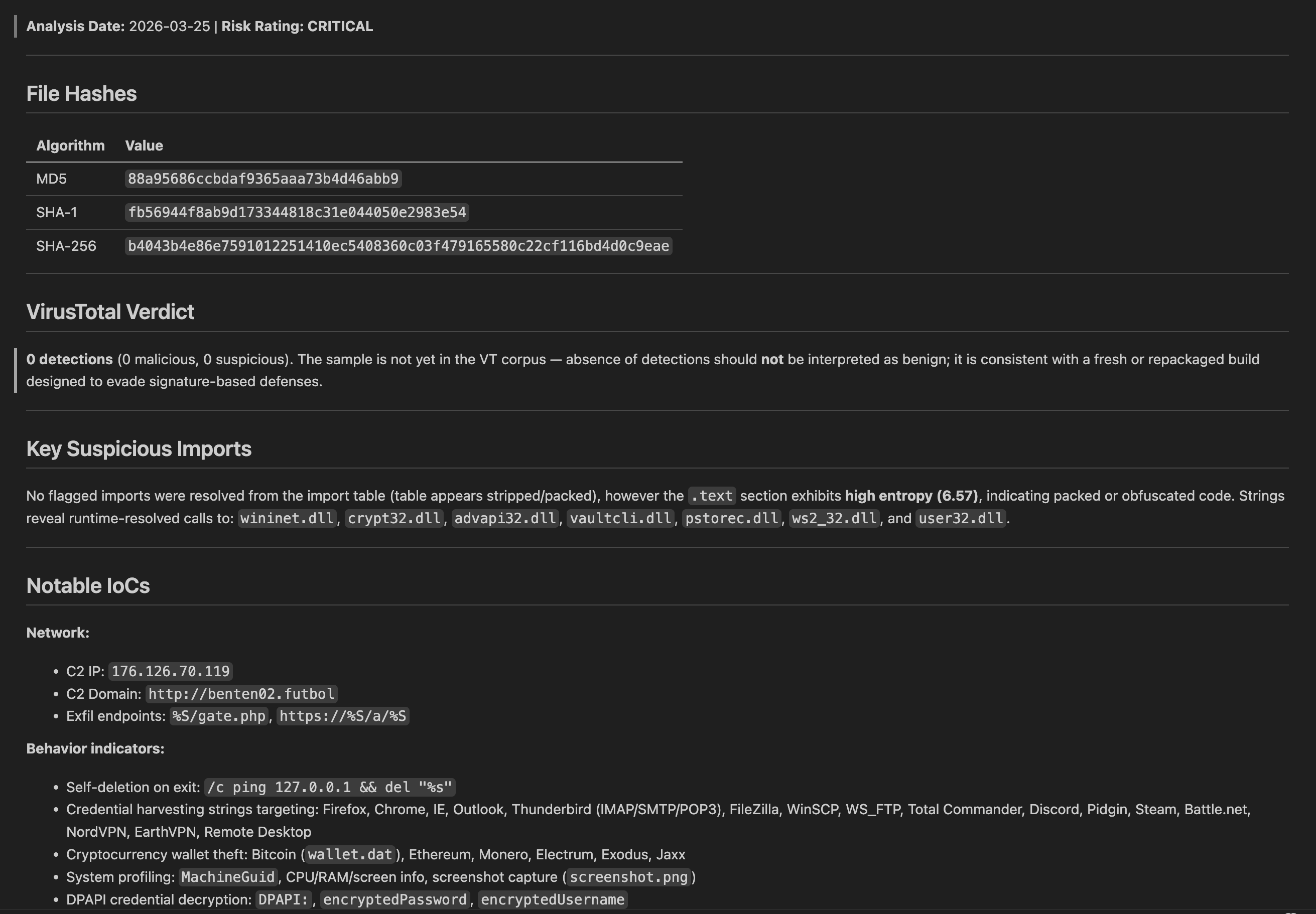
The reports can also be found in the Git repository.
Using AI means “Always Iterate”
If you have deployed the agent discussed int this post and let it run over some time you propably observe that it will consum a decent abount of tokens. It is not a heavy amount, but its enough to generate unnecessary cost in the long time run.
So, what it the reason for this expense? - And can we do better?
The reason is quit simple we use Claude. But for which tasks actually? Let us summarize exaclty, what claude is doing in the current approach
- Claude starts and reads its
Claude.mdand memory files from theagentusers home directory. However, this does not make any sense for our generation of reports, since the are unlrelated. - Next, claude will be prompted to conduct the static file triage. To this end, claude needs to read our skill, just to evaluate, that it needs to start a shell script-wrapper launching the actual docker worker. So, why not directly start the docker worker from the
malware_analyzer.py? - Reports were generated, claude read them into context, summarize them, and copy the results to the
/reportsdirectory. Actually, only here, we need the LLMs capabilities!
As we can see, we waste a lot of tokens by just letting handle claude fully deterministic tradiitonal automation tasks. This is always a bad implementation. So let us fix this using claude. We can easily prompt the LLM with the above issues, and it will adopt the code to our needs. In the end, the LLM is used to handle summarization of the report only.
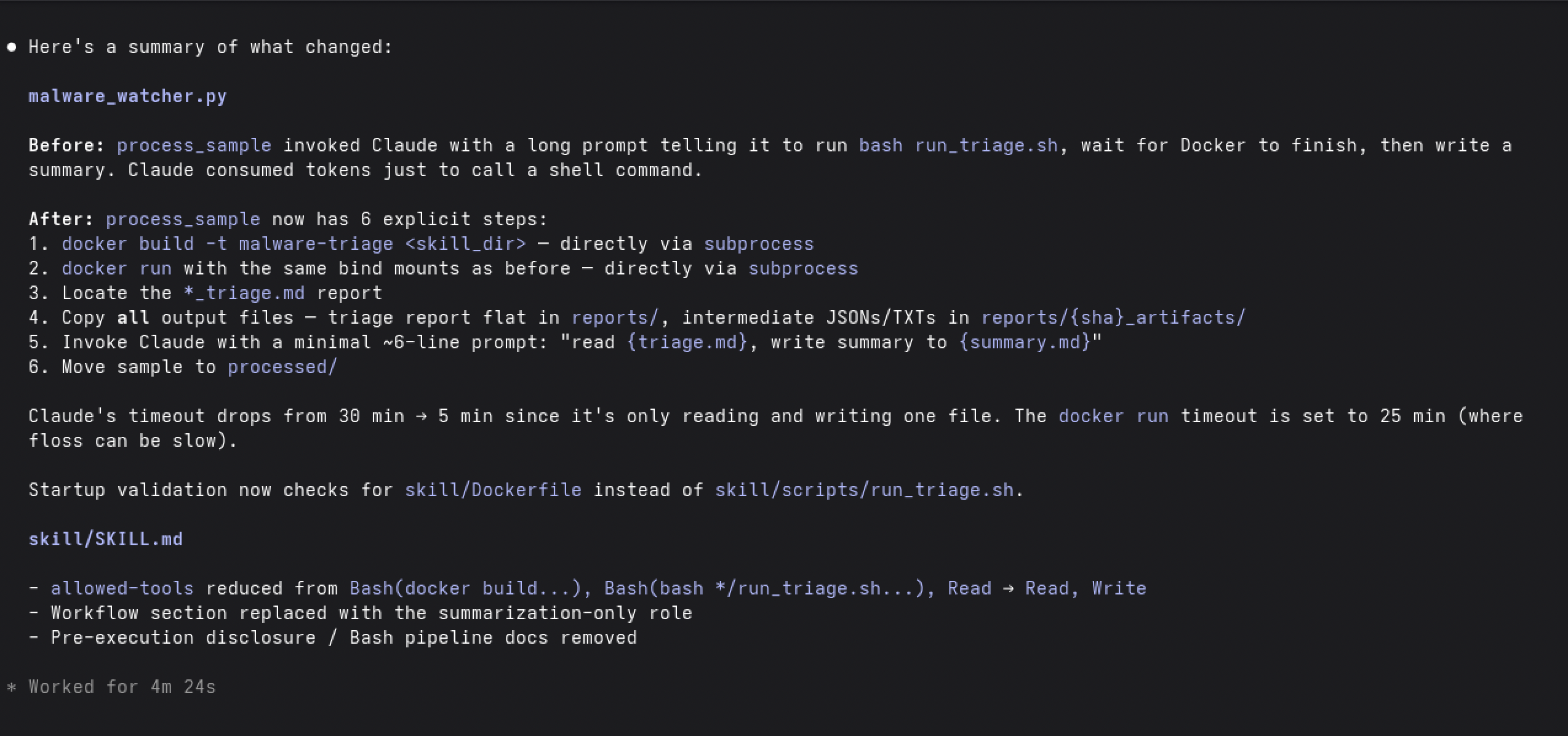
The new approach does not only have the advantage, that it consumes less tokens, it also seperates the LLM and deterministic parts more apart. Now the LLM is only involved in summarizing text, requiring less privileges on the side of the Claude agent. Additionally, the generated Skill file becomes a pure description of a Workflow. This Playbook-like character is exactly how skills are understood in the theory. So after just one iteration, we ended up with an improved version of our triage pipeline.
So, is this the end of the journey? If you trust blind code without understanding the theory probably yes. However using this pipeline in production may cost you your job. There are at least two issues with the current implementation:
- The system prompt primes the agents answer already into the semantic direction of malware
- The report contains all strings from the binary, especially the ones with high entropy yielding model hallucinations.
And these are just two aspects we can solve. Not talking about the fundamental problem of semantic overlap. I.e., imagine a benign password manager and a ransomware. Semantically, they are identical!
Enough of my exragation. Let us see how we can improve these aspects at least.
The second issue is technically easy addressable but requires some background to understand. If you want to dive deeper, read about vector embeddings and the superposition hypothesis. I will provide intuition here only!
Putting it in simple words, high entropy input produces several compounding effects. One of them involves tokens that were rarely seen during training. For these low-frequency tokens, the learned embedding vectors remain close to their random initialization. Unlike well-trained tokens, which occupy meaningful positions in the model’s geometric representation space, rare token embeddings point in essentially random directions with no reliable relationship to semantically related concepts.
This causes two additional problems. First, during attention and MLP processing, these random directions produce erratic intermediate representations, the model may confidently associate a rare token with an unrelated concept simply due to geometric accident. Second, high entropy input activates many unrelated knowledge clusters simultaneously, exhausting the models representational capacity and causing interference between them.
On top of this there is an issue during tokenization as well. Byte-Pair-Encoding tokenization was designed for meaningful human language. It has no concept of semantic validity. I.e., it will produce meaningful-looking tokens from any input, including encrypted garbage like typically found in malware samples. High entropy input doesn’t just introduce rare tokens only, it introduces spuriously meaningful tokens that never corresponded to any intended concept (may even not intended by the adversary). The model processes these tokens as if they were real, activating knowledge clusters that have no relationship to the actual input content. This is hallucination at the tokenization layer itself — before any neural processing has even begun. To state an example, think about the encrypted data .bakcruciallili. In the frist place it does not have meaning, but a valid tokenization may be [.bak, crucial, Lilli]. The model may not assumes that it is about a crucial backup task of personal files from Lilli. In this scenario even the may contained other indicators like cryptographic primitives become sound. We may end up a missclassification.
Summarizing all of this, the fatal insight here is, that the model does not pose uncertainity. The model produces a confident output. It is confident wrongness! This is the mechanistic root of hallucination on rare or domain-specific inputs.
Since we may now have understood the issue, we can fix it by just removing the strings with high entropy. Notice that this will help the LLM, without harming the analysts view of the sample. For the analyst there is the distribution of the strings entropy relevant. I.e., the valuable information is that there are a certain number of high-entropy strings embedded; not the exact value «!j@f63dc....
The reason of the first issue is quite simple and it is related to MLP cluster activation in the intermediate state of the model. I can not wrap up the entire theory here, but may provide a basic intution behind it. So let us take a look at the summary_prompt used by our python script to generate the summarized report.
        # ── Step 5: Invoke Claude Code for executive summary ───────────────
        dest_summary = reports_dir / f"{sha_prefix}_triage_summary.md"
        summary_prompt = (
            f"You are running an automated malware triage pipeline in "
            f"HEADLESS mode.  There is no human operator — do NOT ask for "
            f"confirmation or wait for input.\n\n"
            f"Read the triage report at: {dest_triage}\n\n"
            f"Write a concise executive summary (max ~300 words) to: "
            f"{dest_summary}\n"
            f"The summary must include: file hashes, VirusTotal verdict, "
            f"key suspicious imports, notable IoCs, and an overall risk "
            f"assessment (Low / Medium / High / Critical).\n\n"
            f"Do not output anything else."
        )
It starts with a fundamental biasing phrase you are running an automated malware triage pipeline. The precense of the keyword malware will already prime the models reasoning. Imagine you ar analyzing a password manager. The analysis will run, the LLM will start reasoning and while doing so, it will enable knowledge cluster related to malware from the initial prompt. Combining this with any presence of cryptographic primitives like commonly found in password managers, the model may conclude that it is a ransomware. We have a false positive!
To avoid this, we can start with a more neutral sounding prompt:
You are a binary analysis system performing static PE file analysis.

Apply equal prior probability to all three classification outcomes
before examining any evidence:
- BENIGN: consistent with legitimate software behavior
- SUSPICIOUS: unusual patterns but potentially legitimate
- MALICIOUS: strong indicators of malicious intent

Base your classification solely on the combination of behavioral
indicators provided. Do not weight any single indicator in isolation.

Analyze the following static analysis report and classify the sample.

The following behaviors are common to both legitimate and malicious
software and should NOT alone indicate maliciousness:
- Cryptographic API usage (CryptEncrypt, AES, RSA, key generation)
- File enumeration and read/write operations
- Network connectivity and DNS resolution
- Process creation and management
- Standard Windows API usage

Classification must be based on the COMBINATION of behaviors and
their deviation from expected patterns for the identified file type.

Analysis report:
{markdown_report}

Respond in the following structure:

CLASSIFICATION: [BENIGN / SUSPICIOUS / MALICIOUS]

INDICATORS OBSERVED:
List each behavioral indicator found and its individual significance.

REASONING:
Explain which specific combinations of indicators drove your
classification and why the combination is significant.

CONFIDENCE NOTE:
Identify any behaviors that could support an alternative
classification and explain why you weighted them lower.
This prompt is by the following means better than the previous one:
- We start with neutral context
- We let the model reason; i.e., request answers on how the model come up with the decisions. This will help the analyst to judge on whether the summary is valid or not. (Human in the loop principle)
Implementing these two feature requests is a task for our co-worker Claude. :-)
Conclusion
In this short blog post we provided a high-level approach of developing claude code skills to automate day to day tasks. We highlighted the critical impact of understanding the problem statement, and evaluation whether a task should be handled by AI or not! By a minimal working example we demonstrated how agentic AI can already help us if use it in the right way. By considering claude as our thinkng partner and code writer, we were able to keep control on the high-level features and core principaly, while at the same time speeding up development cycles usiing LLMs. The generated skill was packed in an AI application, the “Malware Triage Monitor”. In an iterative approach, we used the human (developer) in the loop concept to improve the agent. We demonstrated that reliable and working agentic AI requires deep understaning of the LLMs internals. Using agentic AI without this knowledge opens doors on attack surface and safety concerns.
We provided all code of the initial generated prototype on our GitHub repository and it is free to use and improve. We proposed the reader with two improvements not part of the provided code but essentially to productive operations. Users should be aware of the risks associated with the usage of skills provided by untrustworthy external parties. Hence, if using the skill, or monitoring agent, check on your own that it works indeed as you expect.
That’s the entire hype with agentic AI and LLMs for today.